Geekzone: technology news, blogs, forums
Guest
Welcome Guest.
You haven't logged in yet. If you don't have an account you can register now.


breadone

6 posts

Wannabe Geek
+1 received by user: 4


#304595 18-May-2023 12:31
Send private message quote this post

So, I recently bought a Japan-imported Honda Fit, and it came with a Japanese Gathers VXM-175 VFEi head unit. 


It has a button to switch to CarPlay in the audio source menu, but it is always greyed out, no matter what I try.


I've tried changing the settings from iPod to Carplay, connecting to bluetooth, disconnecting from bluetooth, plenty of different lightning cables, went into the "dealership settings" and tried re-enabling carplay, even changed the region on my phone to japan, still nothing. the carplay button just does not become clickable no matter what i try


Anyone got any experience with this sort of stuff? Just enabling carplay would save me the $600 ish it'll cost me to change the head unit entirely


Create new topic

This is a filtered page: currently showing replies marked as answers. Click here to see full discussion.

breadone

6 posts

Wannabe Geek
+1 received by user: 4


  #3469673 13-Mar-2026 12:40
Send private message quote this post

An update after three years! It's now working beautifully with just a cheap cable :)


I used this cable from amazon jp https://www.amazon.co.jp/dp/B06XG2VZZ6.


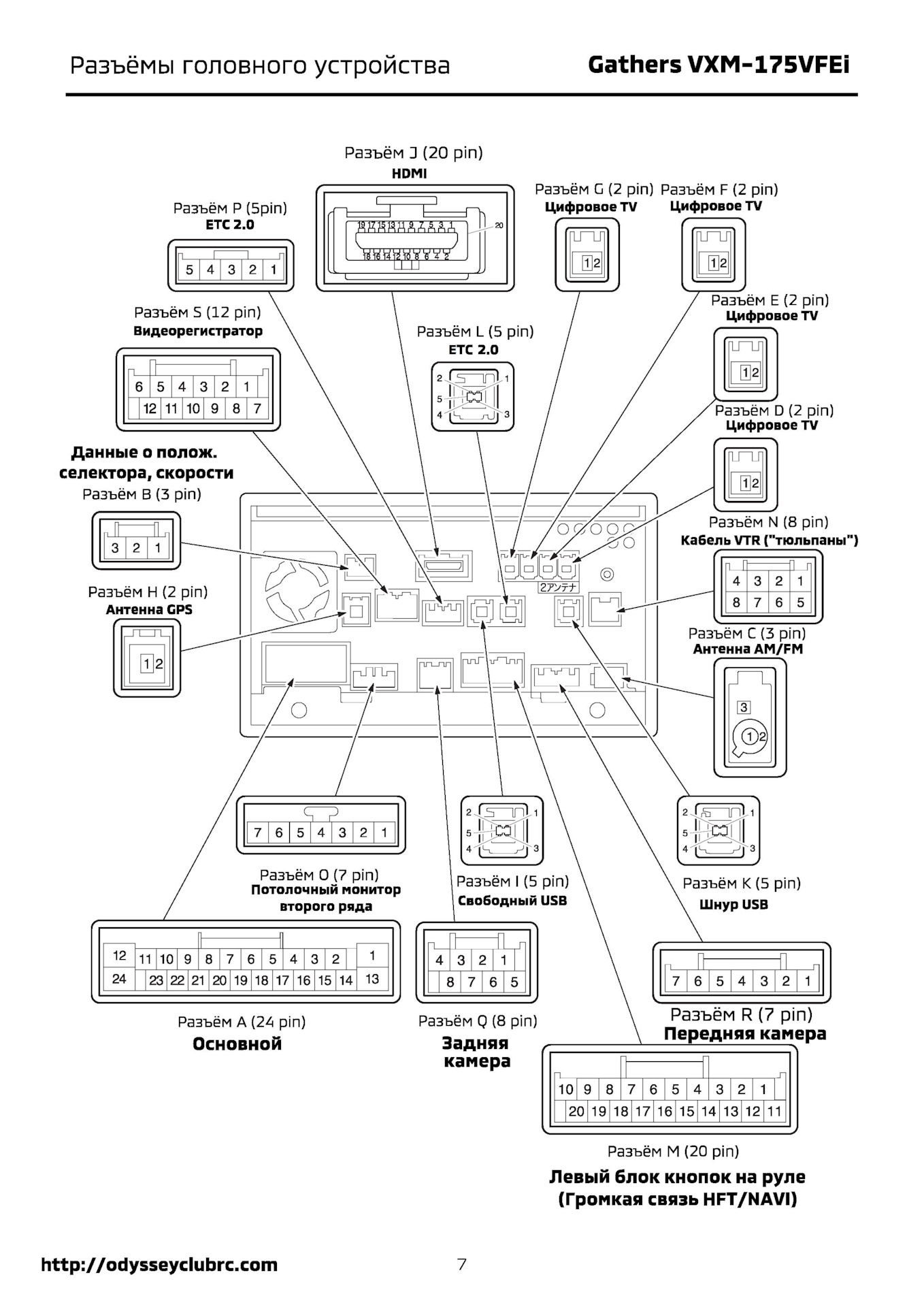
Pictured below is the wiring diagram for the head unit. Basically you need to plug the cable into Connector K. You can disassemble half the car to get the head unit out, but I managed to reach the back of it and plug in the cable by feel just from taking the glove box assembly out, which didn't even need a single screw taken out. Super easy and I did the mod in under 10 mins.


The quality of the USB cable seemed to matter a lot, generic no-name cables were cutting out frequently but using a genuine Anker one gave me no issues at all.


Honda Gathers wiring diagram


Create new topic


Geekzone Live »

Try automatic live updates from Geekzone directly in your browser, without refreshing the page, with Geekzone Live now.


Are you subscribed to our RSS feed? You can download the latest headlines and summaries from our stories directly to your computer or smartphone by using a feed reader.