Geekzone: technology news, blogs, forums
Guest
Welcome Guest.
You haven't logged in yet. If you don't have an account you can register now.


nic.wise

333 posts

Ultimate Geek
+1 received by user: 36

Trusted

#307007 12-Sep-2023 08:29
Send private message

Hi


I guess my first questions is: how do we get hold of @quic if it IS a Quic problem? But anyway...


I have a Ubiquity Dream Machine (the R2D2 looking one), had it for quite a few years. I was previously with Voyager. No problems.


Switched over to Quic - which was, ahem, quick and painless. Overall: 100% recommend. Same day switch over, even.


However, my UDM has been complaining a bit that the connection goes out. I'm guessing it's VERY quick, as I've not noticed it in normal use, even when I'm on a Google Meet call. But ... outages are outages, and it'd be good to know if it IS a problem somewhere. If I had to guess, the remote PPPoE server got a SIG HUP. But my mental model of how that works is likely quite off
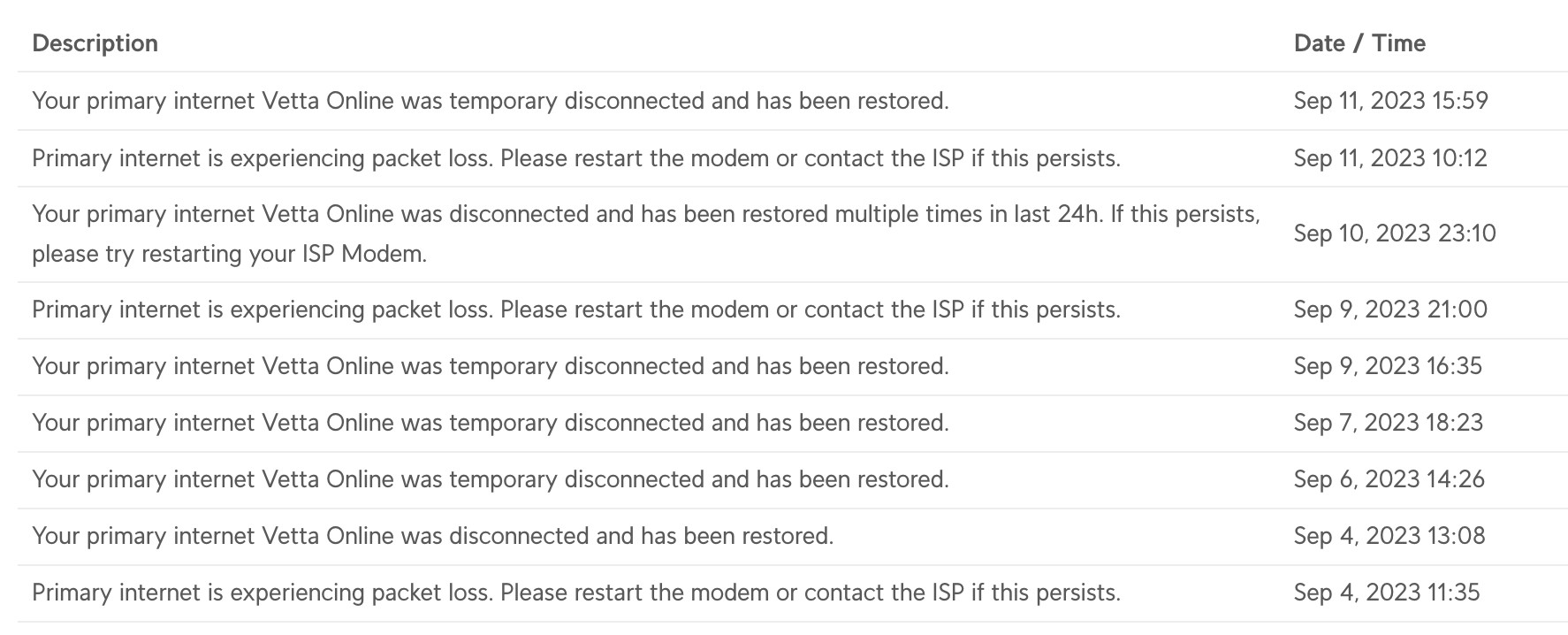


Anyone got any ideas? I've obviously tried rebooting all the things (ONT, UDM), made sure the cables are all decently inserted into the sockets.... No visible change between my house and the nearest "pull out tube of fibre" which is about 50m down the road.




Nic Wise - fastchicken.co.nz


View this topic in a long page with up to 500 replies per page Create new topic
 1 | 2
hucknz
33 posts

Geek
+1 received by user: 7

ID Verified

  #3126377 12-Sep-2023 08:37
Send private message

We had the same issues for months after joining, same device. 


Have you updated your UDM? One of the recent updates has resolved the issue, it seems to be more to do with how the UDM determines connectivity issues than the connection itself. 


There's also a little bit of a flaw (I think) in how the UDM tests for connectivity. They have a DNS entry (ping.ui.com) that has entries for 1.1.1.1 and 8.8.8.8. If anything goes wrong with DNS query it can cause it to think things are down. If you set the UDM to use an IP instead you remove that potential issue. We've set ours (Unifi Devices > UDM > Settings > Internet Verification Server) to 1.1.1.1 as its the closest of the two. 


One of the other things you can do to verify if the connection is actually dropping is to login to your Quic account and check the session information. The session information should tell you if the session is actually dropping, or if it's just being reported as such. 


nic.wise

333 posts

Ultimate Geek
+1 received by user: 36

Trusted

  #3126380 12-Sep-2023 08:40
Send private message

Ah ok, that sounds more likely. Could be a routing difference to ping.ui.com even...


oh. ping.ui.com is just a CNAME to 1.1.1.1 and 8.8.8.8. Right.


I'll give that a go. The UDM is up to date (unless they released something since 3am this morning)


Nic Wise - fastchicken.co.nz


hucknz
33 posts

Geek
+1 received by user: 7

ID Verified

  #3126382 12-Sep-2023 08:45
Send private message

Yeah, it's a weird one. Those changes fixed ours right up. We had an almost identical experience (also moved from Voyager) but the sessions never dropped and the smokeping and speedtest I was running never showed an issue. 


I updated to the latest release yesterday, pretty sure the fix was a release or two before that. 


ping.ui.com is using A records but it's effectively using it as a CNAME, it also has a cname to ping2.ui.com, so it seems a bit flawed to me if it's expecting a response within a certain time to indicate uptime. 


rb99
3505 posts

Uber Geek
+1 received by user: 1830

Lifetime subscriber

  #3126387 12-Sep-2023 08:55
Send private message

That seems quite similar to us. Same UDM but we moved from MyR to 2Degrees.


“The modern conservative is engaged in one of man's oldest exercises in moral philosophy; that is, the search for a superior moral justification for selfishness.” -John Kenneth Galbraith


rb99


myfullflavour
896 posts

Ultimate Geek
+1 received by user: 382

Trusted
Full Flavour

  #3126425 12-Sep-2023 10:43
Send private message

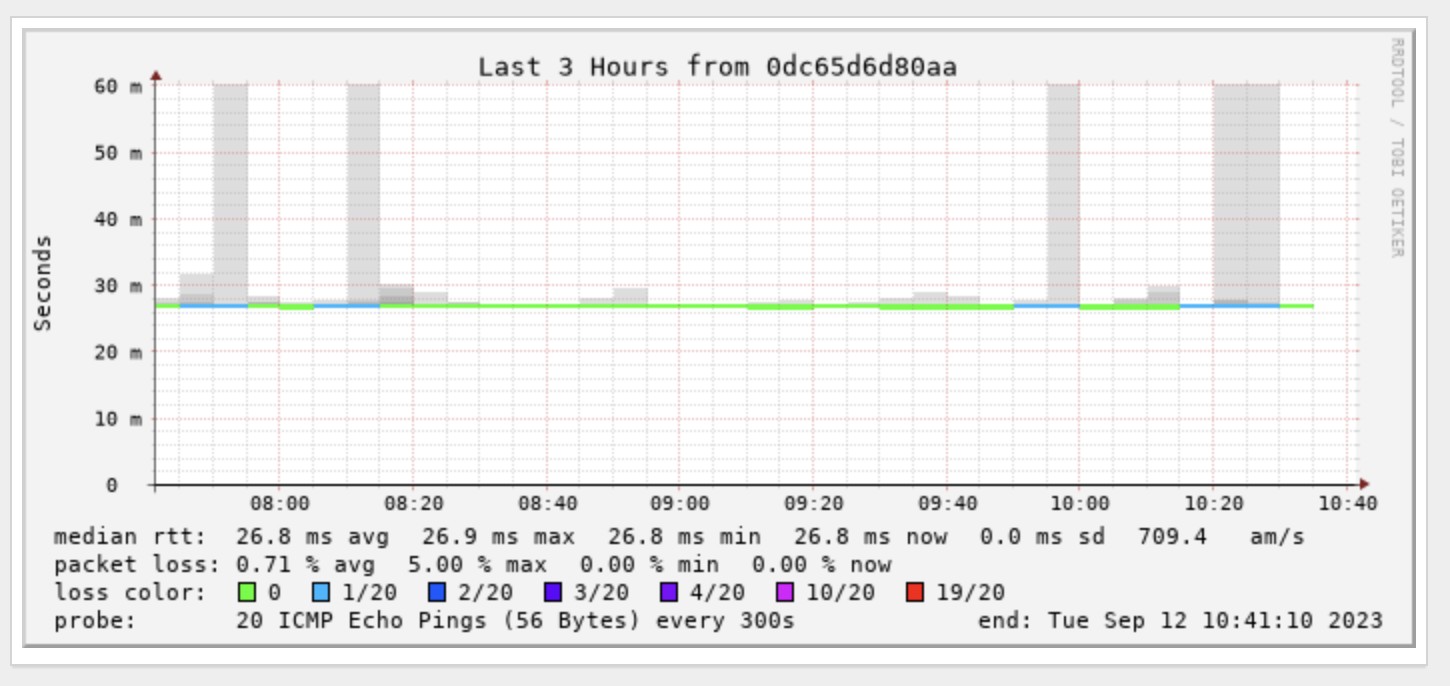
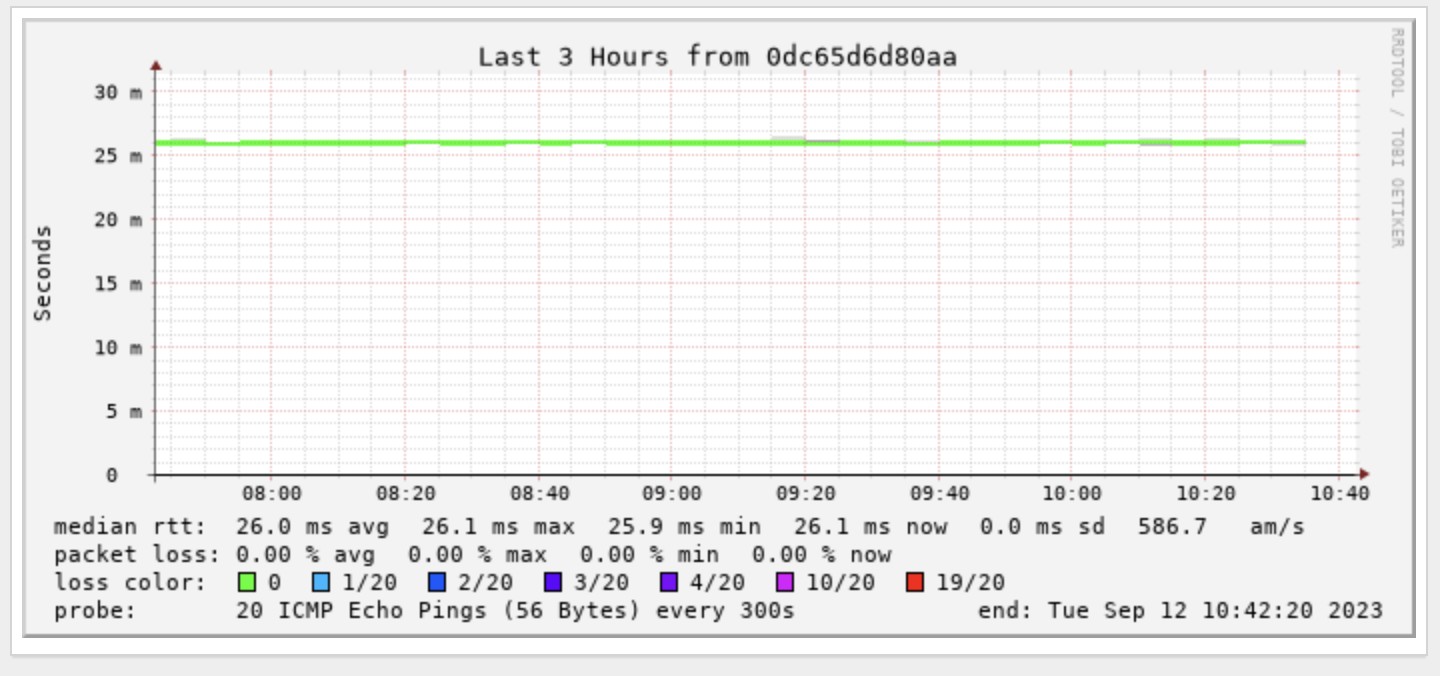
I've got a Quic connection (use it at a location where I need a back up internet provider) and am seeing constant packet loss and latency spikes from Sydney.

Quic connection:


Primary connection (on a different port of the same router)


Wonder if these drop outs are the same one your router is detecting?

ssamjh
358 posts

Ultimate Geek
+1 received by user: 174

ID Verified
Trusted

  #3126428 12-Sep-2023 10:58
Send private message

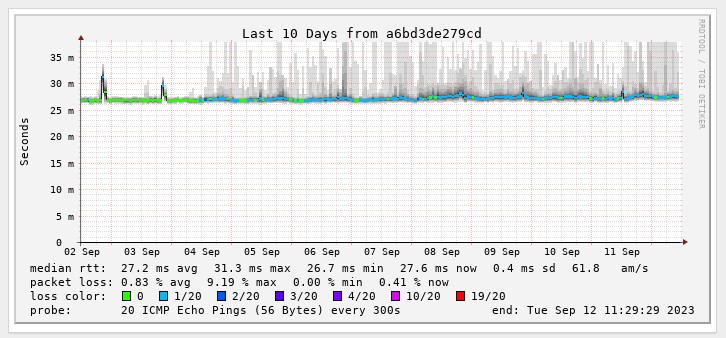
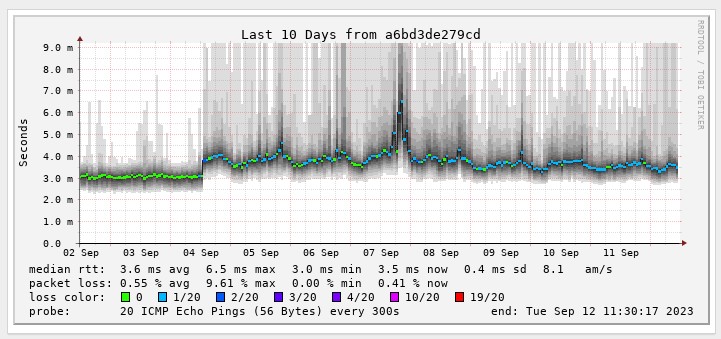
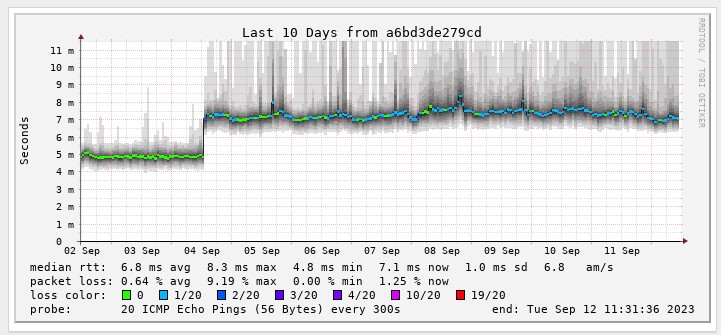
I've also been seeing packet loss since I joined Quic.


The red line is where I switched. Seems likely the UDM could be picking up on these like @myfullflavour says above.


Whitianga, Coromandel - Quic Rocket1G - Ref (free setup): R893192EGADLZ


Smokeping: Quic / Voyager / Starlink


Coromandel Webcam Network


HP


Shop now for HP laptops and other devices (affiliate link).
nic.wise

333 posts

Ultimate Geek
+1 received by user: 36

Trusted

  #3126436 12-Sep-2023 11:33
Send private message

yeah, my smokeping are not great with packet loss.


8.8.8.8


1.1.1.1 cloudflare


Not much change with HTTP, but ICMP is.... droppy


This one is to an IP for one of our clinics, which is just a Spark business fibre connection


I guess the question is, with no help desk, how does one tell @quic cos this isn't a fibre provider issue. Or rather, I doubt it is.


Nic Wise - fastchicken.co.nz


BMarquis
465 posts

Ultimate Geek
+1 received by user: 577

Trusted
Chorus
Lifetime subscriber

  #3126452 12-Sep-2023 11:48
Send private message

I believe they are aware.
I have the same behaviour of packet loss to everywhere.  I can guarantee its not a fibre provider issue :D


CYaBro
4708 posts

Uber Geek
+1 received by user: 1182

ID Verified
Trusted

  #3126455 12-Sep-2023 11:57
Send private message

No issues here with my UDM SE.
If anything the connection has got better in the last couple of weeks.
UDM SE is set to run a speed test at around 4am every day.
Previously wasn’t getting anything over about 700 down 300 up.
Now it’s getting mostly over 800 down but still can’t crack the 300 upload.


Opinions are my own and not the views of my employer.


nic.wise

333 posts

Ultimate Geek
+1 received by user: 36

Trusted

  #3126483 12-Sep-2023 13:11
Send private message

yeah, the speed is.... very good (900/510 on the regular to Chorus Fibre Lab) and international is also very good. Just that ping thing :)


Nic Wise - fastchicken.co.nz


CYaBro
4708 posts

Uber Geek
+1 received by user: 1182

ID Verified
Trusted

  #3126493 12-Sep-2023 13:34
Send private message

nic.wise:

yeah, the speed is.... very good (900/510 on the regular to Chorus Fibre Lab) and international is also very good. Just that ping thing :)


No latency issues either. UDM SE is set to use 1.1.1.1 for latency tests and it averages 12ms.
We are rural Oamaru hence the higher than normal fibre latency.
Usually pinging 1.1.1.1 is about 3-4ms.


Opinions are my own and not the views of my employer.


Shop now on Samsung phones, tablets, TVs and more (affiliate link).
quic
236 posts

Master Geek
+1 received by user: 754

Trusted
Quic Broadband
Lifetime subscriber

  #3126497 12-Sep-2023 13:46
Send private message

Hi Team, thanks for the reports here.


Can confirm our Infrastructure team are aware and investigating.


There are already some planned changes in the network (at the same time as when we bring in IPoE/DHCP, we're also hitting another couple of tasks at the same time) which may already resolve this once done, and aren't far away from being implemented.


Will keep you guys updated once I hear more developments either way.


Quic Broadband
quic.nz - The telco who puts you in charge!


stubbed
GIS Geek
142 posts

Master Geek
+1 received by user: 91

Trusted
Lifetime subscriber

  #3126502 12-Sep-2023 13:56
Send private message
quic
236 posts

Master Geek
+1 received by user: 754

Trusted
Quic Broadband
Lifetime subscriber

  #3126557 12-Sep-2023 14:51
Send private message

stubbed:


@quic do you have timelines? I can't keep operating like this unfortunately, will need to move ISPs.


Too early to give a timeline sorry - however this is being actively worked on and an environment in our lab being stood up to further test network changes. Alongside this, we expect to be putting the call out to beta testers shortly for the "new network", which may on the list are running Smokeping and other tools which we'll be referring to to confirm any changes are in the right direction.


Quic Broadband
quic.nz - The telco who puts you in charge!


nic.wise

333 posts

Ultimate Geek
+1 received by user: 36

Trusted

#3126613 12-Sep-2023 17:58
Send private message

quic:


Hi Team, thanks for the reports here.


Can confirm our Infrastructure team are aware and investigating.


There are already some planned changes in the network (at the same time as when we bring in IPoE/DHCP, we're also hitting another couple of tasks at the same time) which may already resolve this once done, and aren't far away from being implemented.


Will keep you guys updated once I hear more developments either way.


thanks! I’m fine with it how it is, for a bit - only noticed cos my router did. Please add me to the dhcp trial if/when you can. 


Much appreciate the response. Is there a non-geekzone channel I could or should have used?


Nic Wise - fastchicken.co.nz


 1 | 2
View this topic in a long page with up to 500 replies per page Create new topic


Geekzone Live »

Try automatic live updates from Geekzone directly in your browser, without refreshing the page, with Geekzone Live now.


Are you subscribed to our RSS feed? You can download the latest headlines and summaries from our stories directly to your computer or smartphone by using a feed reader.