Geekzone: technology news, blogs, forums
Guest
Welcome Guest.
You haven't logged in yet. If you don't have an account you can register now.


Amsay

4 posts

Wannabe Geek


#322899 4-Oct-2025 14:26
Send private message

Hi all,


I'm going into a flat with a lot of people next year and just wanted to get some tips and ideas from the community, does Quic's Rocket 4G require an upgrade to an already existing fiber connection (on Enable I am assuming for our flat) or would an existing enable connection support it out of the box? 


I was also thinking of getting the Ubiquiti UniFi Dream Router 7 is that overkill and/or does anyone have any other routers I should consider?


Have an awesome day all!


Filter this topic showing only the reply marked as answer Create new topic
Spyware
3825 posts

Uber Geek
+1 received by user: 1374

Lifetime subscriber

  #3421561 4-Oct-2025 14:39
Send private message

Enable only sopport XGS-PON within the CBD, i.e., the four avenues. Would require an ONT upgrade. Rest of the network is GPON only so won't support 4G.


Spark Max Fibre using Mikrotik CCR1009-8G-1S-1S+, CRS125-24G-1S, Unifi UAP, U6-Pro, UAP-AC-M-Pro, Apple TV 4K (2022), Apple TV 4K (2017), iPad Air 1st gen, iPad Air 4th gen, iPhone 13, SkyNZ3151 (the white box). If it doesn't move then it's data cabled.


michaelmurfy
meow
13616 posts

Uber Geek
+1 received by user: 10982

Moderator
ID Verified
Trusted
Lifetime subscriber

  #3421562 4-Oct-2025 14:43
Send private message

The question I always ask when somebody is considering Hyperfibre is what are you wanting to achieve?


The reason I ask this is people often think upgrading to a faster plan means faster WiFi (technically true) and they often don't need Hyperfibre. 4Gbit is a hell of a lot of bandwidth and if you're just using it for gaming then you're best to save your money but if you've got a large homelab or a use for all that bandwidth then go for it. Even for a large flat you'll find Gigabit will often be totally fine. What I would recommend is going for Hyperfibre first, and if you're running into bandwidth constraints then it's just a simple upgrade in the Quic portal.


The only downside though? Unless if you live in the 4 avenues in Christchurch you're out of luck with getting Hyperfibre (right now) with any provider until Enable complete network upgrades.


Michael Murphy | https://murfy.nz
Referral Links: Quic Broadband (use R122101E7CV7Q for free setup)

Are you happy with what you get from Geekzone? Please consider supporting us by subscribing.
Opinions are my own and not the views of my employer.


Amsay

4 posts

Wannabe Geek


  #3421566 4-Oct-2025 14:53
Send private message

Thx for the replies all,


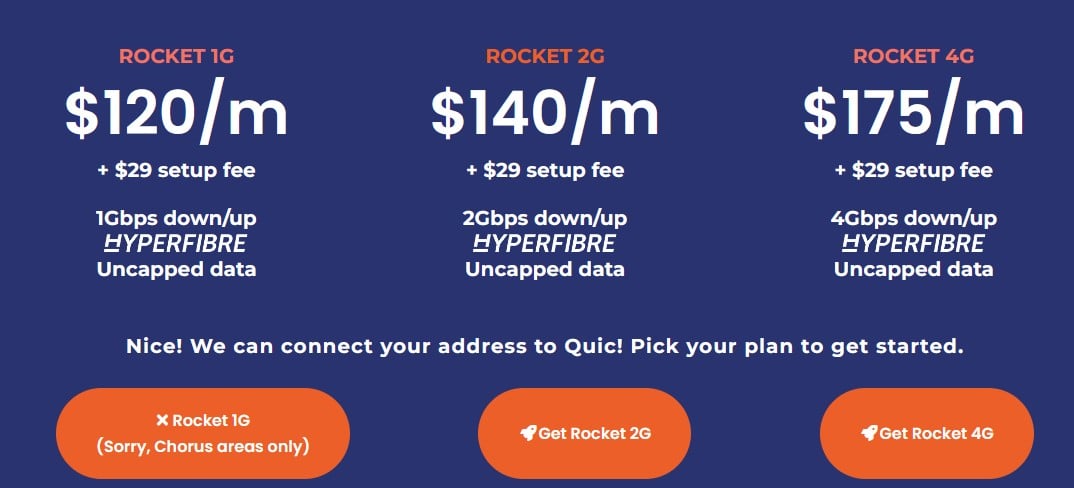
I will be outside the four avenues so I wont be able to get it. (On this not the quic website does not grey out the 2G and 4G plans for my location only 1G is disabled). Ill probably have to go with the standard speeds until enable finishes upgrades.


In terms of why I want hyperfiber 4G would technically be way overkill for my use case. Its a 6 Person flat, I have a small homelab and we have 2 gamer's with one part time gamer. All of us are uni students.


Thanks again for the replies!


Amsay

4 posts

Wannabe Geek


  #3421567 4-Oct-2025 14:56
Send private message


For reference this is what quic shows me, the address is around uc


MaxineN
Max
2081 posts

Uber Geek
+1 received by user: 1692

ID Verified
Trusted
Subscriber

  #3421568 4-Oct-2025 15:04
Send private message

michaelmurfy:


The question I always ask when somebody is considering Hyperfibre is what are you wanting to achieve?


The reason I ask this is people often think upgrading to a faster plan means faster WiFi (technically true) and they often don't need Hyperfibre. 4Gbit is a hell of a lot of bandwidth and if you're just using it for gaming then you're best to save your money but if you've got a large homelab or a use for all that bandwidth then go for it. Even for a large flat you'll find Gigabit will often be totally fine. What I would recommend is going for Hyperfibre first, and if you're running into bandwidth constraints then it's just a simple upgrade in the Quic portal.


The only downside though? Unless if you live in the 4 avenues in Christchurch you're out of luck with getting Hyperfibre (right now) with any provider until Enable complete network upgrades.


I've said this a thousand times but most people don't even need 950/550 unless you're downloading large files, then set some QoS to eliminate buffer bloat to keep real time applications running well whilst you almost max out your connection downloading.


OP you'd probably be fine with 950/550 (you are the exception to this rule) but I would strongly learn QoS and Queues and play around running an ICMP until you've found a happy medium... then you'll see that even 2gbps symmetrical is silly for your use case. A good router and a good AP (or 2 depending on the size of the dwelling) would go well. If you want to dip into the Unifi world, it's not a bad place to start... it is the Apple of networking, but if you're home labbing, go get a Mikrotik and some Grandstream APs and do it right the first time. ;)


This is advice from a fellow ChCh who has a home lab, production services, multi gig internally and has both Cisco, Mikrotik and Cambium in her network... and wishes she had Hyperfibre too (it is a joke that I am 300~ meters away from a HF capable address).


Ramblings from a mysterious lady who's into tech. Warning I may often create zingers.


Amsay

4 posts

Wannabe Geek


  #3421569 4-Oct-2025 15:23
Send private message

MaxineN:


michaelmurfy:


The question I always ask when somebody is considering Hyperfibre is what are you wanting to achieve?


The reason I ask this is people often think upgrading to a faster plan means faster WiFi (technically true) and they often don't need Hyperfibre. 4Gbit is a hell of a lot of bandwidth and if you're just using it for gaming then you're best to save your money but if you've got a large homelab or a use for all that bandwidth then go for it. Even for a large flat you'll find Gigabit will often be totally fine. What I would recommend is going for Hyperfibre first, and if you're running into bandwidth constraints then it's just a simple upgrade in the Quic portal.


The only downside though? Unless if you live in the 4 avenues in Christchurch you're out of luck with getting Hyperfibre (right now) with any provider until Enable complete network upgrades.


I've said this a thousand times but most people don't even need 950/550 unless you're downloading large files, then set some QoS to eliminate buffer bloat to keep real time applications running well whilst you almost max out your connection downloading.


OP you'd probably be fine with 950/550 (you are the exception to this rule) but I would strongly learn QoS and Queues and play around running an ICMP until you've found a happy medium... then you'll see that even 2gbps symmetrical is silly for your use case. A good router and a good AP (or 2 depending on the size of the dwelling) would go well. If you want to dip into the Unifi world, it's not a bad place to start... it is the Apple of networking, but if you're home labbing, go get a Mikrotik and some Grandstream APs and do it right the first time. ;)


This is advice from a fellow ChCh who has a home lab, production services, multi gig internally and has both Cisco, Mikrotik and Cambium in her network... and wishes she had Hyperfibre too (it is a joke that I am 300~ meters away from a HF capable address).


Thx for the reply, any specific recommendations from Mikrotik and Gradstream? 


So unlucky with ur address 😢


Shop now for Lenovo laptops and other devices (affiliate link).
MaxineN
Max
2081 posts

Uber Geek
+1 received by user: 1692

ID Verified
Trusted
Subscriber

  #3421571 4-Oct-2025 15:36
Send private message

Depends. Do you need 10 gig internally?


If you don't, you can't go wrong with the L009UIGS-RM. https://www.gowifi.co.nz/mikrotik/l009uigs-rm.html


If you REALLY want 10 gig (which will be over SFP+), the home labber's favourite is the RB5009UPR+S+IN. https://www.gowifi.co.nz/mikrotik/rb5009upr_s_in.html


The RB5009 is even more desirable as you get PoE, so you can power some Grandstream APs off of it https://www.gowifi.co.nz/access-points/indoor-access-points/gwn7665.html (there are WiFi 7 ones for an extra $80 plus GST~, but can't recommend unless you get a PoE switch with 2.5gbps interfaces on them with a 10 gig uplink, even the 7665s will be at 1gbps unless you want one of them to use the 2.5gbps port on the RB5009, or again said PoE switch).


Even with the L009 can do about 3.4gbps routing with fast path before it starts falling on it's face.


RB5009 will happily do 10 gig.


Plan your network first before you spend upwards from $500 to almost 900. Be smart with your ports and good luck!


Ramblings from a mysterious lady who's into tech. Warning I may often create zingers.


Filter this topic showing only the reply marked as answer Create new topic


Geekzone Live »

Try automatic live updates from Geekzone directly in your browser, without refreshing the page, with Geekzone Live now.


Are you subscribed to our RSS feed? You can download the latest headlines and summaries from our stories directly to your computer or smartphone by using a feed reader.