Geekzone: technology news, blogs, forums
Guest
Welcome Guest.
You haven't logged in yet. If you don't have an account you can register now.


tknz

182 posts

Master Geek
+1 received by user: 7


#312172 23-Mar-2024 17:36
Send private message

Afternoon,


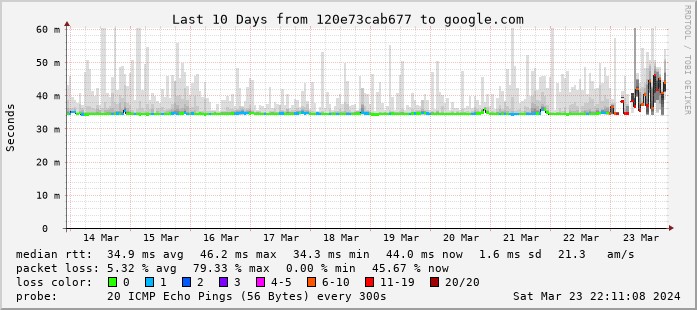
Is anyone having any packet loss issues out to 8.8.8.8? For anyone running smokeping already be good to compare notes. Also, can you all resolve against 103.250.90.8? one of the DHCP offered DNS resolver. I can resolve fine against the second: 202.179.141.8 but not the first directly from the pfsense box.


[23.09-RELEASE][]/root: dig google.com @103.250.90.8


;; communications error to 103.250.90.8#53: timed out


;; communications error to 103.250.90.8#53: timed out


;; communications error to 103.250.90.8#53: timed out


Tracing tcpdump I see the DNS packet to 103.250.90.8 leave the interface ix1 correctly out to the ONT / quic 


[23.09-RELEASE][]/root: tcpdump -i ix1 host 103.250.90.8 port 53


tcpdump: verbose output suppressed, use -v[v]... for full protocol decode


listening on ix1, link-type EN10MB (Ethernet), snapshot length 262144 bytes


04:37:45.910328 IP 118-67-196-26.rdns-d.quic.net.nz.65062 > recdns1.vetta.net.domain: 49670+ [1au] A? google.com. (51)


04:37:50.912896 IP 118-67-196-26.rdns-d.quic.net.nz.20346 > recdns1.vetta.net.domain: 49670+ [1au] A? google.com. (51)


04:37:55.915298 IP 118-67-196-26.rdns-d.quic.net.nz.64128 > recdns1.vetta.net.domain: 49670+ [1au] A? google.com. (51)
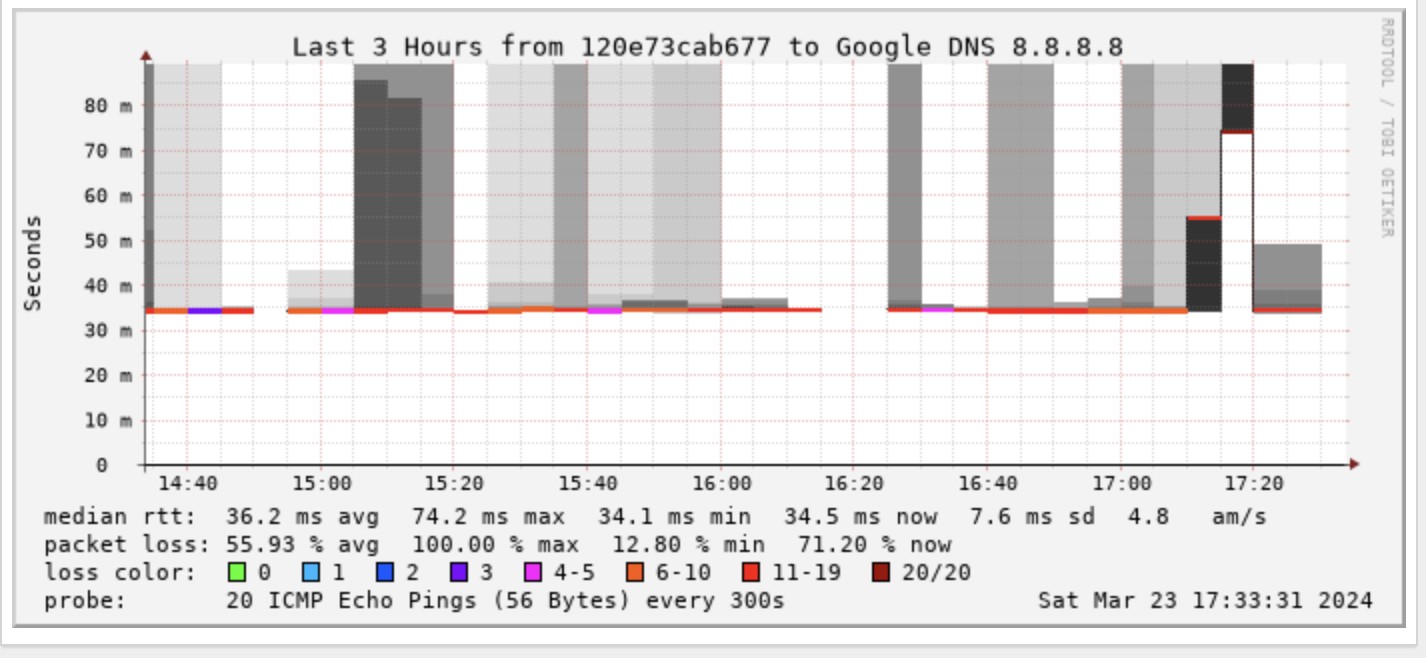


30 Hour view - started just before midnight
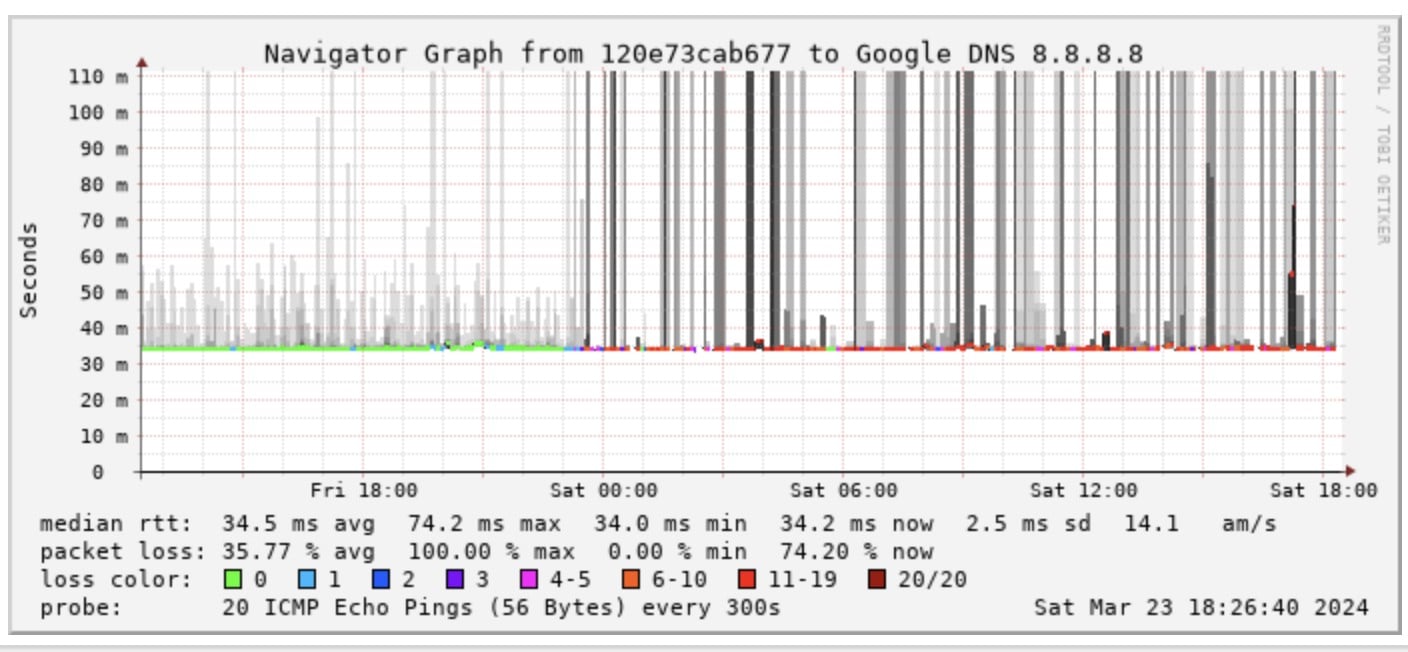


Only just started looking and doing most of the testing from the firewall directly and seeing packet loss - and some addresses unreachable. Have swapped the copper 10g SFP+ out for another one to rule that out - same issues persist.


1500MTU on ix1 no interface errors.



Create new topic
tknz

182 posts

Master Geek
+1 received by user: 7


  #3209981 23-Mar-2024 21:58
Send private message

The DNS Server hasn't been seen online by Shodan since 16/03 


10 Day view of google.com


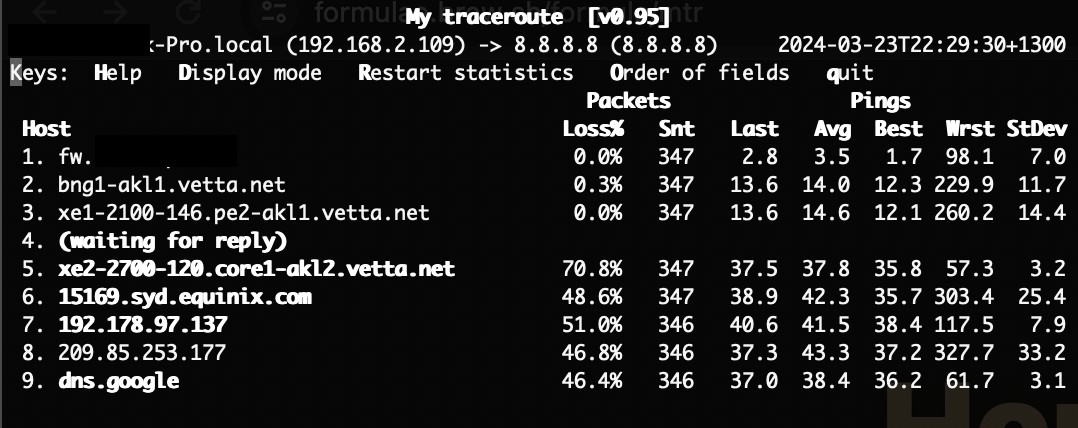
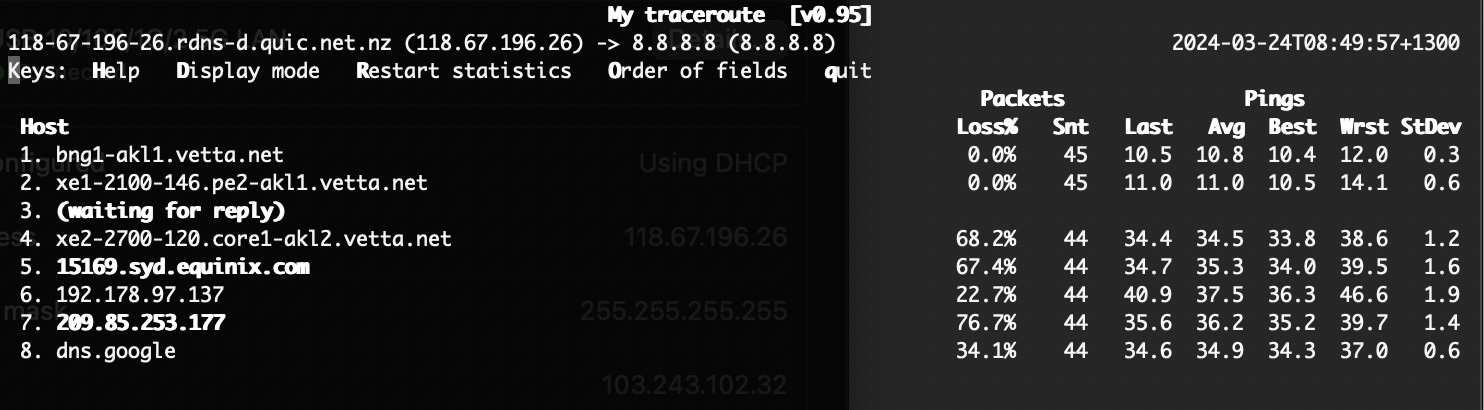
MTR view:


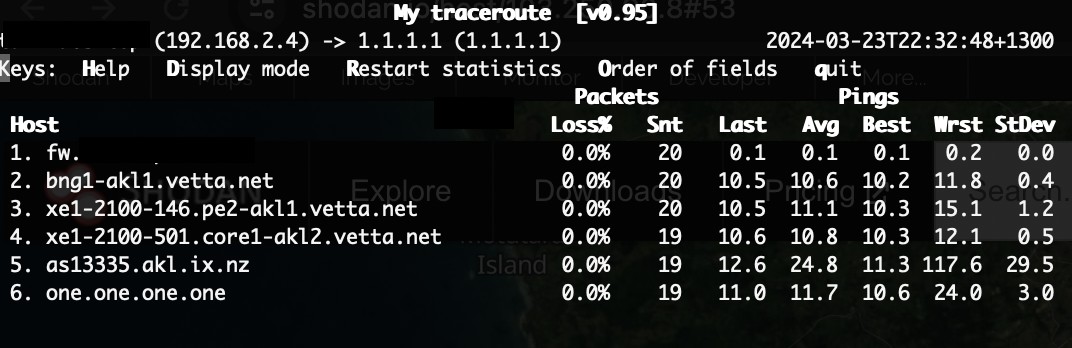
Issues with google peering in sydney, no issues with domestic AKL IX.


Think that this issue is in the Quic network, peering issues, lag issue perhaps + a non responsive DNS resolver.


------------------------------------------------------------------------------------------------------------------------------------------------------------------------------
Any views and ideas that I have expressed in my comments are my own, and do not represent my place of work.
------------------------------------------------------------------------------------------------------------------------------------------------------------------------------


michaelmurfy
meow
13579 posts

Uber Geek
+1 received by user: 10910

Moderator
ID Verified
Trusted
Lifetime subscriber

  #3209997 24-Mar-2024 07:22
Send private message

It is common practise for DNS servers to be firewalled off to the general internet from providers.


I also don’t see anything on my Smokeping nor any others indicating a wider issue, along with you being the only one posting here currently. Test using another router first, and log a fault if it’s actually impacting you.


Michael Murphy | https://murfy.nz
Referral Links: Quic Broadband (use R122101E7CV7Q for free setup)

Are you happy with what you get from Geekzone? Please consider supporting us by subscribing.
Opinions are my own and not the views of my employer.


tknz

182 posts

Master Geek
+1 received by user: 7


  #3210005 24-Mar-2024 08:15
Send private message

michaelmurfy: It is common practise for DNS servers to be firewalled off to the general internet from providers.


Thanks,

If you’re referring to Shodan not seeing the DNS server I concur, either firewalls blocking access or alternatively denied recursion in configuration for out of customer subnet requests. However I noted Shodan could see it on UDP 53 last on the 16th of this month so it wasn’t firewalled at that point and interestingly shodan sees DNS server 2 as recently as it’s scan yesterday.

Are you able to recurse against 103.250.90.8?

Cheers for confirming Smokeping is not showing similar for you


tknz

182 posts

Master Geek
+1 received by user: 7


  #3210010 24-Mar-2024 08:54
Send private message

michaelmurfy: It is common practise for DNS servers to be firewalled off to the general internet from providers. I also don’t see anything on my Smokeping nor any others indicating a wider issue, along with you being the only one posting here currently. Test using another router first, and log a fault if it’s actually impacting you.


Logged the fault, it's more likely upstream - plugged a macbook straight into the ONT and ran the MTR again where source address is the public IP on the macbook and hop 1 is BNG1 now:


michaelmurfy
meow
13579 posts

Uber Geek
+1 received by user: 10910

Moderator
ID Verified
Trusted
Lifetime subscriber

  #3210069 24-Mar-2024 10:17
Send private message

Yep not seeing it at all - https://smokeping.interwebz.nz 


Can hit that DNS server fine too 😊


Michael Murphy | https://murfy.nz
Referral Links: Quic Broadband (use R122101E7CV7Q for free setup)

Are you happy with what you get from Geekzone? Please consider supporting us by subscribing.
Opinions are my own and not the views of my employer.


tknz

182 posts

Master Geek
+1 received by user: 7


  #3210547 25-Mar-2024 13:31
Send private message

Just posting to close the loop here, Quic have advised they've found the fault but it needs to be fixed in the Wed/Thur change window (possibly an outage required). Unfortunately that means degraded / non-functional internet until then (for me) - looking at the logging telemetry my side whatever caused it the issues began at exactly 2300 on Friday evening so will have to live with it for a week. Hopefully gets resolved soon.


Shop now for Dyson appliances (affiliate link).
michaelmurfy
meow
13579 posts

Uber Geek
+1 received by user: 10910

Moderator
ID Verified
Trusted
Lifetime subscriber

  #3210652 25-Mar-2024 15:17
Send private message

This kinda sounds like the random DHCP issue that is affecting just a few people from what I've seen on here.


If you're using DHCP, just switch to PPPoE and I bet it'll solve the issue and at-least provide a workaround for now. Appears there is some maintenance coming up shortly which should have this problem fixed: https://status.quic.nz/issues/65fb3aed10bdfb18fe1b2655 


Then try switching back to DHCP after that maintenance.


Michael Murphy | https://murfy.nz
Referral Links: Quic Broadband (use R122101E7CV7Q for free setup)

Are you happy with what you get from Geekzone? Please consider supporting us by subscribing.
Opinions are my own and not the views of my employer.


Create new topic


Geekzone Live »

Try automatic live updates from Geekzone directly in your browser, without refreshing the page, with Geekzone Live now.


Are you subscribed to our RSS feed? You can download the latest headlines and summaries from our stories directly to your computer or smartphone by using a feed reader.