Geekzone: technology news, blogs, forums
Guest
Welcome Guest.
You haven't logged in yet. If you don't have an account you can register now.


kevinizm

5 posts

Wannabe Geek


#312199 25-Mar-2024 21:26
Send private message

Hi Geekzone community,

I'm in need of dire help this is my last ditch effort before transitioning to another isp. 
I thought I would be able just use the old settings with IPOE/DHCP in the modem with vlan10 tagging.
However, everything says it is connected on the modem and on quics end. After adjusting the config for a couple of days,
I have still not been able to connect.
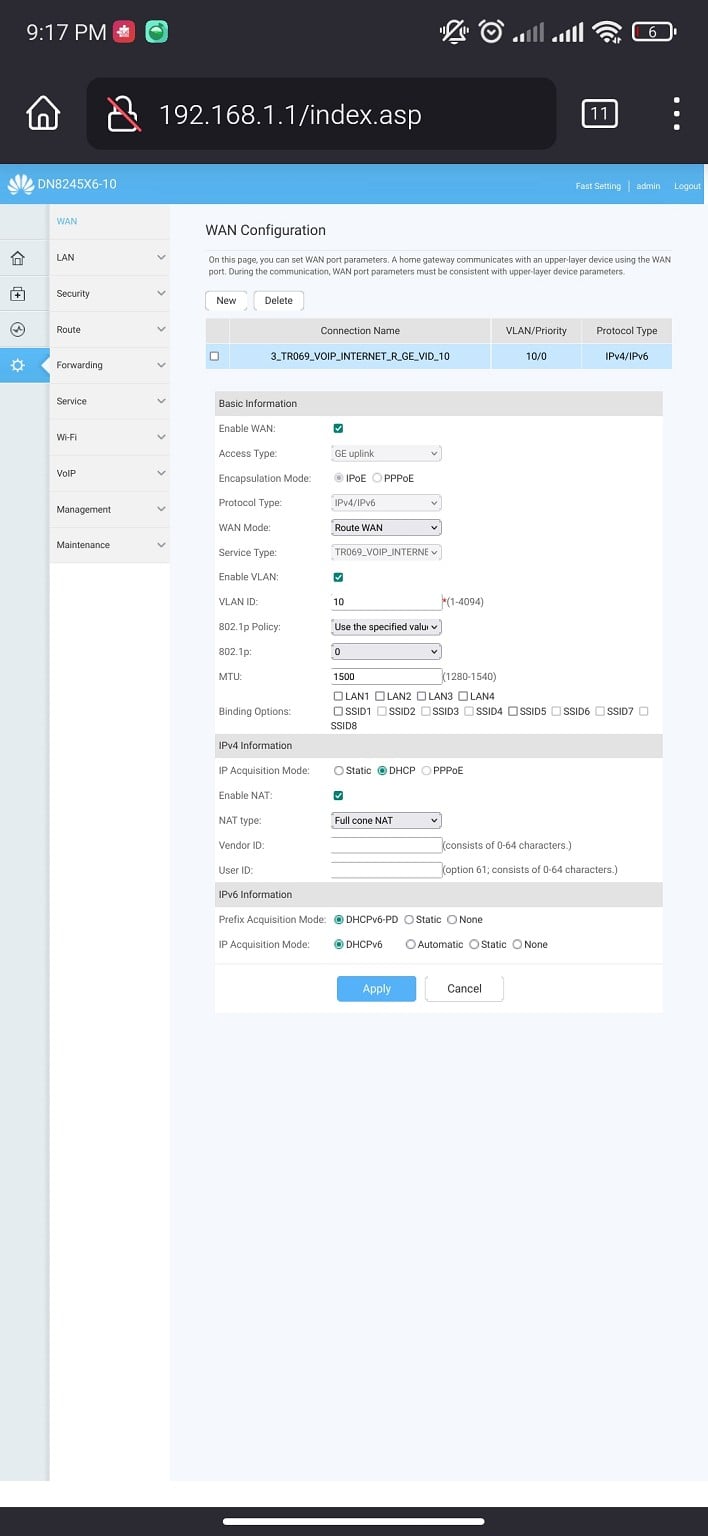


What do I need to change in order to make a good connection? Should I lodge a fault?

Kind regards,
Kevin


Create new topic
RunningMan
9184 posts

Uber Geek
+1 received by user: 4833


  #3210865 26-Mar-2024 07:01
Send private message

Remove the VLAN 10 tagging unless you requested this when signing up.


jamesrt
1663 posts

Uber Geek
+1 received by user: 941

ID Verified
Trusted
Lifetime subscriber

  #3210929 26-Mar-2024 08:31
Send private message

I've tried two different older consumer-grade routers with DHCP on my Quic connection; and neither of them will actually route traffic - they don't pick up a default gateway IP address from Qiuc, so don't know where to send the traffic to.


Neither device seem to have any way of specifying the default route for the EXTERNAL interface; and even if they did, I wouldn't know what to use as I can't find that information out.


@kevinizm; not withstanding the VLAN10 comment above, why not just try PPPoE mode?  Works for me when DHCP wouldn't.


michaelmurfy
meow
13579 posts

Uber Geek
+1 received by user: 10910

Moderator
ID Verified
Trusted
Lifetime subscriber

  #3210948 26-Mar-2024 09:35
Send private message

This router can do hardware accelerated PPPoE so no real need to use IPoE if it doesn't work.


It's weird, as IPoE can be hit and miss on some routers despite following standards as router manufacturers seem to believe standards don't apply to them.


Michael Murphy | https://murfy.nz
Referral Links: Quic Broadband (use R122101E7CV7Q for free setup)

Are you happy with what you get from Geekzone? Please consider supporting us by subscribing.
Opinions are my own and not the views of my employer.


kevinizm

5 posts

Wannabe Geek


  #3210955 26-Mar-2024 09:58
Send private message

I've tried PPPoE but somehow the password always ends up changing for some miraculous reason. The password quic ends up changing to a password over 10 characters...


michaelmurfy
meow
13579 posts

Uber Geek
+1 received by user: 10910

Moderator
ID Verified
Trusted
Lifetime subscriber

  #3210964 26-Mar-2024 10:17
Send private message

@kevinizm That doesn't matter. It'll be the router "encrypting" the password. Quic accepts any username and password as long as it isn't blank.


Michael Murphy | https://murfy.nz
Referral Links: Quic Broadband (use R122101E7CV7Q for free setup)

Are you happy with what you get from Geekzone? Please consider supporting us by subscribing.
Opinions are my own and not the views of my employer.


kevinizm

5 posts

Wannabe Geek


  #3211069 26-Mar-2024 11:41
Send private message

I've managed to connect using PPPoE after numerous attempts of failed passwords.


I've got some connectivity using these settings, however sites are not fully loading or a bit slow to load. Is there anything I can change to troubleshoot this?


I can access Geekzone, gmail, google search smoothly. Youtube loads a bit sluggish. I fully can't access nzpost and pbtech.


I'm getting 300/100 on speed tests.


Shop now for Dell laptops and other devices (affiliate link).
michaelmurfy
meow
13579 posts

Uber Geek
+1 received by user: 10910

Moderator
ID Verified
Trusted
Lifetime subscriber

  #3211079 26-Mar-2024 12:07
Send private message

It takes up to 30mins from when you were using IPoE to be able to connect again using PPPoE. There were no failed passwords here.


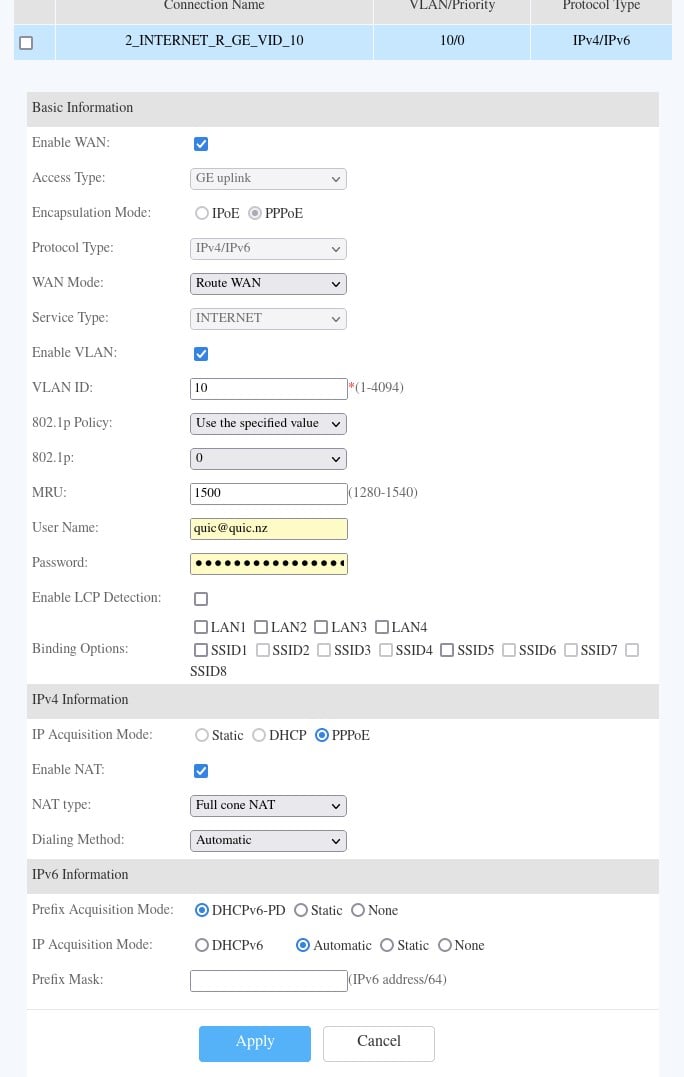
Set the MRU to 1500


Michael Murphy | https://murfy.nz
Referral Links: Quic Broadband (use R122101E7CV7Q for free setup)

Are you happy with what you get from Geekzone? Please consider supporting us by subscribing.
Opinions are my own and not the views of my employer.


nztim
4012 posts

Uber Geek
+1 received by user: 2710

ID Verified
Trusted
TEAMnetwork
Subscriber

  #3211083 26-Mar-2024 12:13
Send private message

Also looks like you are using a mobile phone to make these changes, the POST for non-mobile optimized pages can be hit and miss. 


Any views expressed on these forums are my own and don't necessarily reflect those of my employer. 


kevinizm

5 posts

Wannabe Geek


  #3211088 26-Mar-2024 12:17
Send private message

I'm using my laptop atm. I've set the MRU to 1500 now and it's been around a hour since I've changed to PPPoE. Most sites are still not loading or fully loading.


It still does not load my tracking for parcel on nzpost after clearing cache and site data. Many websites still don't load trademe, nzpost, reddit


This is my current PPPoE config.


michaelmurfy
meow
13579 posts

Uber Geek
+1 received by user: 10910

Moderator
ID Verified
Trusted
Lifetime subscriber

  #3211140 26-Mar-2024 13:28
Send private message

You need to do more investigation to why this is failing. Remember, Quic is a self-support ISP so things like traceroutes or using WinMTR to diagnose where the problem may be is helpful: https://sourceforge.net/projects/winmtr/


Check DNS settings on your router and also ensure you've rebooted it once you've made the change.


Michael Murphy | https://murfy.nz
Referral Links: Quic Broadband (use R122101E7CV7Q for free setup)

Are you happy with what you get from Geekzone? Please consider supporting us by subscribing.
Opinions are my own and not the views of my employer.


kevinizm

5 posts

Wannabe Geek


  #3211145 26-Mar-2024 13:36
Send private message

I'll try traceroute tomorrow when no one is home. If I can't figure it out, I'll give up.
Thanks for the help.


Stream your favourite shows now on Apple TV (affiliate link).
RunningMan
9184 posts

Uber Geek
+1 received by user: 4833


  #3211327 26-Mar-2024 17:25
Send private message

You still have VLAN 10 enabled. Did you request this at sign up as it is non standard for Quic.


Create new topic


Geekzone Live »

Try automatic live updates from Geekzone directly in your browser, without refreshing the page, with Geekzone Live now.


Are you subscribed to our RSS feed? You can download the latest headlines and summaries from our stories directly to your computer or smartphone by using a feed reader.