Geekzone: technology news, blogs, forums
Guest
Welcome Guest.
You haven't logged in yet. If you don't have an account you can register now.


TG09

244 posts

Master Geek
+1 received by user: 16


#294008 28-Feb-2022 08:21
Send private message

Hi all


I currently have a NAS- QNAP TS-231 and recently want to share my Plex with a friend, but it they get "device can not decode the show". Some lower resolution shows work, but some 720p or 1080p keeps getting the errors.


Assumption is that the NAS is not powerful enough to decode on the fly, would a bigger NAS help with this? Plex runs on the NAS that has the shows on it.


Tried changing some settings like restricting the bandwidth, no difference.


Anyone with experience on this that is willing to help me please.


Cheers


View this topic in a long page with up to 500 replies per page Create new topic

This is a filtered page: currently showing replies marked as answers. Click here to see full discussion.

freitasm
BDFL - Memuneh
80652 posts

Uber Geek
+1 received by user: 41045

Administrator
ID Verified
Trusted
Geekzone
Lifetime subscriber

  #2876047 28-Feb-2022 08:46
Send private message

Or ask your friend to configure his Plex client to play at the original rate. It will use more bandwidth but the onus on transcoding is on him.


Referral links: Quic Broadband (free setup code: R587125ERQ6VE) | Samsung | AliExpress | Wise | Sharesies 


Support Geekzone by subscribing (browse ads-free), or making a one-off or recurring donation through PressPatron.


michaelmurfy
meow
13579 posts

Uber Geek
+1 received by user: 10910

Moderator
ID Verified
Trusted
Lifetime subscriber

  #2876086 28-Feb-2022 09:23
Send private message

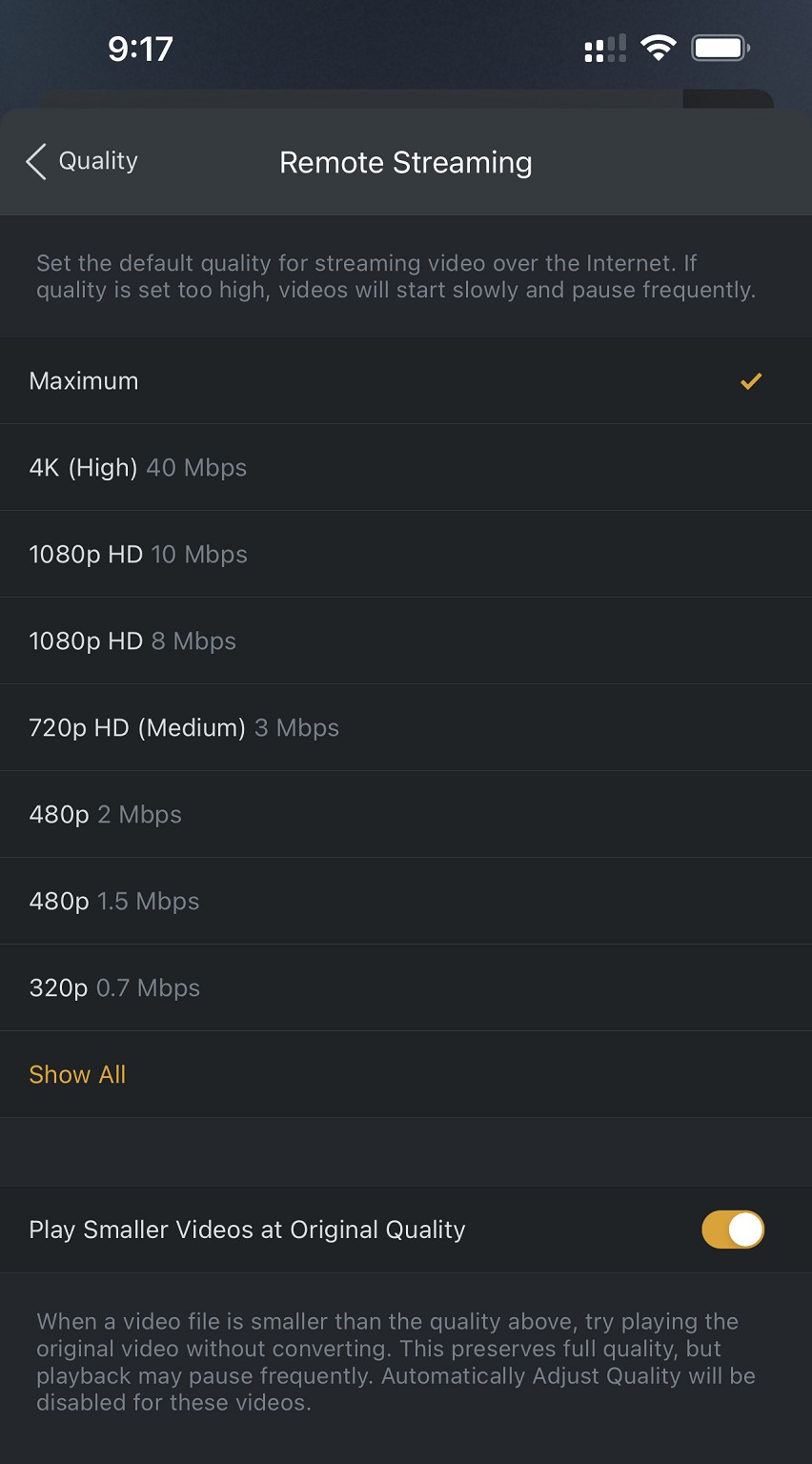
As somebody who runs Plex on limited hardware myself what you need to do is tell your friend to set the remote streaming quality to either Original or Maximum depending on the client - this is in the Plex settings and a note also this needs to be changed on all clients your friend uses:


My record is 19 streams running at once during the 2020 Lockdown but the important factor to this is most of my clients play media at original quality, not transcoded. I furthermore have a script that runs across the majority of users to terminate their stream to go to a help URL to show them how to configure their remote streaming quality to Maximum or Original. Repeat offenders I also remind.


Your NAS, while not ideal, will run it fine once this setting is changed. You seriously don't need anything too powerful if transcoding isn't used. I run Plex on LXC (Linux Containers) on an i5 Lenovo Tiny with 4gb of ram and a NFS mount to my NAS.


Michael Murphy | https://murfy.nz
Referral Links: Quic Broadband (use R122101E7CV7Q for free setup)

Are you happy with what you get from Geekzone? Please consider supporting us by subscribing.
Opinions are my own and not the views of my employer.


View this topic in a long page with up to 500 replies per page Create new topic


Geekzone Live »

Try automatic live updates from Geekzone directly in your browser, without refreshing the page, with Geekzone Live now.


Are you subscribed to our RSS feed? You can download the latest headlines and summaries from our stories directly to your computer or smartphone by using a feed reader.