Geekzone: technology news, blogs, forums
Guest
Welcome Guest.
You haven't logged in yet. If you don't have an account you can register now.


33coupe

1024 posts

Uber Geek
+1 received by user: 75

ID Verified

#180686 17-Sep-2015 22:16
Send private message

So I sarched a few weeks ago, and spent many hours trying to figure it out.

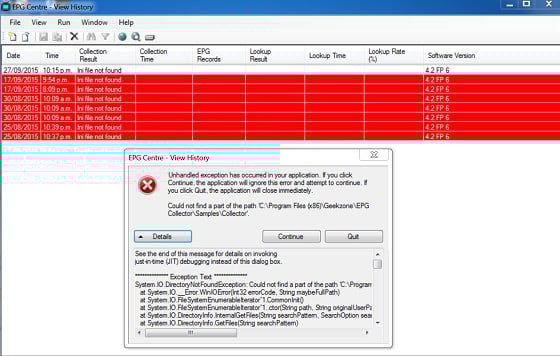
I have just spent many more hours trying again, but to no avail. All I get is 'Ini file not found'.Call me stupid, but this is really driving me crazy.

Can someone please provide (or post a link) a step by step (aka dummy) guide for using EPG Collector with WMC 7??

Many Thanks

View this topic in a long page with up to 500 replies per page Create new topic
 1 | 2
Kiwibro
69 posts

Master Geek
+1 received by user: 1


  #1395323 27-Sep-2015 20:08
Send private message

..............CREDIT TO SJB FOR THESE INSTRUCTIONS................

These are the instructions SJB gave me for EPG collector setup. (I believe SJB is the creator of EPG collector and a very helpful forum regular).
Obviously you will need to change your region in step 5 to your local area. Hope this helps.


1. Load EPG Centre.
2. Select File - Create Collection Parameters
3. Select New Zealand - Terrestrial Freeview - Auckland from the list and press OK
4. In the Selected Scanning Frequencies click on the 530 MHz line and press Delete
5. From the Area dropdown select Waikato - Te Aroha (After May 2012) then click Add
6. Go to the Output tab and click 'EPG Collector imports the data to Windows Media Centre'
7. In the General Options click "Create data for channels with the same name if data not present'.
8. In the Windows Media Centre options click all 4 options. Leave the Import name blank.
9. Select File - Save As
10. Click Save and you will have created an EPG Collector.ini file with your parameter settings.
11. To test your parameter now Select Run - Collect EPG Data.
12. Answer yes to Do you want to use the parameters currently loaded to run the collection?
13. The collection will run and load the data into your WMC database.
14. Once the collection finishes  (about a couple of minutes) you must reboot your PC for one of the options you selected at point 8 above to take effect.

To set up a scheduled task so that the collection runs automatically every day see section 2.2.2 in the ReadMe.

Note that EPG Collector and WMC can't both user the tuner card at the same time. so schedule your task when WMC isn't running or when your PC boots up.


33coupe

1024 posts

Uber Geek
+1 received by user: 75

ID Verified

  #1395373 27-Sep-2015 20:52
Send private message

Thanks for the reply.

I can only get to step 2 before I run into trouble.

'Ini file can't be found'

Sorry

mdf

mdf
3566 posts

Uber Geek
+1 received by user: 1519

Trusted

  #1395391 27-Sep-2015 21:56
Send private message

Where'd you install EPG collector? C:\epg or elsewhere?


33coupe

1024 posts

Uber Geek
+1 received by user: 75

ID Verified

  #1395394 27-Sep-2015 22:02
Send private message

I've tried c, users, downloads
Also tried c, program files, epg
Also tried c, program files 86, common files, system

mdf

mdf
3566 posts

Uber Geek
+1 received by user: 1519

Trusted

  #1395413 27-Sep-2015 22:12
Send private message

Which version? Did you install the fix pack?

I use it with MediaPortal. Instructions here worked for me: 

http://wiki.team-mediaportal.com/1_MEDIAPORTAL_1/15_Customization/98_Localization/4_By_Country/New_Zealand/3a_TV_Guide_DVB-T_(Freeview_HD)

The only problem I had was setting it up on a 720p monitor. A few of the things were off screen and couldn't be scrolled, which took a bit of creativity to resolve.

SJB

SJB
2945 posts

Uber Geek
+1 received by user: 2287
Inactive user


  #1395415 27-Sep-2015 22:19
Send private message

mdf: Which version? Did you install the fix pack?

I use it with MediaPortal. Instructions here worked for me: 

http://wiki.team-mediaportal.com/1_MEDIAPORTAL_1/15_Customization/98_Localization/4_By_Country/New_Zealand/3a_TV_Guide_DVB-T_(Freeview_HD)

The only problem I had was setting it up on a 720p monitor. A few of the things were off screen and couldn't be scrolled, which took a bit of creativity to resolve.


Is that still the case with v4.2 FP6? I thought I had fixed the screen size problems a while ago.


Support Geekzone with one-off or recurring donations Donate via PressPatron.

mdf

mdf
3566 posts

Uber Geek
+1 received by user: 1519

Trusted

  #1395416 27-Sep-2015 22:24
Send private message

Haven't checked 4.2. From memory, I think I was still on 4.1. It worked awesome once it was up and running and I've learnt from (hard) experience not to fiddle with something that works. The HTPC is currently down for maintenance but I'll check again once I've sorted it out.

SJB

SJB
2945 posts

Uber Geek
+1 received by user: 2287
Inactive user


  #1395418 27-Sep-2015 22:27
Send private message

33coupe: I've tried c, users, downloads
Also tried c, program files, epg
Also tried c, program files 86, common files, system


For step 3 select custom parameters instead of New Zealand Terrestrial.

Then select New Zealand as the country and carry on from step 4.

33coupe

1024 posts

Uber Geek
+1 received by user: 75

ID Verified

  #1395419 27-Sep-2015 22:39
Send private message

Version 4.2 Fix pack 6 (lateset on sourceforge)

Tried the above wiki link still no joy.


SJB

SJB
2945 posts

Uber Geek
+1 received by user: 2287
Inactive user


  #1395490 28-Sep-2015 09:05
Send private message

If you have installed the software correctly you should have the following directories

c:\program files (x86)\geekzone\epg collector
c:\program files (x86)\geekzone\epg collector\configuration
c:\program files (x86)\geekzone\epg collector\configuration\program categories
c:\program files (x86)\geekzone\epg collector\configuration\tuningparameters
c:\program files (x86)\geekzone\epg collector\configuration\tuningparameters\dvbs
c:\program files (x86)\geekzone\epg collector\configuration\tuningparameters\dvbt
c:\program files (x86)\geekzone\epg collector\configuration\tuningparameters\dvbc
c:\program files (x86)\geekzone\epg collector\configuration\tuningparameters\atsc
c:\program files (x86)\geekzone\epg collector\configuration\tuningparameters\clear qam
c:\program files (x86)\geekzone\epg collector\configuration\tuningparameters\isdbs
c:\program files (x86)\geekzone\epg collector\configuration\tuningparameters\isdbt
c:\program files (x86)\geekzone\epg collector\samples
c:\program files (x86)\geekzone\epg collector\samples\collector
c:\program files (x86)\geekzone\epg collector\samples\dvblogic plugin

There should be files in all of the directories. If you don't have this structure something went wrong with your install so de-install/remove everything and start again.

Take the base release v4.2 (use the msi not the zip as there's less chance of mistakes) and install that and then unzip FP6 into c:\program files (x86)\geekzone\epg collector.

What did you install originally, the msi or the zip?

33coupe

1024 posts

Uber Geek
+1 received by user: 75

ID Verified

  #1395885 28-Sep-2015 16:25
Send private message

Thanks for that. I originally used the zip file.

Now I've used the msi, I can see the geekzone folders have been created etc.

I am about to extract the fix pack into epg collector, but it says there is already a file with that name in that location.

Should I replace?
Sorry, just want to get it right


Want to support Geekzone and browse the site without the ads? Subscribe to Geekzone now (monthly, annual and lifetime options).

dan

dan
1134 posts

Uber Geek
+1 received by user: 105

Lifetime subscriber

  #1395886 28-Sep-2015 16:27
Send private message

yes replace

33coupe

1024 posts

Uber Geek
+1 received by user: 75

ID Verified

  #1395899 28-Sep-2015 16:49
Send private message

Thanks.

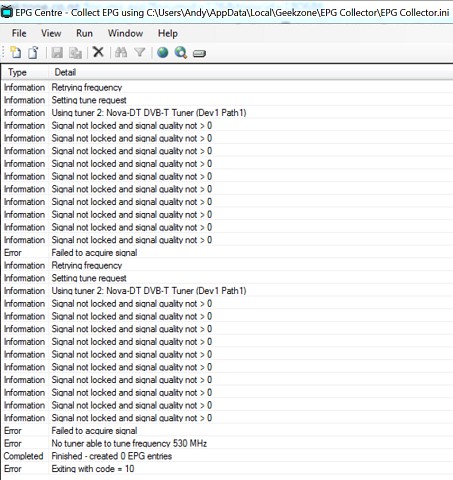
I have finally managed to run it (thanks to everyone above), but I dont think it has worked fully. 


SJB

SJB
2945 posts

Uber Geek
+1 received by user: 2287
Inactive user


  #1395900 28-Sep-2015 16:51
Send private message

Try another frequency.

33coupe

1024 posts

Uber Geek
+1 received by user: 75

ID Verified

  #1395909 28-Sep-2015 17:12
Send private message

Thanks, thought add much.

I've just tried all three frequencies with Auckland - sky tower, and Auckland - Remuera, and still no joy.

I feel so close!

 1 | 2
View this topic in a long page with up to 500 replies per page Create new topic


Geekzone Live »

Try automatic live updates from Geekzone directly in your browser, without refreshing the page, with Geekzone Live now.


Are you subscribed to our RSS feed? You can download the latest headlines and summaries from our stories directly to your computer or smartphone by using a feed reader.