Geekzone: technology news, blogs, forums
Guest
Welcome Guest.
You haven't logged in yet. If you don't have an account you can register now.


Paul1977

5171 posts

Uber Geek
+1 received by user: 2192


#322608 4-Sep-2025 12:40
Send private message

We purchased several of these laptops for deployment. These will mainly be docked often it a position no good for using Windows Hello facial recognition - so want to use external USB webcams for Windows Hello.


I've tried 3 different webcams that support Windows Hello. They show up in device manager and work as regular webcams, but Windows doesn't detect them Windows Hello cameras. I've verified all 3 if these work on other computers for Windows Hello.


I did a complete manual reinstall of Windows 11 not using the factory Lenovo image and the problem persists.


I'm wondering if it's some sort of issue specific to Lenovos (or even just this particular model) but can't find any about this specific issue.


Does anyone have any ideas?



Create new topic
Dynamic
4015 posts

Uber Geek
+1 received by user: 1851

ID Verified
Trusted
Lifetime subscriber

  #3411259 4-Sep-2025 15:49
Send private message

My only experience around an external Windows Hello webcam was a surprising one.  I finally set up Windows Hello face recognition on my HP EliteBook, and it worked pretty well most of the time.  I sat down in our training/meeting room and plugged into our USB-C connected conferencing screen.  It's an E27m, from memory, with a Windows Hello-capable pop-up webcam.  I saw the little LED flashing on the external monitor's webcam and while looking at it my laptop unlocked.  I incorrectly had guessed that my facial recognition would have been tied to the original webcam.


So, use of an external Windows Hello capable webcam on a Windows 11 laptop that has a built-in Windows Hello webcam does work 100% of the time in my vast experience of 1 scenario. :)


“Don't believe anything you read on the net. Except this. Well, including this, I suppose.” Douglas Adams


tanivula
998 posts

Ultimate Geek
+1 received by user: 158

Lifetime subscriber

  #3411263 4-Sep-2025 15:55
Send private message

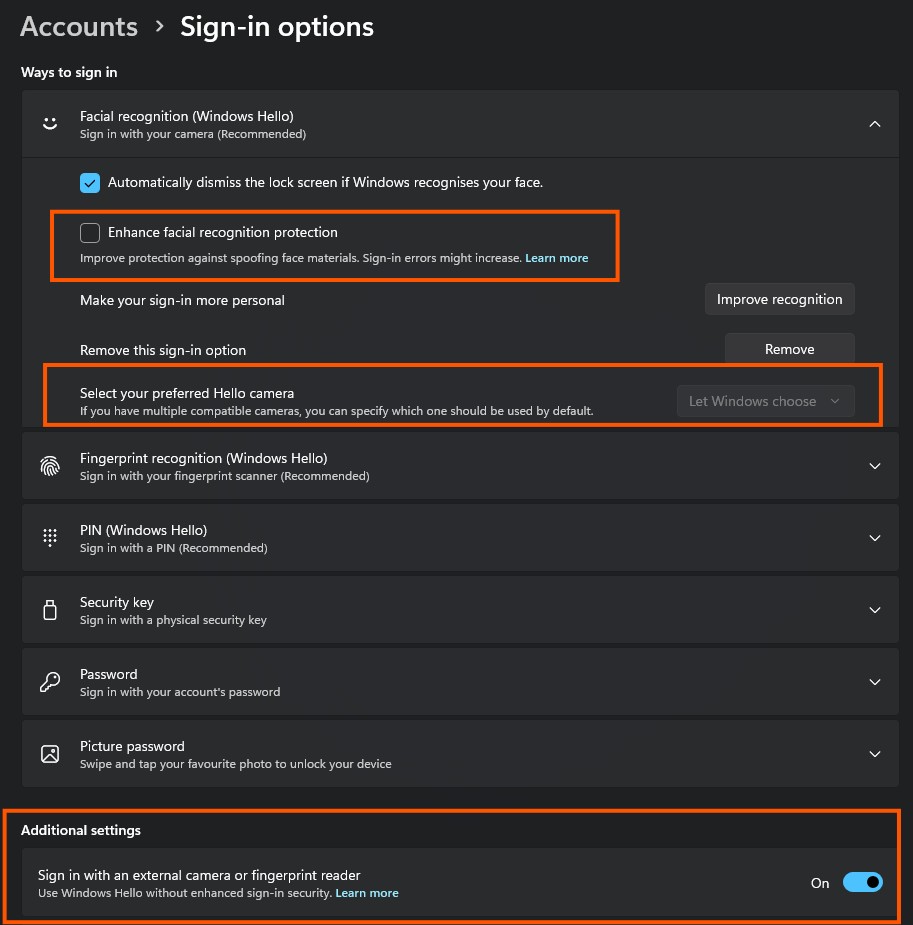
There's a couple of windows settings to check/tweak.


The one down the bottom is the first.  You can make the external one your default too.


Create new topic


Geekzone Live »

Try automatic live updates from Geekzone directly in your browser, without refreshing the page, with Geekzone Live now.


Are you subscribed to our RSS feed? You can download the latest headlines and summaries from our stories directly to your computer or smartphone by using a feed reader.