Geekzone: technology news, blogs, forums
Guest
Welcome Guest.
You haven't logged in yet. If you don't have an account you can register now.


calep

15 posts

Geek


#210445 27-Mar-2017 20:59
Send private message

We had VDSL activated a couple of months ago.


We found we had problems where the internet would go down every so often (didn't seem to be a pattern) but restarting the router (Huawei HG659b) seemed to fix this.


I presumed it was due to too much load and the router overheating (others seemed to complain about this online).


I bought a new router/modem (Asus DSL-n66u) and we are still having problems.


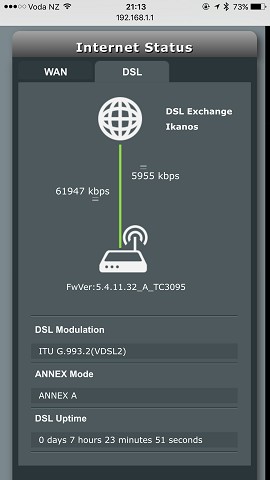
Stats below (Huawei):


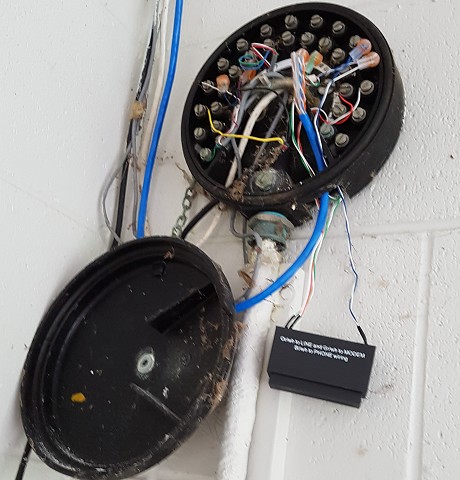
We don't have a master filter, but don't have a landline (I believe technically from other reading on the form that on the Naked package we have a landline with a bar installed) so I've connected the phone cable direct to the wall (I also tried previously with an ADSL filter - no impact). I also tried a couple of different phone points - moving from the one in our office to the one in the hall gives us an extra few mb on the sync speed so my guess is we have cr*p internal wiring.


In case anyone suggests it, we did try and get fibre direct but we rent as part of a 3 unit development and (once we got our landlord to agree) one of the other units refused permission (as Chorus have such a bad rep).


Any suggestions on what to do? I'm thinking a master filter may help. We're in mission bay, Auckland.


View this topic in a long page with up to 500 replies per page Create new topic

This is a filtered page: currently showing replies marked as answers. Click here to see full discussion.

RunningMan
9186 posts

Uber Geek
+1 received by user: 4839


  #1749003 27-Mar-2017 21:05
Send private message

You've got good downstream attenuation and sync rate, but poor upload. This is a symptom of reflections on the line causes by line stubs.


Master filter is likely to make a significant improvement.


EDIT: Take up @hio77's offer and flick him a PM...


coffeebaron
6304 posts

Uber Geek
+1 received by user: 3567

Trusted
Lifetime subscriber

  #1765325 17-Apr-2017 15:08
Send private message

Master filter installed. Also found a rogue jack-point with old phone plugged in.


Alas I can't fix this old school ETP :(


Rural IT and Broadband support.


Broadband troubleshooting and master filter installs.
Starlink installer - one month free: https://www.starlink.com/?referral=RC-32845-88860-71 
Wi-Fi and networking
Cel-Fi supply and installer - boost your mobile phone coverage legally


Need help in Auckland, Waikato or BoP? Click my email button, or email me direct: [my user name] at geekzonemail dot com


calep

15 posts

Geek


  #1765337 17-Apr-2017 16:02
Send private message

Coffeebaron - thanks for doing a neat job of putting in the master filter, very professional. The connection stayed live on the Huawei router over the weekend (we were away so I wanted to check it didn't hang straightaway!)


I have found a beta firmware from Asus for my other router so will keep an eye on how that goes, unfortunately the Huawei seemed to drop randomly (undiagnosed, perhaps due to rogue phone/filter issues), and it had issues issuing internal IPs via powerline adaptors...


To sum up, since I joined, I've gone from 53mb (8.8dB / 2.0 dB attenuation):


to 62mb (Hio tinkering + changing to another jack):


to 66mb (changing to new master filtered jack): 


Thanks to both Hio and Coffeebaron... Hopefully the guys at the Asus forums are as helpful!


Cheers


Charlie


View this topic in a long page with up to 500 replies per page Create new topic


Geekzone Live »

Try automatic live updates from Geekzone directly in your browser, without refreshing the page, with Geekzone Live now.


Are you subscribed to our RSS feed? You can download the latest headlines and summaries from our stories directly to your computer or smartphone by using a feed reader.