Geekzone: technology news, blogs, forums
Guest
Welcome Guest.
You haven't logged in yet. If you don't have an account you can register now.


rodloc

55 posts

Master Geek
+1 received by user: 2


#233386 14-Apr-2018 07:05
Send private message

Hi,

So I had my @Chorusnz fibre installed yesterday on the same day as my scoping visit. Which I thought a bit odd but I am not complaining.

Anyway I believe I have set up my router correctly. I have Netgear R7000P and followed a guide on here for it from a couple of years ago.

https://m.geekzone.co.nz/Forums/158/Topic/204279

However my connection is not working. I believe the only is working fine. Has green light for power, flashing green light for optical and Lan1 is flashing orange.

On the settings of the router it tells me I am connected but with no internet connection.

Chorus contractor said nothing should have to happen as it will be automatic. However, I am wondering because he installed it on scoping day not my actual install date it may have something to do with this. Does @BigPipeNZ have to do anything on there end to connect me.

Thanks Rod

Create new topic

epr

epr
267 posts

Ultimate Geek
+1 received by user: 132

Lifetime subscriber

  #1995858 14-Apr-2018 07:12
Send private message

Call your isp and check that everything has been set up at their end who is your isp?


Here is my Quic referral https://account.quic.nz/refer/39513 if you are keen to change ISP and to get free setup (save $29). I will get a $50 credit if you use this.  Thank you very much if you use my link but I'm sure there are quite a few others who could share the same on here, no hard feelings if you use a different link. 


RunningMan
9186 posts

Uber Geek
+1 received by user: 4840


  #1995862 14-Apr-2018 07:31
Send private message

epr:  who is your isp?
Given this is in the BigPipe forum, and the OP has contacted BigPipe to resolve, I'm going out on limb and saying BigPipe.


Yep, they will need to activate from their end.


EDIT: Is your router getting a WAN address at all?


Linux
12182 posts

Uber Geek
+1 received by user: 8476

Trusted
Lifetime subscriber

  #1995863 14-Apr-2018 07:34
Send private message

epr: Call your isp and check that everything has been set up at their end who is your isp?


I am guessing @bigpipeNZ from the first post


Linux


rodloc

55 posts

Master Geek
+1 received by user: 2


  #1995864 14-Apr-2018 07:55
Send private message

RunningMan:

epr:  who is your isp?
Given this is in the BigPipe forum, and the OP has contacted BigPipe to resolve, I'm going out on limb and saying BigPipe.


Yep, they will need to activate from their end.


EDIT: Is your router getting a WAN address at all?


Yes I am getting an IP Address in the settings.

It is NOT 0.0.0.0

It current starts with 100

itxtme
2102 posts

Uber Geek
+1 received by user: 557


  #1995865 14-Apr-2018 07:56
Send private message

We have had an install at our premise this week as well, trying to connect a USG failed to connect and then ran out of time to contact bigpipe Friday afternoon.  I was planning to run this test today, might be worth a go as well?  I have read a reddit issue someone had with bigpipe and static IP's.  We definitely got one, so wondering if its related, not sure if you ordered one.


rodloc

55 posts

Master Geek
+1 received by user: 2


  #1995867 14-Apr-2018 08:00
Send private message

itxtme:

We have had an install at our premise this week as well, trying to connect a USG failed to connect and then ran out of time to contact bigpipe Friday afternoon.  I was planning to run this test today, might be worth a go as well?  I have read a reddit issue someone had with bigpipe and static IP's.  We definitely got one, so wondering if its related, not sure if you ordered one.


I did see that test I was going to try it as well. However, I was going to see if they have to do anything on there end first.

I also do not have static IP address currently.


Shop now at Mighty Ape (affiliate link).
RunningMan
9186 posts

Uber Geek
+1 received by user: 4840


  #1995870 14-Apr-2018 08:05
Send private message

Can you browse to https://www.bigpipe.co.nz/ ?


HadEnough
9 posts

Wannabe Geek
+1 received by user: 2


  #1995871 14-Apr-2018 08:05
Send private message

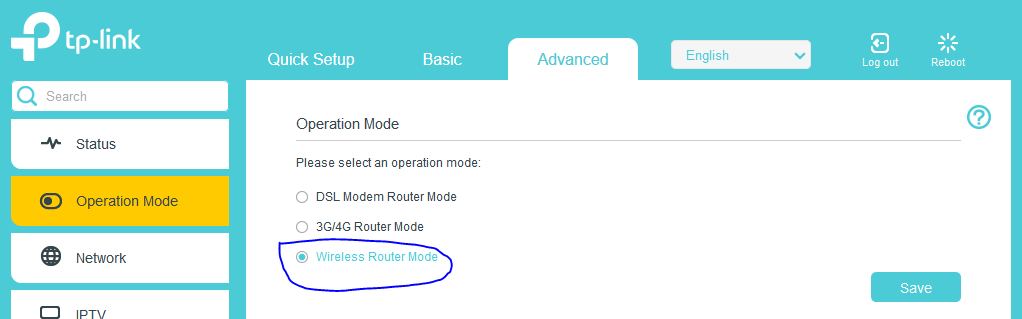
Been here with my TP-Link Archer VR600. The out of the box configuration is to use the inbuilt DSL modem


In the advanced settings for the VR600 is a page for Operation Mode. Changed away from DSL modem router to wireless router


Also make sure the cable from chorus ONT to router is connected to the WAN/LAN port


Create new topic


Geekzone Live »

Try automatic live updates from Geekzone directly in your browser, without refreshing the page, with Geekzone Live now.


Are you subscribed to our RSS feed? You can download the latest headlines and summaries from our stories directly to your computer or smartphone by using a feed reader.