Geekzone: technology news, blogs, forums
Guest
Welcome Guest.
You haven't logged in yet. If you don't have an account you can register now.


JMatt94

225 posts

Master Geek


#39097 8-Aug-2009 20:04
Send private message

Our Telecom broadband frequently disconnects, this first happened with our D-link modem that Telecom supplied us but it didn't happen often enough to annoy us. We upgraded to a Linksys Wag200g wireless router. Everything was okay for the first few months but recently it's been disconnecting a lot, the internet is almost unusable somedays. Every 5-20 minutes or so it disconnects.


We phoned Telecom broadband and said we have a Linksys router, as soon as we said that, of course they blamed it on Lynksys but we also mentioned the same thing happened to the D-link router they supplied us but they still insisted it was our Linksys router.


They gave us a number to phone Lynksys, we rang that and they gave us another number and another until we were talking to someone in America so we hung up.


I've tried hardbooting, resetting modem to default, tried multiple combinations of settings, pulling all cables apart and reinserting them but nothing, the problem is still there. The internet speed is fine, and good when it decides to work, the only problem is frequent disconnections!!


I'm running Mac OS X Leopard if that helps, if you have any solutions or any ideas you may think will work, please tell me!


Thanks


Create new topic
boby55
1539 posts

Uber Geek
+1 received by user: 38

Trusted

  #244286 8-Aug-2009 20:08
Send private message

I have the same router and get disconnections with Telecom Broadband every 1-3 hours, I just login to the router and force it to reconnect and it seems to do the job.


thinhvy
136 posts

Master Geek


  #244314 8-Aug-2009 22:59
Send private message

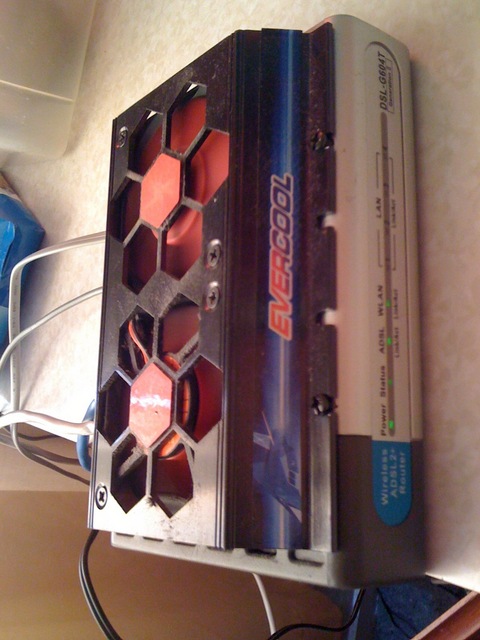
It may be the router is too hot when it runs 24/7.I got a Wireless Dlink G604T and it was disconnected like that before but since I installed an external fan on the router I never have any more disconnection

codyc1515
1598 posts

Uber Geek
Inactive user


  #244316 8-Aug-2009 23:03
Send private message

I have the same linksys router, same things happens, not sure why though??


thinhvy
136 posts

Master Geek


  #244358 9-Aug-2009 08:59
Send private message

This is my solution see the photo


codyc1515
1598 posts

Uber Geek
Inactive user


  #244372 9-Aug-2009 10:00
Send private message

thinhvy: This is my solution see the photo


Thats pretty awesome

Ragnor
8279 posts

Uber Geek
+1 received by user: 585

Trusted

  #244379 9-Aug-2009 10:31
Send private message

Haha great mod!


Shop now for Lenovo laptops and other devices (affiliate link).
Spyware
3818 posts

Uber Geek
+1 received by user: 1366

Lifetime subscriber

  #244380 9-Aug-2009 10:31
Send private message

The first thing we need is the sync rates, attenuation figures and noise margins. Distance from exchange could be helpful if you know it.  Do you have a master splitter/filtered installed in house?, if not are you sure you have filters on all phones, sky decoders, burglar alarms etc. Have you done an isolation test with all above devices disconnected?, remonitor sync speeds and attenuation at this point. Post results.


Spark Max Fibre using Mikrotik CCR1009-8G-1S-1S+, CRS125-24G-1S, Unifi UAP, U6-Pro, UAP-AC-M-Pro, Apple TV 4K (2022), Apple TV 4K (2017), iPad Air 1st gen, iPad Air 4th gen, iPhone 13, SkyNZ3151 (the white box). If it doesn't move then it's data cabled.


boby55
1539 posts

Uber Geek
+1 received by user: 38

Trusted

  #244381 9-Aug-2009 10:32
Send private message

Ok So My WAG200g is 18 months old and I just got off chat with Linksys Support here

and they have given me a RMA form to take to DSE (where I purcashed it from) for a free replacement as there was apparntly a faulty batch with these routers.

tunafish
93 posts

Master Geek


  #244446 9-Aug-2009 15:29

Yes my Linksys also stops, and just after moving to the big plan, pull the plug it reboots and then all ok for 4 hours or so. I think Telecom is just doing a mass market reset.

Create new topic


Geekzone Live »

Try automatic live updates from Geekzone directly in your browser, without refreshing the page, with Geekzone Live now.


Are you subscribed to our RSS feed? You can download the latest headlines and summaries from our stories directly to your computer or smartphone by using a feed reader.