Geekzone: technology news, blogs, forums
Guest
Welcome Guest.
You haven't logged in yet. If you don't have an account you can register now.


Dreamy

251 posts

Ultimate Geek

Trusted

#73205 10-Dec-2010 21:57
Send private message

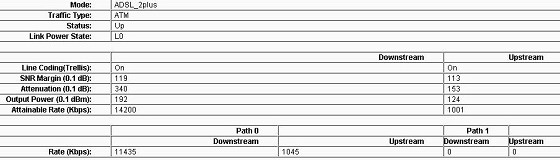
router stats


These stats seem out of whack to me. On my old router I'm sure the SNR and attenuation weren't that high, but I don't have it anymore to check. (I've also moved house recently).

My speed is pretty good, and speedtest shows pretty good speed as well https://www.speedtest.net/result/1064853158.png

Is this something I should get telecom to look at?

edit: sorry for the small font in the stat pic. If anyone needs me to post the actual stats just let me know, thanks.



~~Dream.Catcher~~
iPhone 4s 16 GB, Ipad2 32gb
windows 7 computer


Create new topic
johnr
19282 posts

Uber Geek
+1 received by user: 2526
Inactive user


  #415718 10-Dec-2010 21:59
Send private message

Why are these in the subject field 850/900/1800/1900MHz?


Damager
2125 posts

Uber Geek
+1 received by user: 37


  #415720 10-Dec-2010 22:01
Send private message

Subject relates to a router, however the rest of it seems to do with 3G mobile network frequencies.


- Telstra HTC Touch Pro2 - Energy ROM WM6.5.5 20 Oct/Cyanogen Mod Froyo 2.2 - R.I.P
- AT&T Galaxy S Captivate 16GB on XT (now with brother)
- Samsung Galaxy S2 on XT- Runs ICS 4.0.3 Resurrection Remix 9.2
- Business Hours - Work In The Electricity Industry, After Hours - DJ/Turntablist - Will Scratch Vinyl For Free'
- What's next??? S3?

johnr
19282 posts

Uber Geek
+1 received by user: 2526
Inactive user


  #415721 10-Dec-2010 22:05
Send private message

I have not seen 1800mhz used for 3G before


Dreamy

251 posts

Ultimate Geek

Trusted

  #415724 10-Dec-2010 22:09
Send private message

Yes, I made an absolute mess of the first post, have updated now.


~~Dream.Catcher~~
iPhone 4s 16 GB, Ipad2 32gb
windows 7 computer


Dreamy

251 posts

Ultimate Geek

Trusted

  #415836 11-Dec-2010 11:58
Send private message

Anyone have an answer now that I've fixed the post? I get these type of stats even if the router is rebooted.


~~Dream.Catcher~~
iPhone 4s 16 GB, Ipad2 32gb
windows 7 computer


cbrpilot
964 posts

Ultimate Geek
+1 received by user: 555

Trusted
Spark NZ

  #416009 11-Dec-2010 23:33
Send private message

Yes those stats look fine.

Your router just has an odd way of presenting them (SNR Margin & Attenuation)- in multiples of 0.1 rather than multiples of 1.  I.e. Its showing you a number 10x bigger than you're used to seeing.  Divide by 10 and you'll get what you're used to seeing.


My views are my own, and may not necessarily represent those of my employer.


Create new topic


Geekzone Live »

Try automatic live updates from Geekzone directly in your browser, without refreshing the page, with Geekzone Live now.


Are you subscribed to our RSS feed? You can download the latest headlines and summaries from our stories directly to your computer or smartphone by using a feed reader.