Geekzone: technology news, blogs, forums
Guest
Welcome Guest.
You haven't logged in yet. If you don't have an account you can register now.


PhoenixNZ

52 posts

Master Geek


#94885 20-Dec-2011 21:42
Send private message

So my old modem kicked the bucket and I've got a new TG582N from Telecom. Since I've got this new modem I have had nothing but trouble when trying to play TF2. The connection seems to freeze after about 30 seconds of play. This is not just the connection to the TF2 server but the whole internet connection. After about a min it rights itself.

Can anyone elighten me on how this may be fixed?


I have my own mind which is not that of my company. As such do not mistake my opinions as being those of any company you may or may not think I work for.

Create new topic
Ragnor
8279 posts

Uber Geek
+1 received by user: 585

Trusted

  #560448 21-Dec-2011 21:41
Send private message

Hopefully solved, see:
http://www.gpforums.co.nz/thread/437899/?s=

Seems to be a common issue with the existing NAT binding in the Technicolor (formerly Thomson) units.

For the record, here are the comands that I used on my friends Thomson ST536 back in the day which should work on similar Thomson/Technicolor units with the same problem.

1: Open the command prompt (start > run > cmd)
2: Type "telnet 192.168.1.254"
3: Login as: Administrator (default password should be blank/empty or "admin")
4: Enter the command: connection bindlist and press enter
5: Enter the command: connection unbind application=GAME(UDP) port=27010-27011
6: Reboot router
7: Restart steam


PhoenixNZ

52 posts

Master Geek


  #560463 21-Dec-2011 22:06
Send private message

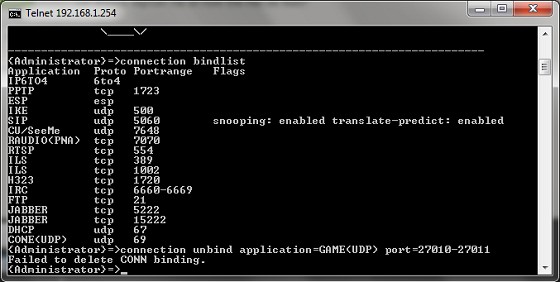
I found that solution also but the issue is that I dont have GAME UDP settings showing up when I try that.

This is what happens when I try the above solution:


I have my own mind which is not that of my company. As such do not mistake my opinions as being those of any company you may or may not think I work for.

Ragnor
8279 posts

Uber Geek
+1 received by user: 585

Trusted

  #560502 21-Dec-2011 23:46
Send private message

Hmm what a pain, looks like a different problem then.

You may have to use wireshark to capture some network logs to debug the issue further.

Did you pay anything for the modem/router or was it a freebie?

Have you tried logging an issue with the Telecom's helpdesk, I've had some success getting through to people that had a clue (bypassing L1 phone answerers) using the contact us form online
http://telecom.custhelp.com/app/ask 

Create new topic


Geekzone Live »

Try automatic live updates from Geekzone directly in your browser, without refreshing the page, with Geekzone Live now.


Are you subscribed to our RSS feed? You can download the latest headlines and summaries from our stories directly to your computer or smartphone by using a feed reader.