Geekzone: technology news, blogs, forums
Guest
Welcome Guest.
You haven't logged in yet. If you don't have an account you can register now.


kiwirock

694 posts

Ultimate Geek
+1 received by user: 141


#197949 19-Jun-2016 18:16
Send private message

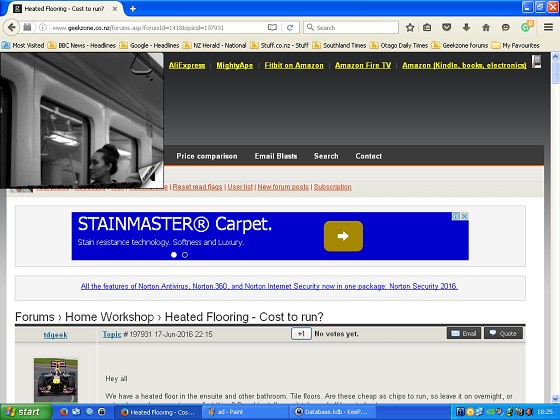
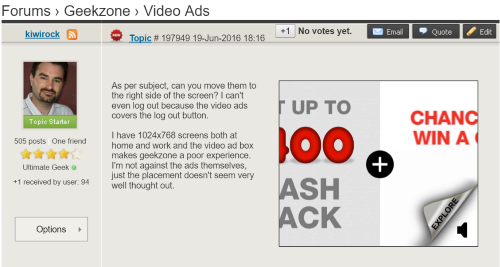
As per subject, can you move them to the right side of the screen? I can't even log out because the video ads covers the log out button.


I have 1024x768 screens both at home and work and the video ad box makes geekzone a poor experience. I'm not against the ads themselves, just the placement doesn't seem very well thought out.


View this topic in a long page with up to 500 replies per page Create new topic
 1 | 2
freitasm
BDFL - Memuneh
80646 posts

Uber Geek
+1 received by user: 41029

Administrator
ID Verified
Trusted
Geekzone
Lifetime subscriber

  #1576678 19-Jun-2016 18:17
Send private message

Do you have a screenshot please?


Referral links: Quic Broadband (free setup code: R587125ERQ6VE) | Samsung | AliExpress | Wise | Sharesies 


Support Geekzone by subscribing (browse ads-free), or making a one-off or recurring donation through PressPatron.


kiwirock

694 posts

Ultimate Geek
+1 received by user: 141


  #1576682 19-Jun-2016 18:28
Send private message


Hopefully that works, haven't posted a picture for a very long time :o)


freitasm
BDFL - Memuneh
80646 posts

Uber Geek
+1 received by user: 41029

Administrator
ID Verified
Trusted
Geekzone
Lifetime subscriber

  #1576685 19-Jun-2016 18:37
Send private message

Is this Internet Explorer 8 on Windows XP?


If it is, sorry, can't do much - that box should be way below that position and I guess the browser is just not doing it right.


Referral links: Quic Broadband (free setup code: R587125ERQ6VE) | Samsung | AliExpress | Wise | Sharesies 


Support Geekzone by subscribing (browse ads-free), or making a one-off or recurring donation through PressPatron.


kiwirock

694 posts

Ultimate Geek
+1 received by user: 141


  #1576686 19-Jun-2016 18:43
Send private message

XP yes, but Firefox 46 and 47.


freitasm
BDFL - Memuneh
80646 posts

Uber Geek
+1 received by user: 41029

Administrator
ID Verified
Trusted
Geekzone
Lifetime subscriber

  #1576688 19-Jun-2016 18:55
Send private message

See how it goes now.


Referral links: Quic Broadband (free setup code: R587125ERQ6VE) | Samsung | AliExpress | Wise | Sharesies 


Support Geekzone by subscribing (browse ads-free), or making a one-off or recurring donation through PressPatron.


kiwirock

694 posts

Ultimate Geek
+1 received by user: 141


  #1576705 19-Jun-2016 19:21
Send private message

Is the video meant to be somewhere else on the page? They aren't showing up anywhere now.


HP


Shop now for HP laptops and other devices (affiliate link).
freitasm
BDFL - Memuneh
80646 posts

Uber Geek
+1 received by user: 41029

Administrator
ID Verified
Trusted
Geekzone
Lifetime subscriber

  #1576709 19-Jun-2016 19:27
Send private message

The ads (not all videos, most of the times just static images) should be like this:


On a window smaller than 1100 pixels the CSS will automatically hide that space but... it seems the video ad (and only the video ad) shows on a different overlay and since the box is hidden the browser puts it on the top corner. The problem with your browser happens exactly because I was being nice and hiding the ad...


Obviously will have to look at other more permanent solution.


Referral links: Quic Broadband (free setup code: R587125ERQ6VE) | Samsung | AliExpress | Wise | Sharesies 


Support Geekzone by subscribing (browse ads-free), or making a one-off or recurring donation through PressPatron.


Linuxluver
5833 posts

Uber Geek
+1 received by user: 1639

Trusted
Subscriber

  #1576716 19-Jun-2016 19:45
Send private message

kiwirock:


As per subject, can you move them to the right side of the screen? I can't even log out because the video ads covers the log out button.


I have 1024x768 screens both at home and work and the video ad box makes geekzone a poor experience. I'm not against the ads themselves, just the placement doesn't seem very well thought out.


Subscribe. Then you don't see any ads at all. 


Worth every penny. 


_____________________________________________________________________

I've been on Geekzone over 16 years..... Time flies.... 


raytaylor
4076 posts

Uber Geek
+1 received by user: 1296

Trusted

  #1577425 20-Jun-2016 22:17
Send private message

I still had forum text disappearing off behind the right hand column even when i was a subscriber.


I Probably should get around to resubscribing.


Ray Taylor

There is no place like localhost

Spreadsheet for Comparing Electricity Plans Here


freitasm
BDFL - Memuneh
80646 posts

Uber Geek
+1 received by user: 41029

Administrator
ID Verified
Trusted
Geekzone
Lifetime subscriber

  #1577426 20-Jun-2016 22:21
Send private message

raytaylor:


I still had forum text disappearing off behind the right hand column even when i was a subscriber.


I Probably should get around to resubscribing.


This is a different thing - this is when people post long URLs and the browser don't correctly wrap them. If people report a post like this a mod fix it pretty quickly.


Referral links: Quic Broadband (free setup code: R587125ERQ6VE) | Samsung | AliExpress | Wise | Sharesies 


Support Geekzone by subscribing (browse ads-free), or making a one-off or recurring donation through PressPatron.


PhantomNVD
2619 posts

Uber Geek
+1 received by user: 759
Inactive user


  #1577434 20-Jun-2016 22:54
Send private message

freitasm:

raytaylor:


I still had forum text disappearing off behind the right hand column even when i was a subscriber.


I Probably should get around to resubscribing.


This is a different thing - this is when people post long URLs and the browser don't correctly wrap them. If people report a post like this a mod fix it pretty quickly.


Great!

I wondered why that happened on some pages but not others, even in the same thread. Really frustrating on my phone though, as it won't even resize or reposition on swiping.


Move to New Zealand's best fibre broadband service (affiliate link). Free setup code: R587125ERQ6VE. Note that to use Quic Broadband you must be comfortable with configuring your own router.
freitasm
BDFL - Memuneh
80646 posts

Uber Geek
+1 received by user: 41029

Administrator
ID Verified
Trusted
Geekzone
Lifetime subscriber

  #1577436 20-Jun-2016 22:55
Send private message

Particularly bad whjen a long unbreakable URL is inside a quote. Trust me, I tried lots of things and tricks.


Referral links: Quic Broadband (free setup code: R587125ERQ6VE) | Samsung | AliExpress | Wise | Sharesies 


Support Geekzone by subscribing (browse ads-free), or making a one-off or recurring donation through PressPatron.


kiwirock

694 posts

Ultimate Geek
+1 received by user: 141


  #1703020 14-Jan-2017 03:42
Send private message

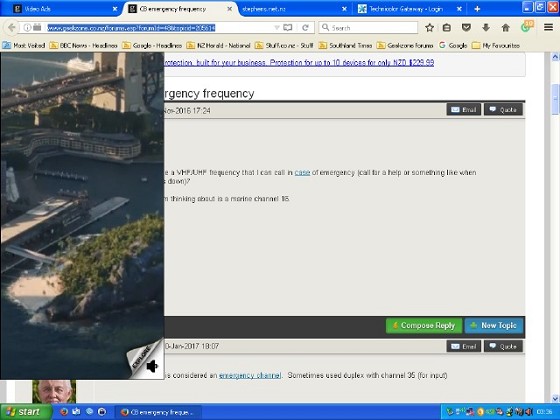
Firefox 50.1, 1024x768 desktop unfortunately the video ads are getting bigger when minimised.


lNomNoml
1841 posts

Uber Geek
+1 received by user: 521

ID Verified

  #1703022 14-Jan-2017 04:27
Send private message

kiwirock:


Firefox 50.1, 1024x768 desktop unfortunately the video ads are getting bigger when minimised.


Cheap option, subscribe to get rid of them.


More expensive option, upgrade.


lxsw20
3689 posts

Uber Geek
+1 received by user: 2174

Subscriber

  #1703024 14-Jan-2017 05:19
Send private message

Yeap, can't be expected to support a 15 year old OS and old hardware forever.


 1 | 2
View this topic in a long page with up to 500 replies per page Create new topic


Geekzone Live »

Try automatic live updates from Geekzone directly in your browser, without refreshing the page, with Geekzone Live now.


Are you subscribed to our RSS feed? You can download the latest headlines and summaries from our stories directly to your computer or smartphone by using a feed reader.