Geekzone: technology news, blogs, forums
Guest
Welcome Guest.
You haven't logged in yet. If you don't have an account you can register now.


bazbear

13 posts

Geek
+1 received by user: 5


#205145 31-Oct-2016 15:58
Send private message

Hi,


Does anyone know why you can't use your own router on Vodafone's Fibre X network and know if you can make your own router to work?


I have an Asus RT-AC56U and have tried but it won't pick up an IP via DHCP as know you don't have a static IP via standard Cable on Vodafone.


The Huawei HG659 router are just plain awful.


Filter this topic showing only the reply marked as answer View this topic in a long page with up to 500 replies per page Create new topic
 1 | 2 | 3
hio77
'That VDSL Cat'
13036 posts

Uber Geek
+1 received by user: 3896

ID Verified
Trusted
Lizard Networks
Subscriber

  #1661525 31-Oct-2016 16:10
Send private message

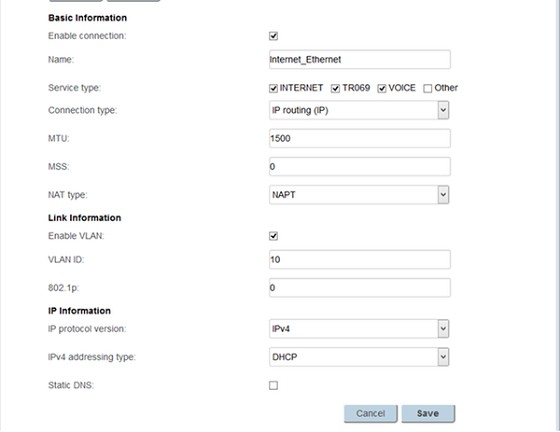
vlan 10, dhcp.


has been designed to replicate standard setup for UFB.


#include <std_disclaimer>


Any comments made are personal opinion and do not reflect directly on the position my current or past employers may have. 


Jase2985
13730 posts

Uber Geek
+1 received by user: 6202

ID Verified
Lifetime subscriber

  #1661527 31-Oct-2016 16:11
Send private message

you can, its just not supported so if you do it, and there is an issue you will have to connect the vodafone supplied one to do any testing etc with the CSR


michaeln
238 posts

Master Geek
+1 received by user: 44

Trusted

  #1661531 31-Oct-2016 16:13
Send private message

As is mentioned in the main FibreX thread, the new services behave just like UFB. That is, they use VLANs. That means that the 802.1Q priority bits are actioned (like UFB). But it also means that you need a router that can support VLANs on its WAN port. Specifically, it needs to talk on VLAN 10. If you DHCP on VLAN 10, you'll get a lease. But untagged frames are just dropped.


bazbear

13 posts

Geek
+1 received by user: 5


  #1661562 31-Oct-2016 16:49
Send private message

yup, thanks.  Vodafone finally replied to me too and said the same thing.


demdix
13 posts

Geek
+1 received by user: 3


  #1661836 1-Nov-2016 08:13
Send private message

Anyone tried with OpenWRT and a Linksys WRT1900AC?    I have tagged the packets with the correct VLAN and I am using DHCP but I don't get an address.  Must be a bug with that particular combo... I am using the latest stable version of Chaos Calmer (15.05.1)


I will Wireshark it tonight and see if there is anything interesting in the capture.


Sideface
9649 posts

Uber Geek
+1 received by user: 15596

Trusted
DR
Lifetime subscriber

  #1661847 1-Nov-2016 09:01
Send private message

Is anyone using an EdgeRouter Lite on FibreX?

I have been using an ERL for several years on HFC cable 100/10Mbps (fixed IP), with excellent results.
Now I'm on "FibreX200".
I get full line speeds with the supplied HG659, but slower speeds (typically below 150Mbps) with the ERL - this is completely unexpected.

I'm using DHCP with VLAN 10, with the IPv4 default gateway and DNS server addresses copied from the HG659.

Here are my ethernet port settings:

eth0:


eth1.10 (VLAN):


eth1:


Any obvious bloopers?   undecided


Sideface


Shop now at Mighty Ape (affiliate link).
hio77
'That VDSL Cat'
13036 posts

Uber Geek
+1 received by user: 3896

ID Verified
Trusted
Lizard Networks
Subscriber

  #1661901 1-Nov-2016 10:23
Send private message

Sideface:


Any obvious bloopers?   undecided


Apart from the following no.


Hardware offloading on the vlan tagging by chance?


#include <std_disclaimer>


Any comments made are personal opinion and do not reflect directly on the position my current or past employers may have. 


speshnz
84 posts

Master Geek
+1 received by user: 23

ID Verified

  #1662040 1-Nov-2016 14:07
Send private message

Interesting, i seem to get around 800Mbit with the Vodafone supplied router and 400Mbit with my R8000


Lorenceo
904 posts

Ultimate Geek
+1 received by user: 336

Trusted

  #1662060 1-Nov-2016 15:00
Send private message

That is interesting. I've personally tested an R8000 on a 1000/500 PPPoE UFB connection. Handled around 930/450Mbps on speedtest.net, nperf and iperf.


Edit: Running the stock Netgear firmware. No VLAN tagging involved.


Djmixerdomo
255 posts

Ultimate Geek
+1 received by user: 53


  #1662367 1-Nov-2016 22:54
Send private message

So every time I start a torrent it will climb up to about 60-70MB/s and then my internet completely dies, requiring a router restart to fix it.


Turns out the HG659 was completely freezing up a minute or two after the torrent started. All the lights looked normal except the LAN activity LEDs weren't flashing and I'm unable to load the login page to configure it.


Just wondering if I should get a new router (I kinda want one anyway), it would seem as though it can't quite handle the jandal when it comes to torrenting at very high speeds.


PC: 5800X3D/32GB/RTX3070


Car: Toyota Celica GT-Four ST205


Jase2985
13730 posts

Uber Geek
+1 received by user: 6202

ID Verified
Lifetime subscriber

  #1662391 2-Nov-2016 05:24
Send private message

how many conections do you have going with your torrents? try reducing this and see if its better? you could just be hammering the router and it doesnt like it


Shop now at Mighty Ape (affiliate link).
Djmixerdomo
255 posts

Ultimate Geek
+1 received by user: 53


  #1662487 2-Nov-2016 09:42
Send private message

Jase2985:


how many conections do you have going with your torrents? try reducing this and see if its better? you could just be hammering the router and it doesnt like it


Just at the default 50, I tried lowering it to 20 but it still does it.


PC: 5800X3D/32GB/RTX3070


Car: Toyota Celica GT-Four ST205


mdf

mdf
3566 posts

Uber Geek
+1 received by user: 1519

Trusted

  #1662642 2-Nov-2016 13:02
Send private message

I've just posted on the big thread, but if anyone is only monitoring this one, I'm getting regular ~850 Mbps on a Netgear Nighthawk R7000 running Advanced Tomato with CTF enabled. 5 minutes earlier on the HG659 was more like ~600, though I've also had the HG659 up over 900. My results are all over the place so I think the severs are under a bit of pressure.


Riposte
11 posts

Geek
+1 received by user: 2


  #1663542 4-Nov-2016 08:32
Send private message

Does it need PPPoE set up as well in order to use your own router?


I set up my Edgerouter Lite and managed to get it to pull down an IP to VLAN 10 but still not working.


Rather than just add the new interface maybe I should have re-run the setup wizard?


Also, how does the default gateway get set with a dhcp set IP address?


I have a static IP being sorted for me today so that particular problem will go away anyway.


For anyone who doesn't know already you can get a static IP for $5 extra a month - you dont need to buy the whole $20 'Internet Pack'.


Sideface
9649 posts

Uber Geek
+1 received by user: 15596

Trusted
DR
Lifetime subscriber

  #1663549 4-Nov-2016 08:44
Send private message

Riposte:


Does it need PPPoE set up as well in order to use your own router?


I set up my Edgerouter Lite and managed to get it to pull down an IP to VLAN 10 but still not working.


Rather than just add the new interface maybe I should have re-run the setup wizard?


<snip>


I have exactly the same problem - I've tried and failed with an ERL-3 and with an ER-X, with and without the setup wizard, with latest firmware.


I get an IP to VLAN 10, but still not working ...  frown


Is this a firewall problem?


The ERL-3 and the ER-X both worked perfectly with the old fixed IP HFC cable.


Sideface


 1 | 2 | 3
Filter this topic showing only the reply marked as answer View this topic in a long page with up to 500 replies per page Create new topic


Geekzone Live »

Try automatic live updates from Geekzone directly in your browser, without refreshing the page, with Geekzone Live now.


Are you subscribed to our RSS feed? You can download the latest headlines and summaries from our stories directly to your computer or smartphone by using a feed reader.