About 5 months ago I started having connection problems. An ’x’ would appear over the two little computers at the bottom of my screen with the message, ’a network cable is disconnected’.
Two things changed 5 months ago, 1. I got a new motherboard (asus m4a78 - em/1394), and 2. I changed my isp to Telstra clear and along with that got a new modem (dynalink rta1320v6).
When I first started getting the disconnected cable error all I noticed was that whatever page I was trying to load took a bit longer to load. The ‘x’ and error message would then disappear and the page would load. Sometimes this would happen several times an hour, other times, not so much.
One day it crapped out completely and nothing I did could get my internet back up. I don’t recall exactly what steps I tried back then to fix it … all the usual no doubt, disconnect and reconnect modem ect … after a while I gave up and decided to use another computer.
But that computer was really slow so I took a stick of ram out of my computer and put it in the slow one … and it blew up. So I put the ram back into my computer and all of a sudden it started working again and I was able to connect to the internet again. I don’t know if I had any further ‘minor’ connection drop-outs after that because the two little computers at the bottom of my screen disappeared.
Fast forward to 5 days ago and my net connection dropped again and the two little computers re-appeared with the ‘x’ and error message that a network cable was disconnected. I tried rebooting the comp, unplugging the modem and all cables and power from the comp and I tried 4 different Ethernet cables all to no avail. I borrowed a friends computer that apparently works fine at her place but got the same error message when I plugged it in here. It was about then that we noticed the light that comes on, on the cable, where it connects to the computer, was not working.
I made a few calls to Telstra help desk but still couldn’t get it sorted. Then I tried un-installing the network adapters in my device manager (don’t ask me why I did that). There were two entries under network adapters, 1394 net adapter and Realtek PCIe GBE family controller, I un-installed them both and rebooted the comp hoping they’d re-install themselves and would work again. I’m a bit hazy as to the order of events at this stage because I spent the next two days crying drunk. Suffice to say my internet didn’t start working again and the ‘Realtek family controller’ didn’t come back at all. So in my ‘network connections’ I had no ‘lan’ connections at all. I tried calling the help desk again thinking they’d be able to help me get it back but they told me without that ‘lan’ connection I needed a comp tech to check out my computer.
I had no money for a computer tech so decided to ring the guy who works at the local net café who installed my new motherboard. No joy there either as local net café had just been taken over by new owners and they did not have the name or number of the guy who installed my motherboard.
So then I decided to use my ’windows xp pro’ cd and tried the recommended ‘update’ installation … and that’s where my problems really started. (cuz I obviously didn’t have enough problems as it was) Turns out my computer had software incompatible with windows on it and the update installation kept getting stuck till it wouldn’t allow me to do anything on my comp and long story short a friend had to walk me through a fresh install of my operating system. With the fresh install came a whole host of new problems and still no internet connection or lan connection.
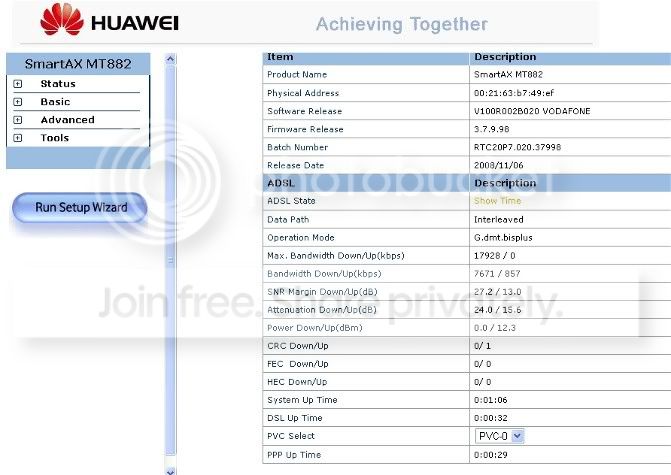
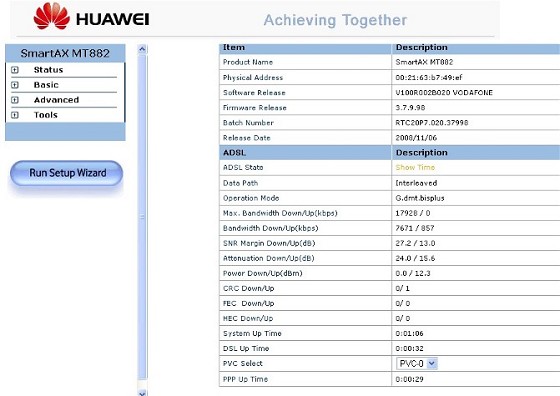
So then I decided to try using an old Vodafone modem (Huawei SmartAx MT882), I had tried it before with no luck but this time I’d found a disc to go with it and used a usb cable so was able to install it to the point where it was at least showing up in my device manager. I had the Ethernet cable plugged in as well and a light was showing on the Ethernet cable where it was connected to the comp, but if I disconnected the usb cable the modem disappeared from my network devices.
Sunday night I called Telstra again and they helped me configure the modem and finally I was able to connect to the internet but had frequent drop-outs having to wait several minutes with each before my internet would reconnect again. I tried removing the Ethernet cable completely and still had drop-outs. I persevered with the drop-outs till 4 am Monday morning before deciding to give the problem a rest for a day or so. Somewhere during this time Telstra told me they would be monitoring the line for 24 hrs and would call me back.
Yesterday (Monday) my daughter got online, she said it took about 20 minutes before she could get a connection but after that she had no drop-outs. This was using the usb connection with Ethernet cable still disconnected.
This morning (10 hrs ago) I was able to get online no problem and had no drop-outs for a couple of hours. Telstra rang me back and said they had monitored the line and noticed that it had a lot of drop-outs (or disconnections, can’t recall what term they used). They had no explanation for the problems and asked again if I’d had a tech in to check out my comp. I told them I would be spending more time on the comp today trying to isolate the problem and I would ring them back.
After two hours of no drop-outs using the usb this morning I decided to try using the Ethernet cable again. It worked straight away for like 5 seconds and then my net dropped out again. Hauwei SmartAx disappeared from my device manager and the Realtek family controller finally re-appeared. I’ve had about 5 drop-outs since reconnecting my Ethernet cable today but as it reconnects itself and I’ve spent a lot of time reading and looking for solutions without refreshing pages, it’s hard to know how many times it’s dropped out and reconnected without me knowing. I also can’t be sure whether the fact it started dropping out again straight after I reconnected the Ethernet cable is due to a problem with Ethernet connection or whether it’s just a coincidence and my connection would have started dropping out with the usb connection too. One thing different about the drop-outs is my two little computers at the bottom of my screen don’t have an ‘x’ over them and there are no ‘disconnected cable’ errors. (the light stays on on my cable too)
Sorry for such a long post and we’re not there yet. My daughter has already told me off for writing a novel but the forum guides do say to give as much info as possible so here are the stats from my modem web configuration page:
Adsl state: show time (this changes to ‘down’ when I lose connection)
Data path: interleaved
Operation mode: g.dmt.bisplus
Max.bandwidth down/up(kbps): 14336/0
Bandwidth down/up(kbps): 7671/857
Snr margin down/up(dB): 26.2/12.8
Attenuation down/up(dB): 24.0/15.5
Power down/up(dBm): 0.0/12.3
Crc down/up: 0/1
Fec down/up: 72/651
Hec down/up: 0/0
System up Time: 3:14:44
DSL up time: 0:29:00
Pvc select: pvc-0
Ppp up time: 0:29:32
Finally, and have no idea whether this is relevant either. Have been doing speed tests throughout the day at speedtest.net. With the usb connection my speed was around 5.18 mbps and with the Ethernet connection my speeds are around 6.53 down, 0.72 up. These are standard speeds for me though few weeks ago, and probably the first time I tested my speed with Telstra, my speed was up to 14mbps, can’t remember what it was up. It was like that for a few hours and today is first time I’ve tested since.
So that’s it. Any help you can give me with my connection problems would be greatly appreciated. Happy to provide more info if necessary.





 Administrator
 ID Verified
 Trusted
 Geekzone