Geekzone: technology news, blogs, forums
Guest
Welcome Guest.
You haven't logged in yet. If you don't have an account you can register now.


FurzNZ

10 posts

Wannabe Geek
+1 received by user: 1


#304177 11-Apr-2023 12:13
Send private message

G'day everyone,


We live 8 minutes from Rolleston just out of Chch and our internet is woeful at best. Currently can only get 1mbps and we are on One/Farmside RBI. Not only is this expensive, the service is poor. We do not have a copper line or fiber to our property.


2 degrees and a few others offer wireless 4G at our address. Can anyone recommend an external antenna and modem (if the company provided one is not external antenna capable). 


Yes Starlink have a good deal on now, but the monthly cost v $65ish from 2degrees is not justifable to my current budget.


Or perhaps you know of a better solution?


Thanks


Create new topic
wratterus
1687 posts

Uber Geek
+1 received by user: 678


  #3061428 11-Apr-2023 13:36
Send private message

The provider you go with will supply you with a modem. Any LTE modem should have external antenna ports. Do you have an external antenna now? 'RBI' is just 4G wireless - same thing, just a different type of plan. 


Can you give your rough address? Like what street you are on? Do you know what signal you get on the modem currently? Do either Spark or 2D have towers that are closer than Vodafone? Are you sure you are getting offered an uncapped plan from Spark/2D when searching?


FurzNZ

10 posts

Wannabe Geek
+1 received by user: 1


  #3061434 11-Apr-2023 13:57
Send private message

Thanks for the reply.


If you search for Sandy Knolls we are a couple 100 meters from there (https://goo.gl/maps/kmTwCWB8KwQ8Wgnh8)
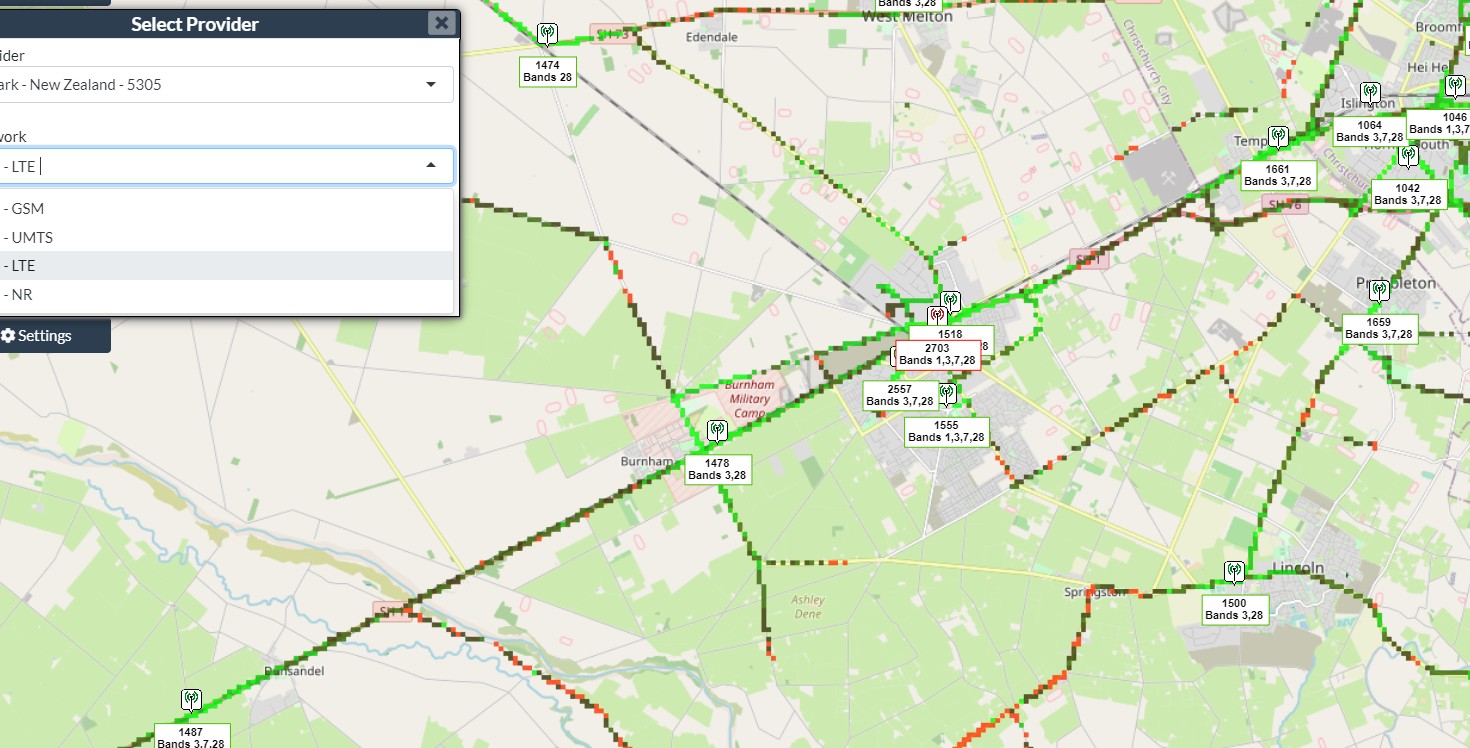
Looking at the GIS Geek maps, all the towers are within a stones throw of each other at Rolleston, Aylesbury, Burnham and West Melton.


We don't have an external antenna. The modem is showing full bars although I have read that 4G wireless and RBI use towers and if we were going for 4G then perhaps an antenna would help as our mobile reception is incredibly poor.


RBI is around $100 for 120GB. 2 Degrees is $45 for 300GB or $55 for Unlimited. Not all providers offer Wireless at our address.


wratterus
1687 posts

Uber Geek
+1 received by user: 678


  #3061442 11-Apr-2023 14:09
Send private message

Surprised you would get an uncapped plan there at all. If 2D offer one for that price, it would be worth a shot, with an antenna like this, or a pair of these, and the appropriate cabling. 


Have you tried Amuri or Ultimate Broadband?


quickymart
14940 posts

Uber Geek
+1 received by user: 13954

ID Verified

  #3061446 11-Apr-2023 14:38
Send private message

Depending on where you are on that map - if you're in the direction of "NZ Moisture Meters" you might be able to get VDSL if you're interested in getting a copper line. However, if there is none at the address (as you state) installation might be a bit costly.


Jase2985
13731 posts

Uber Geek
+1 received by user: 6202

ID Verified
Lifetime subscriber

  #3061448 11-Apr-2023 14:42
Send private message

have you looked into fixed wireless options? 


https://www.ultimatebroadband.co.nz/rural-broadband-canterbury/ 


they cover a lot of canterbury


Silvrav
477 posts

Ultimate Geek
+1 received by user: 173

ID Verified

  #3061466 11-Apr-2023 14:57
Send private message

Having just gone through this exercise myself I ended up with Spark unlimited plan fixed wireless as they provide me with a static IP as well. $70 a month all in.


On testing, if you get anything between 50 and 90mbs, an external antenna wont help much. I would recommend first signing up with your provider and test the speed and latency.


I am also happy with the smart modem Spark provides and can't really complain at this stage. 


Here is my thread: https://www.geekzone.co.nz/forums.asp?forumid=39&topicid=302716


and I did try external antennas :)


and from the map it seems spark has better coverage in the area as well


Move to New Zealand's best fibre broadband service (affiliate link). Free setup code: R587125ERQ6VE. Note that to use Quic Broadband you must be comfortable with configuring your own router.
FurzNZ

10 posts

Wannabe Geek
+1 received by user: 1


  #3061864 12-Apr-2023 12:59
Send private message

Cheers for the reply.
Using the Spark website it says that we are not in the coverage zone. Is it worth just going into see them or giving them a ring?
Great thread too and interesting the results you got without an external antenna.

Silvrav
477 posts

Ultimate Geek
+1 received by user: 173

ID Verified

  #3061880 12-Apr-2023 13:03
Send private message

FurzNZ: Cheers for the reply.
Using the Spark website it says that we are not in the coverage zone. Is it worth just going into see them or giving them a ring?
Great thread too and interesting the results you got without an external antenna.


Try Skinny maybe?


otherwise log a ticket and see what they say.


otherwise, your options are 2degrees or vodofone (or ONE now?) 


but either provider who you decide on should be able to give you a good indication on signal strength at your house.


FurzNZ

10 posts

Wannabe Geek
+1 received by user: 1


  #3065159 18-Apr-2023 20:12
Send private message

UPDATE:


Went with 2Degrees as they were the only ones that would supply to our property.


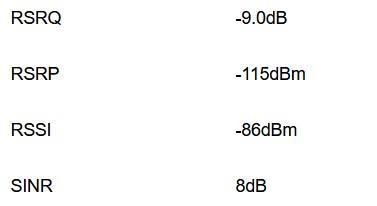
Much better speeds than RBI and LOTS cheaper with no datacap! Have attached router info - figures aren't on the brilliant side but better than RBI, will be turning it off tomorrow.


Cheers for the advice.


Silvrav
477 posts

Ultimate Geek
+1 received by user: 173

ID Verified

  #3065337 19-Apr-2023 08:35
Send private message

FurzNZ:


UPDATE:


Went with 2Degrees as they were the only ones that would supply to our property.


Much better speeds than RBI and LOTS cheaper with no datacap! Have attached router info - figures aren't on the brilliant side but better than RBI, will be turning it off tomorrow.


Cheers for the advice.


Nice! and what speeds were you getting?


Create new topic


Geekzone Live »

Try automatic live updates from Geekzone directly in your browser, without refreshing the page, with Geekzone Live now.


Are you subscribed to our RSS feed? You can download the latest headlines and summaries from our stories directly to your computer or smartphone by using a feed reader.