Geekzone: technology news, blogs, forums
Guest
Welcome Guest.
You haven't logged in yet. If you don't have an account you can register now.


Oddball

65 posts

Master Geek
+1 received by user: 2


#153986 14-Oct-2014 16:51
Send private message

Hi,

Been banging my head against the wall for hours now :/

We signed up at 2talk and bigpipe for voip + vdsl. Net runs great, phone will not connect at all.

It never even attempts to connect. It just permanently sits there with status 'down' and the light on the router has never flashed. In some ways it feels like there is a 'connect' button but there isn't. It's probably something so simple but.. whatever it is, it's eluding me.

How do I get it to even attempt to connect to the VOIP?

I have gone through every setting on the router and read through many many threads even mimicking their setup.

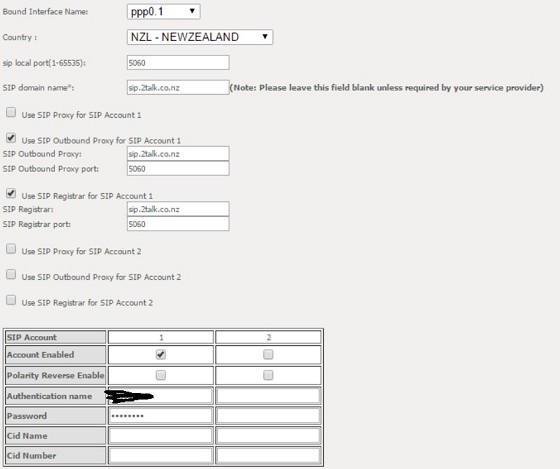
Current settings:

Create new topic
RunningMan
9184 posts

Uber Geek
+1 received by user: 4834


  #1153810 14-Oct-2014 17:07
Send private message

Have you got a public IP, or are you behind the CG-NAT?


Oddball

65 posts

Master Geek
+1 received by user: 2


  #1153811 14-Oct-2014 17:10
Send private message

We have a public IP.

taneb1
544 posts

Ultimate Geek
+1 received by user: 213

ID Verified
Trusted
Mercury

  #1153819 14-Oct-2014 17:39
Send private message

According to http://blog.2talk.co.nz/genericsettings.html it may need the proxy as well.
Possibly also try set the 2Talk number in the cid number field 
I had a lot of issues setting the NF4 up with another Sip provider in the weekend and can't remember exactly what fixed it undecided
Will try set it back up when i'm home and will let you know


Any comments made are my personal views and does not represent those of my employer


Oddball

65 posts

Master Geek
+1 received by user: 2


  #1153911 14-Oct-2014 19:58
Send private message

Ah, the CID field got me a 'Up' status!

I can not call or be called, though.

And no calls show up in the call history, so it's not just the handset.

Oddball

65 posts

Master Geek
+1 received by user: 2


  #1153924 14-Oct-2014 20:39
Send private message

All fixed :) It really was just the CID number, then reverting settings I had tested.

Cheers mate... knew it would be a silly solution :)

Create new topic


Geekzone Live »

Try automatic live updates from Geekzone directly in your browser, without refreshing the page, with Geekzone Live now.


Are you subscribed to our RSS feed? You can download the latest headlines and summaries from our stories directly to your computer or smartphone by using a feed reader.
