Geekzone: technology news, blogs, forums
Guest
Welcome Guest.
You haven't logged in yet. If you don't have an account you can register now.


seretonin

58 posts

Master Geek
+1 received by user: 7


#220131 27-Jul-2017 13:12
Send private message

Ok so ive ditched the landline and currently need help setting up VOIP on the router , the router i have is a HG659B from bigpipe , ive tried emailing 2talk and they weren't very helpful. they provided me with this 

https://www.2talk.co.nz/supportview....ricsipsettings

this is what my settings look like currently 

http://iforce.co.nz/i/0ihpwi0h.1ab.jpg

do the settings look right ? 

any help is appreciated


Came here to make BraaiGuy  My B1tch 

View this topic in a long page with up to 500 replies per page Create new topic
 1 | 2
rscole86
4999 posts

Uber Geek
+1 received by user: 462

Moderator
Trusted
Lifetime subscriber

  #1832208 27-Jul-2017 13:15
Send private message

I am on spark, but same router with 2talk. My settings are the same, except I have not defined any outbound settings ie I have left unchecked. 


EDIT: Also, have you tried searching as there are a lot of threads on this already, which do explain how to set it up.


sbiddle
30853 posts

Uber Geek
+1 received by user: 9996

Retired Mod
Trusted
Biddle Corp
Lifetime subscriber

  #1832214 27-Jul-2017 13:20
Send private message

Do you have a public IP? I'm not sure whether that combination of device and 2talk will work behind CG-NAT.


jonathan18
7415 posts

Uber Geek
+1 received by user: 2850

ID Verified
Trusted

  #1832246 27-Jul-2017 13:45
Send private message

sbiddle:


Do you have a public IP? I'm not sure whether that combination of device and 2talk will work behind CG-NAT. 


I have exactly the same combo - HG659, BigPipe and 2Talk.


When I switched over to BP a year or so ago, based on what I read here on GZ I knew there was a chance I'd need a static IP address to ensure 2Talk worked ok, but we've never had any problems with our phone using a public IP.


Can't comment on the specifics of my VOIP settings as currently at work.


seretonin

58 posts

Master Geek
+1 received by user: 7


  #1832425 27-Jul-2017 18:02
Send private message

Hmm read those threads and it looks like im really screwed , im on bigpipe VDSL with bigpipes Huawei modem , :( any help is appreciated 


Came here to make BraaiGuy  My B1tch 

hbngan
89 posts

Master Geek
+1 received by user: 10

ID Verified

  #1832551 27-Jul-2017 21:40
Send private message

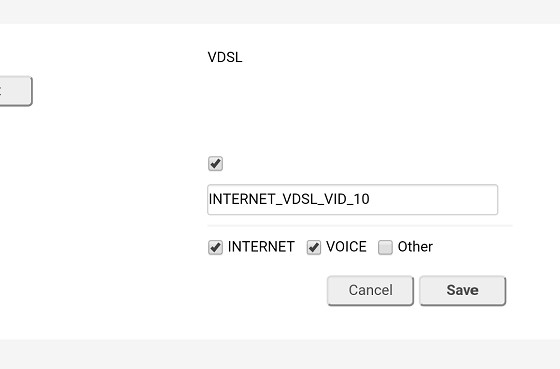
Goto internet ,internet settings, edit, make sure voice is ticked, see picture


hbngan


seretonin

58 posts

Master Geek
+1 received by user: 7


  #1832594 28-Jul-2017 04:36
Send private message

Yea done that, ticked voice , just seems using 2talk on vdsl with a analog phone is the most autistic combination ,your not on VDSL Jonathan18 ?


Came here to make BraaiGuy  My B1tch 


Shop now for Dell laptops and other devices (affiliate link).
crewsaider
70 posts

Master Geek
+1 received by user: 24


  #1832732 28-Jul-2017 11:03
Send private message

I am on Vodafone VDSL through a VF Huawei HG659 with a Uniden Elite 9135 connected to 2talk VOIP. The VOIP Providers tab is set the same as OP with Call Settings and Additional Settings under the Advanced tab as per:


Call Settings were taken from the Generic SIP Settings offered on 2talk support site and Additional Settings were not changed from factory. The setup works well enough, although the Uniden no longer gives visual indication of voicemail (icon and flashing light), however, aural indicator of flashing dial tone does work.  This is not a major problem as 2talk send an email with message attached.


sbiddle
30853 posts

Uber Geek
+1 received by user: 9996

Retired Mod
Trusted
Biddle Corp
Lifetime subscriber

  #1832736 28-Jul-2017 11:11
Send private message

seretonin:


Hmm read those threads and it looks like im really screwed , im on bigpipe VDSL with bigpipes Huawei modem , :( any help is appreciated 


You can help yourself by answering some of the questions above.


Do you have a public IP? If not then the 2talk service may not work over CG-NAT with this hardware.


All the testing you do will be pointless if this is the case and I can't help you because I a) don't use 2talk, b) don't use a HG659, and c) don't have a CG-NAT connection


kiwicam
136 posts

Master Geek
+1 received by user: 54


  #1832756 28-Jul-2017 11:36
Send private message

sbiddle:


seretonin:


Hmm read those threads and it looks like im really screwed , im on bigpipe VDSL with bigpipes Huawei modem , :( any help is appreciated 


You can help yourself by answering some of the questions above.


Do you have a public IP? If not then the 2talk service may not work over CG-NAT with this hardware.


All the testing you do will be pointless if this is the case and I can't help you because I a) don't use 2talk, b) don't use a HG659, and c) don't have a CG-NAT connection


Can anyone explain where the Public IP requirement comes from? I, like many others, am running 2Talk over CG-NAT just fine and I don't understand why this would be a requirement.


To answer the original question, I have BigPipe, 2Talk, and an HG659 running the BigPipe firmware and it works great using the settings already discussed here (Ticking the VOICE option seems to be the trick most people miss).


Cameron


seretonin

58 posts

Master Geek
+1 received by user: 7


  #1832789 28-Jul-2017 12:06
Send private message

caminham:


sbiddle:


seretonin:


Hmm read those threads and it looks like im really screwed , im on bigpipe VDSL with bigpipes Huawei modem , :( any help is appreciated 


You can help yourself by answering some of the questions above.


Do you have a public IP? If not then the 2talk service may not work over CG-NAT with this hardware.


All the testing you do will be pointless if this is the case and I can't help you because I a) don't use 2talk, b) don't use a HG659, and c) don't have a CG-NAT connection


Can anyone explain where the Public IP requirement comes from? I, like many others, am running 2Talk over CG-NAT just fine and I don't understand why this would be a requirement.


To answer the original question, I have BigPipe, 2Talk, and an HG659 running the BigPipe firmware and it works great using the settings already discussed here (Ticking the VOICE option seems to be the trick most people miss).


Cameron


Hi ,


pretty sure by default id be put on dynamic IP with bigpipe , so i don't have a static address if that's what you mean its also the ISP provided router. just came on here to figure out if i need to pay $45 for a static IP or if i need a new router.


Came here to make BraaiGuy  My B1tch 

jimbob79
673 posts

Ultimate Geek
+1 received by user: 165


  #1832794 28-Jul-2017 12:12
Send private message

Where do you add your 2Talk username (phone number) and password?


HP


Shop now for HP laptops and other devices (affiliate link).
kiwicam
136 posts

Master Geek
+1 received by user: 54


  #1832796 28-Jul-2017 12:14
Send private message

At the bottom of the original screenshot (http://iforce.co.nz/i/0ihpwi0h.1ab.jpg) there's a "New Number" link.  That's where you add the phone number and password... and it looks like it might be missing.


seretonin

58 posts

Master Geek
+1 received by user: 7


  #1832822 28-Jul-2017 12:30
Send private message

Yeah ive added that info there as well  . i get the VOIP flashing on the router  and a beep beep beep instead of a dialtone on my analog phone.


i ported my old number , and should it be entered in this format ? 072160XXX        


Came here to make BraaiGuy  My B1tch 

crewsaider
70 posts

Master Geek
+1 received by user: 24


  #1832888 28-Jul-2017 13:55
Send private message


Entry under VOIP Numbers. I do not have static IP and analogue phone works just fine.


sbiddle
30853 posts

Uber Geek
+1 received by user: 9996

Retired Mod
Trusted
Biddle Corp
Lifetime subscriber

  #1832910 28-Jul-2017 14:25
Send private message

caminham:


Can anyone explain where the Public IP requirement comes from? I, like many others, am running 2Talk over CG-NAT just fine and I don't understand why this would be a requirement.


CG-NAT is essentially double NAT.


Double NAT and VoIP don't go well together and essentially break SIP over UDP. There are some hardware and tricks that can work, but in some cases you'll never make things work. It really depends on the setup.


 1 | 2
View this topic in a long page with up to 500 replies per page Create new topic


Geekzone Live »

Try automatic live updates from Geekzone directly in your browser, without refreshing the page, with Geekzone Live now.


Are you subscribed to our RSS feed? You can download the latest headlines and summaries from our stories directly to your computer or smartphone by using a feed reader.