Geekzone: technology news, blogs, forums
Guest
Welcome Guest.
You haven't logged in yet. If you don't have an account you can register now.


Gordy7

gordy7
2002 posts

Uber Geek
+1 received by user: 505

ID Verified
Lifetime subscriber

#299138 14-Aug-2022 18:43
Send private message

I have a Windows 10 cloned SSD that lost the MBR in the cloning process.


Will a re-install of Windows 10 keeping personal settings create an MBR on the SSD?


Longer story:


My son-in-law (100km away) had a HDD near death. Extremely/painfully slow desktop. 


Managed to catch an image of the HDD using Macrium Reflect and transferred the image to an SSD.


I was never able to get access to the HDD again. Never had a second computer with me to help out.


However, the SSD ended up with no MBR.


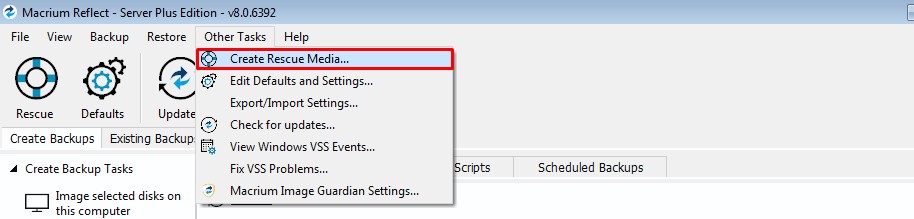
Bit hazy - but in my rush Macrium Reflect had a build MBR option.... but it put the MBR on the Macrium Reflect USB stick.


Now the computer boots up using the USB stick. If I remove the USB stick when Windows is running - all stops.


To repair I have tried Aomei Partition Assist but it only repairs an MBR and does not create a new MBR.


I can of course leave him with the USB stick and SSD combo.... it does work.


I could also gather up his personal info and do a fresh install of Windows 10.



Gordy


My first ever AM radio network connection was with a 1MHz AM crystal(OA91) radio receiver.


Create new topic
Behodar
11116 posts

Uber Geek
+1 received by user: 6116

Trusted
Lifetime subscriber

  #2954498 14-Aug-2022 18:49
Send private message

If I recall correctly, if you boot from the Windows installer and open a command prompt, you can run "fixmbr" to drop a new one on without reinstalling.


Edit: It looks like it's changed to "bootrec /fixmbr" in recent versions of Windows.


Oblivian
7347 posts

Uber Geek
+1 received by user: 2117

ID Verified

  #2954545 14-Aug-2022 18:56
Send private message

Yeah that ^^

A reinstall will likely be dumb and not tell what you hope to do

The path to go gown, is treat it as a 'windows not booting' install case and use the tools at hand.

You know the files are there. You just need to update windows/uefi to find it.

Windows DART or recovery on a stick should help fins the install Using drive search and as you if you need help repairing.

K8Toledo
1018 posts

Uber Geek
+1 received by user: 311


  #2954554 14-Aug-2022 20:16
Send private message

Gordy7:


I have a Windows 10 cloned SSD that lost the MBR in the cloning process.


Will a re-install of Windows 10 keeping personal settings create an MBR on the SSD?


Longer story:


My son-in-law (100km away) had a HDD near death. Extremely/painfully slow desktop. 


Managed to catch an image of the HDD using Macrium Reflect and transferred the image to an SSD.


I was never able to get access to the HDD again. Never had a second computer with me to help out.


However, the SSD ended up with no MBR.


Bit hazy - but in my rush Macrium Reflect had a build MBR option.... but it put the MBR on the Macrium Reflect USB stick.


Now the computer boots up using the USB stick. If I remove the USB stick when Windows is running - all stops.


To repair I have tried Aomei Partition Assist but it only repairs an MBR and does not create a new MBR.


I can of course leave him with the USB stick and SSD combo.... it does work.


I could also gather up his personal info and do a fresh install of Windows 10.


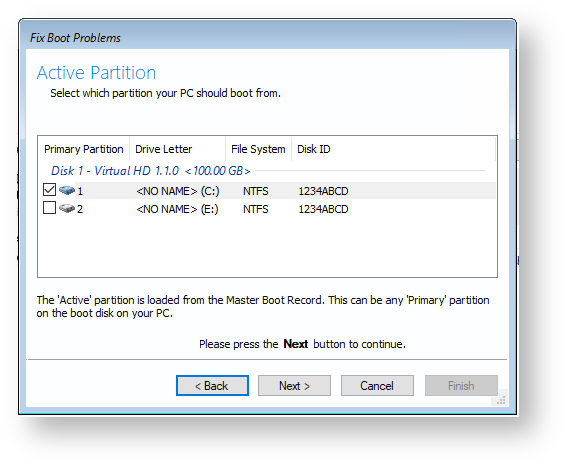
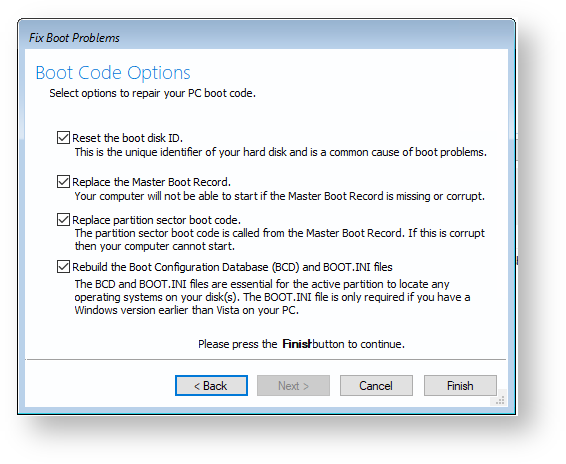
Edit: Here is the link to Macrium KB article.


https://knowledgebase.macrium.com/display/KNOW80/Fixing+Windows+boot+problems


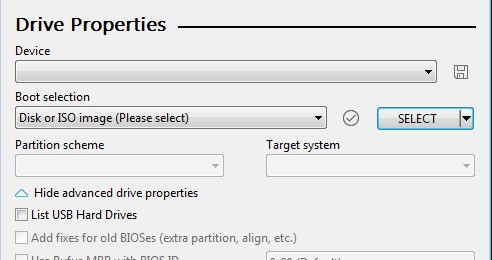
In Rufus select the MR ISO to create a bootable USB drive.


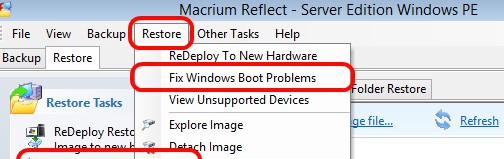
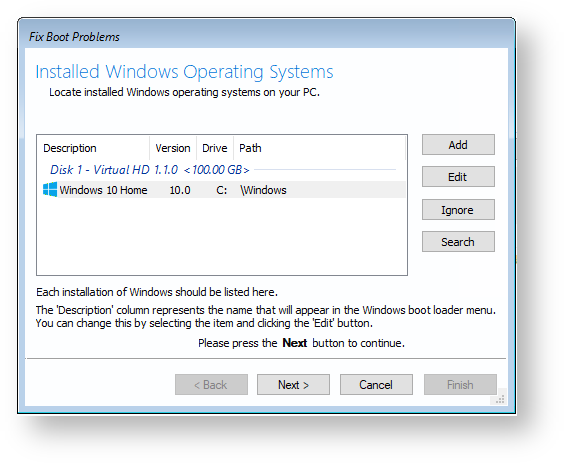
Boot from the USB drive and select Fix Windows Boot Problems below.


yitz
2240 posts

Uber Geek
+1 received by user: 594


  #2954608 14-Aug-2022 21:29
Send private message

It could also be a valid MBR which points to the system boot loader files ("system partition") which somehow got installed to the USB flash drive in which case you need to run:
(sometimes the built-in diagnostics are too stubborn to pick up and fix)


BCDBOOT C: 


or


bcdboot C: /s S:
where C: is the "boot partition" with the \WINDOWS folder
and S: is the separate "system bootloader partition" if it is not the same partition as the \WINDOWS folder (you might have to mount first using the diskpart tool as system drive usually has no letter). This is most likely the option for Windows Professional with Bit Locker and 64-bit installations.


This all assumes you are indeed on a MBR boot layout and not actually UEFI.


https://docs.microsoft.com/en-us/windows-hardware/manufacture/desktop/bcdboot-command-line-options-techref-di 


K8Toledo
1018 posts

Uber Geek
+1 received by user: 311


  #2954676 15-Aug-2022 00:22
Send private message

Reflect Rescue disk writes a new MBR to the selected partition. I use it all the time.


Gordy7

gordy7
2002 posts

Uber Geek
+1 received by user: 505

ID Verified
Lifetime subscriber

  #2954739 15-Aug-2022 08:57
Send private message

Thanks for all the fix MBR options.


A good reminder to use KISS.


I haven't had to use MBR fixes since DOS days 😃


Gordy


My first ever AM radio network connection was with a 1MHz AM crystal(OA91) radio receiver.


Shop now for Lego sets and other gifts (affiliate link).
richms
29116 posts

Uber Geek
+1 received by user: 10229

Trusted
Lifetime subscriber

  #2954757 15-Aug-2022 10:10
Send private message

MBR only applies to legacy boot devices. There is a lot more to it to get current hardware, but reflect has got me back booting again when the useless windows repair options did precisely nothing to get it working again. I am sure that the inclusion of the repair option on the boot media is just a troll by microsoft because I am zero from about 30 with trying that.


Richard rich.ms

Create new topic


Geekzone Live »

Try automatic live updates from Geekzone directly in your browser, without refreshing the page, with Geekzone Live now.


Are you subscribed to our RSS feed? You can download the latest headlines and summaries from our stories directly to your computer or smartphone by using a feed reader.