Geekzone: technology news, blogs, forums
Guest
Welcome Guest.
You haven't logged in yet. If you don't have an account you can register now.


antaeusa

221 posts

Master Geek


#116068 17-Apr-2013 11:41
Send private message

Hi There,

Can anyone please help me to select the right keyboard? I have went into Text Services and Input Language and have selected the closest keyboard yet, it doesn't function properly?

When I type K I get 2, L => 3 M => -

Please see the attached ss of the keyboard.
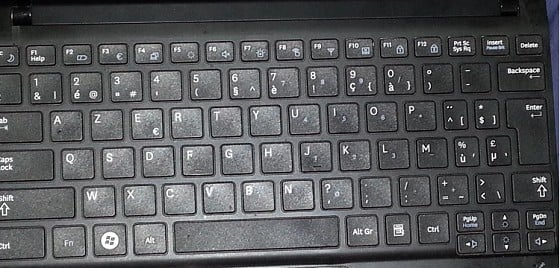


Currently I have selected Dutch (Belgium) -> Belgian (Period) as the Keyboard.

Create new topic

This is a filtered page: currently showing replies marked as answers. Click here to see full discussion.

jonb
1796 posts

Uber Geek
+1 received by user: 545

Trusted

  #800855 17-Apr-2013 11:56
Send private message

Seems like you need to press Fn + Num Lock (F11) at the same time.

http://www.tomshardware.com/forum/46929-35-problem-function-acer-samsung-laptop

Create new topic


Geekzone Live »

Try automatic live updates from Geekzone directly in your browser, without refreshing the page, with Geekzone Live now.


Are you subscribed to our RSS feed? You can download the latest headlines and summaries from our stories directly to your computer or smartphone by using a feed reader.