Geekzone: technology news, blogs, forums
Guest
Welcome Guest.
You haven't logged in yet. If you don't have an account you can register now.


freitasm

BDFL - Memuneh
80652 posts

Uber Geek
+1 received by user: 41034

Administrator
ID Verified
Trusted
Geekzone
Lifetime subscriber

#185531 26-Nov-2015 15:19
Send private message

I have a Windows 7 HTPC in the lounge and hope to not have to upgrade this machine to Windows 10.

How do I stop it offering the upgrade?


Referral links: Quic Broadband (free setup code: R587125ERQ6VE) | Samsung | AliExpress | Wise | Sharesies 


Support Geekzone by subscribing (browse ads-free), or making a one-off or recurring donation through PressPatron.



View this topic in a long page with up to 500 replies per page Create new topic
 1 | 2 | 3 | 4 | 5 | 6 | ... | 11
Jase2985
13730 posts

Uber Geek
+1 received by user: 6202

ID Verified
Lifetime subscriber

  #1435285 26-Nov-2015 15:23
Send private message

delete KB 3035583 and hide it in windows update

the hide the windows 10 download in windows update

i have found that the win 10 download keeps coming back even though ive hidden it so i have to be careful when doing updates.

dont think you can truly hide or stop it being offered


nedkelly
666 posts

Ultimate Geek
+1 received by user: 104

Trusted
Subscriber

  #1435287 26-Nov-2015 15:24
Send private message

Uninstall KA3035883 and then hide update from Windows Update.

gbwelly
1263 posts

Uber Geek
+1 received by user: 776


  #1435290 26-Nov-2015 15:28
Send private message

I removed it by hand and hid the update, however MS re-released it and GWX returned. The second time I used 'GWX Control Panel' which worked really well and it hasn't come back. My fear was my HTPC based on WMC on 8.1 would upgrade one day and cause chaos in the lounge with no media center.

That machine is in lock down since MS tried to kill off Netflix in Media Center (yes I know it only does 720p... show me a reliable remote friendly Netflix client for windows and I'll switch)


nathan
5695 posts

Uber Geek
+1 received by user: 1630
Inactive user


  #1435308 26-Nov-2015 15:37
Send private message

How to manage Windows 10 notification and upgrade options
https://support.microsoft.com/en-us/kb/3080351 

To suppress this offer through the registry, specify the following registry value: 

Subkey: HKLM\SOFTWARE\Policies\Microsoft\Windows\WindowsUpdate

DWORD value: DisableOSUpgrade = 1

1101
3141 posts

Uber Geek
+1 received by user: 1143


  #1436179 27-Nov-2015 16:50
Send private message

If you allready have the notification icon (most do) then the reg fix above doesnt removed, at least not on the (1) PC is tried

other reg entries on other sites didnt work either


Jase2985
13730 posts

Uber Geek
+1 received by user: 6202

ID Verified
Lifetime subscriber

  #1436255 27-Nov-2015 19:20
Send private message

thats because you need to delete the KB from the PC to remove the icon

changing the registry wont get rid of it


Move to New Zealand's best fibre broadband service (affiliate link). Free setup code: R587125ERQ6VE. Note that to use Quic Broadband you must be comfortable with configuring your own router.
nathan
5695 posts

Uber Geek
+1 received by user: 1630
Inactive user


  #1436261 27-Nov-2015 19:30
Send private message

For Core or Pro versions of Windows that are not joined to a domain, the notification icon can be suppressed through the Windows registry. To do this, set the following registry value:

Subkey: HKLM\Software\Microsoft\Windows\CurrentVersion\WindowsUpdate\OSUpgrade
DWORD value: ReservationsAllowed = 0

1101
3141 posts

Uber Geek
+1 received by user: 1143


  #1437873 30-Nov-2015 14:28
Send private message

double fail

On another machine(Not the one I mentioned above),
Win7 home laptop
I set winupdates to never check.
made the reg change (Nathans 1st one)
uninstalled the KB

restart
icon still there
*** KB3035583 had instantly reinstalled itself after/on restart (it says installed on 30/11/2015)

now this is all one big fail.
From this, just dont assume any of the suggestions out there actually work.
In the past, on other machines, removing the KB would at least work for a while :-(


edit: GWX Stopper worked..instantly...so far

http://blog.ultimateoutsider.com/2015/08/using-gwx-stopper-to-permanently-remove.html


freitasm

BDFL - Memuneh
80652 posts

Uber Geek
+1 received by user: 41034

Administrator
ID Verified
Trusted
Geekzone
Lifetime subscriber

  #1437876 30-Nov-2015 14:30
Send private message

If you click "Restart" it will automatically install any "Important" updates. You should have hidden the update before restart.


Referral links: Quic Broadband (free setup code: R587125ERQ6VE) | Samsung | AliExpress | Wise | Sharesies 


Support Geekzone by subscribing (browse ads-free), or making a one-off or recurring donation through PressPatron.


1101
3141 posts

Uber Geek
+1 received by user: 1143


  #1437952 30-Nov-2015 16:58
Send private message

freitasm: If you click "Restart" it will automatically install any "Important" updates. You should have hidden the update before restart.


sure, but...
 In the past, on other PC's the update didnt allways immediately show itself again,just after removal, even on a few reboots
if if doesnt show, it cant be hidden . I didnt look this time, I assumed :-)

The reg fix was supposed to stop it anyway.
Ive some more PC's here I can experiment on.
A Work in progress, Im a bit nervous installing 3rd party programs onto other Peoples PC's  to stop all this

1101
3141 posts

Uber Geek
+1 received by user: 1143


  #1439328 2-Dec-2015 15:55
Send private message

Heres the missing reg entry, needed on 64bit (I presume)

[HKEY_LOCAL_MACHINE\SOFTWARE\Wow6432Node\Policies\Microsoft\Windows\WindowsUpdate]
"DisableOSUpgrade"=dword:00000001

Exported from a 'fixed' PC. Confirmed & tested on another laptop , with the 2 reg entries below

[HKEY_LOCAL_MACHINE\SOFTWARE\Microsoft\Windows\CurrentVersion\WindowsUpdate\OSUpgrade]
"ReservationsAllowed"=dword:00000000
"KickoffDownload"=dword:00000000
"KickoffSource"=dword:00000000
"Refresh"=dword:00000001
"AllowOSUpgrade"=dword:00000000


[HKEY_LOCAL_MACHINE\SOFTWARE\Policies\Microsoft\Windows\WindowsUpdate]
"DisableOSUpgrade"=dword:00000001


What a mission this has been. After the reg fixes, still have to go & uninstall the kb if its there .
Hopefully a permanent fix, time will tell :-)
Also works to get rid of the Win10 upgrade notice from Windows Updates Console.

Seems theres alot of mis-information about this on some websites, I guess they just blog & dont even test what they are writing about


Shop now for Lenovo laptops and other devices (affiliate link).
freitasm

BDFL - Memuneh
80652 posts

Uber Geek
+1 received by user: 41034

Administrator
ID Verified
Trusted
Geekzone
Lifetime subscriber

  #1522572 30-Mar-2016 08:53
Send private message

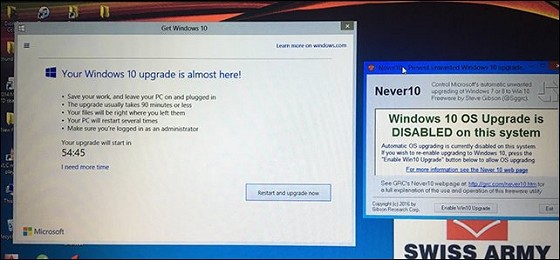
The easiest way: Never10 by GRC.


Referral links: Quic Broadband (free setup code: R587125ERQ6VE) | Samsung | AliExpress | Wise | Sharesies 


Support Geekzone by subscribing (browse ads-free), or making a one-off or recurring donation through PressPatron.


nathan
5695 posts

Uber Geek
+1 received by user: 1630
Inactive user


  #1522589 30-Mar-2016 09:15
Send private message

freitasm:


The easiest way: Never10 by GRC.


No its not:


The easiest way is to follow the Microsoft guidance and set a registry key


https://support.microsoft.com/en-us/kb/3080351


Subkey: HKLM\Software\Policies\Microsoft\Windows\Gwx


DWORD value: DisableGwx = 1


Subkey: HKLM\SOFTWARE\Policies\Microsoft\Windows\WindowsUpdate


DWORD value: DisableOSUpgrade = 1


freitasm

BDFL - Memuneh
80652 posts

Uber Geek
+1 received by user: 41034

Administrator
ID Verified
Trusted
Geekzone
Lifetime subscriber

  #1522592 30-Mar-2016 09:16
Send private message

It worked for me on my HTPC which had no registry touched - so a "clean" machine.


Referral links: Quic Broadband (free setup code: R587125ERQ6VE) | Samsung | AliExpress | Wise | Sharesies 


Support Geekzone by subscribing (browse ads-free), or making a one-off or recurring donation through PressPatron.


freitasm

BDFL - Memuneh
80652 posts

Uber Geek
+1 received by user: 41034

Administrator
ID Verified
Trusted
Geekzone
Lifetime subscriber

  #1522596 30-Mar-2016 09:18
Send private message

On another note Microsoft should really give an option. I have a perfectly good Windows 7 PC that's supported for years to come and it's running Windows Media Center. I do not want to change to Windows 10 because Windows Media Center is not an option on that OS. There's no compelling reason for this PC to be changed to Windows 10.


This should be as easy as a switch in Windows Update, not all this work/trouble.


Microsoft is not looking after its users. Simple as that.


Referral links: Quic Broadband (free setup code: R587125ERQ6VE) | Samsung | AliExpress | Wise | Sharesies 


Support Geekzone by subscribing (browse ads-free), or making a one-off or recurring donation through PressPatron.


 1 | 2 | 3 | 4 | 5 | 6 | ... | 11
View this topic in a long page with up to 500 replies per page Create new topic


Geekzone Live »

Try automatic live updates from Geekzone directly in your browser, without refreshing the page, with Geekzone Live now.


Are you subscribed to our RSS feed? You can download the latest headlines and summaries from our stories directly to your computer or smartphone by using a feed reader.