Geekzone: technology news, blogs, forums
Guest
Welcome Guest.
You haven't logged in yet. If you don't have an account you can register now.


Batman

Mad Scientist
30012 posts

Uber Geek
+1 received by user: 6217

Trusted
Lifetime subscriber

#196518 3-Jun-2016 05:56
Send private message

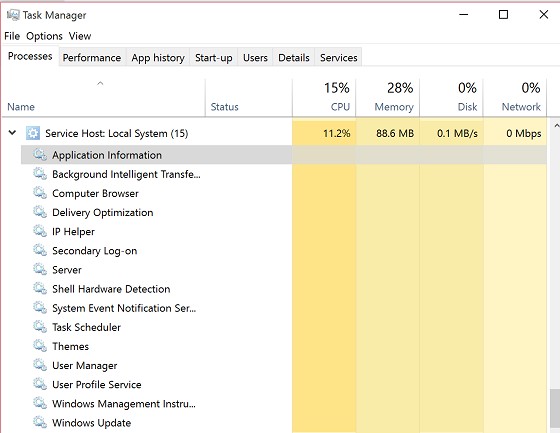
I am trying to eek out every minute I can when the laptop [Win 10 Pro] is on battery.


One of the things I came across is this thing ... "Service Host: Local System". one of 16 things is burning up my battery ... but how do I tell which one? I've done virus scanning on Avast boot scan and comes back clean.



Create new topic
Batman

Mad Scientist
30012 posts

Uber Geek
+1 received by user: 6217

Trusted
Lifetime subscriber

  #1564689 3-Jun-2016 05:58
Send private message

Btw it's 10% of a quad core i7 Haswell ... that's a lot of juice. the MP3 player only uses 0.05% (cycles between 0.0% and 0.1%)


mrdrifter
589 posts

Ultimate Geek
+1 received by user: 294

ID Verified
Trusted

  #1564727 3-Jun-2016 08:12
Send private message

Have you tried Process Monitor? https://technet.microsoft.com/en-us/sysinternals/processmonitor.aspx?f=255&MSPPError=-2147217396 This may allow you to identify the exact process.


trig42
5889 posts

Uber Geek
+1 received by user: 2094

ID Verified

  #1564775 3-Jun-2016 09:25
Send private message

I'll place 10 cents on it being Windows Update.


wasabi2k
2102 posts

Uber Geek
+1 received by user: 860


  #1564777 3-Jun-2016 09:28
Send private message

from a command prompt, tasklist /svc


will show you the PID and any hosted services for the svchost.exe process


You will need to go to the details view of task manager, select columns and add PID to the list.


Match the PID of the high CPU process with the PID from tasklist - you will have a list of suspect services.


timmmay
20857 posts

Uber Geek
+1 received by user: 5349

Trusted
Lifetime subscriber

  #1564822 3-Jun-2016 09:51
Send private message

joker97:


Btw it's 10% of a quad core i7 Haswell ... that's a lot of juice. the MP3 player only uses 0.05% (cycles between 0.0% and 0.1%)


When I was at university, with a 486, a 128kbps mp3 would take the entire CPU to decode, sometimes it skipped. Those new fangled pentiums were the bomb and did it much more easily.


linw
2893 posts

Uber Geek
+1 received by user: 1205


  #1564831 3-Jun-2016 10:00
Send private message

wasabi2k:


from a command prompt, tasklist /svc


will show you the PID and any hosted services for the svchost.exe process


You will need to go to the details view of task manager, select columns and add PID to the list.


Match the PID of the high CPU process with the PID from tasklist - you will have a list of suspect services.


Very useful info - thanks.


Shop now for Dell laptops and other devices (affiliate link).
darylblake
1172 posts

Uber Geek
+1 received by user: 410

Trusted

  #1564833 3-Jun-2016 10:01
Send private message

trig42:


I'll place 10 cents on it being Windows Update.


Yeh it will have a lot of disk activity on the C drive too. Might be hard to notice on an SSD. Id probably place more than 10 cents on this though.


Batman

Mad Scientist
30012 posts

Uber Geek
+1 received by user: 6217

Trusted
Lifetime subscriber

  #1564954 3-Jun-2016 12:09
Send private message

trig42:


I'll place 10 cents on it being Windows Update.


I doubt it. Zero network, zero disk use. But only if those are accurate however. I have no idea. All I know is if it didn't do that my battery life could double!\


Thanks guys I'll take a look when I have time.


Batman

Mad Scientist
30012 posts

Uber Geek
+1 received by user: 6217

Trusted
Lifetime subscriber

  #1564955 3-Jun-2016 12:10
Send private message

Hmm I wonder if manually stopping each service might throw a lead or two ...


Batman

Mad Scientist
30012 posts

Uber Geek
+1 received by user: 6217

Trusted
Lifetime subscriber

  #1565469 4-Jun-2016 07:47
Send private message

Hmm a reboot stopped it ... 


Might leave it at that for now ...


I'm sure it will come back - then I'll take a look


JayADee
2233 posts

Uber Geek
+1 received by user: 478


  #1565955 5-Jun-2016 08:41
Send private message

Let us know if you find out -I'm following with interest. 🙂

Create new topic


Geekzone Live »

Try automatic live updates from Geekzone directly in your browser, without refreshing the page, with Geekzone Live now.


Are you subscribed to our RSS feed? You can download the latest headlines and summaries from our stories directly to your computer or smartphone by using a feed reader.