Geekzone: technology news, blogs, forums
Guest
Welcome Guest.
You haven't logged in yet. If you don't have an account you can register now.


freitasm

BDFL - Memuneh
80646 posts

Uber Geek
+1 received by user: 41027

Administrator
ID Verified
Trusted
Geekzone
Lifetime subscriber

#214317 6-May-2017 09:58
Send private message

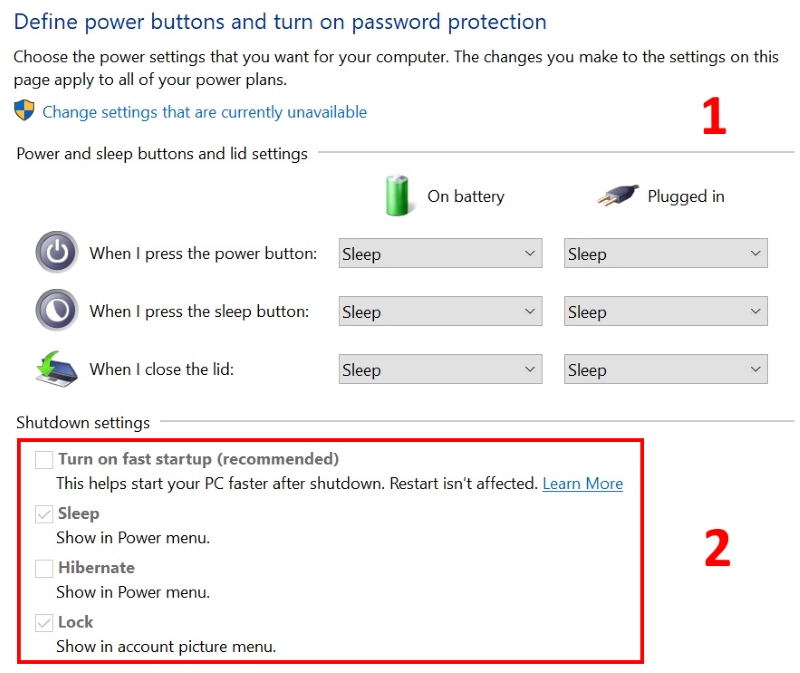
Windows has some strange things. One that has always annoyed me since Windows Vista is that of all the Control Panel items, the only thing that asks for permission is... to show or not Sleep and Hibernate options in the Start Menu power button. What?


I would put almost everything else in Control Panel under the "Require permissions" but hey, what do I know, right?



Referral links: Quic Broadband (free setup code: R587125ERQ6VE) | Samsung | AliExpress | Wise | Sharesies 


Support Geekzone by subscribing (browse ads-free), or making a one-off or recurring donation through PressPatron.


Create new topic
Gordy7
gordy7
2001 posts

Uber Geek
+1 received by user: 505

ID Verified
Lifetime subscriber

  #1776817 6-May-2017 11:10
Send private message

Another one that bugs me is the Task Manager opening on the Processes tab, a text summary.


Window 10 is a graphical OS so why not open the Task Manager on the Performance tab to get a quick over view.


I have not successfully created a macro script to open the Task Manager directly to the Performance tab.


Gordy


My first ever AM radio network connection was with a 1MHz AM crystal(OA91) radio receiver.


solutionz
589 posts

Ultimate Geek
+1 received by user: 164
Inactive user


  #1776846 6-May-2017 12:54
Send private message

Gordy7:


Another one that bugs me is the Task Manager opening on the Processes tab, a text summary.


Window 10 is a graphical OS so why not open the Task Manager on the Performance tab to get a quick over view.


I have not successfully created a macro script to open the Task Manager directly to the Performance tab.


In Windows Server 2016 (and I think some previous versions) I noticed disk performance counters are disabled by default (meaning your don't get a graph of disk i/o in Task Manager) apparently due to the performance drain.


If it's not good enough for Server 2016, why's it enabled by default on Windows 10 etc? Or at least isn't disabled when "Adjust for Best Performance" is enabled and what other optimizations are made for server OS? 


Another Server 2016 oddity ("Windows 10 Creators Update" on Windows Server???):


Create new topic


Geekzone Live »

Try automatic live updates from Geekzone directly in your browser, without refreshing the page, with Geekzone Live now.


Are you subscribed to our RSS feed? You can download the latest headlines and summaries from our stories directly to your computer or smartphone by using a feed reader.
