Why is it that I have to flag a program as 'run as administrator' when I'm logged in as an administrator to get it to run correctly?
This is on Win 10.
|
|
It's basically the local OS level implementation of Microsoft's JITJEA concept.
In short, even when logged in as a user with access to administrative rights, you don't actually HAVE administrative rights until you click "Yes I really want to run this with admin rights", so that bad stuff can't run as admin without you knowing/approving it. The theory being that if virus.exe suddenly wants admin rights you'll click no rather than it just being able to run because you're logged in as an admin.
I'm a geek, a gamer, a dad, a Quic user, and an IT Professional. I have a full rack home lab, size 15 feet, an epic beard and Asperger's. I'm a bit of a Cypherpunk, who believes information wants to be free and the Net interprets censorship as damage and routes around it. If you use my Quic signup you can also use the code R570394EKGIZ8 for free setup. Opinions are my own and not the views of my employer.
As above. You can obviously change UAC to never notify you but then you will have unknown programs running around with full Administrator rights on your machine...
Referral links: Quic Broadband (free setup code: R587125ERQ6VE) | Samsung | AliExpress | Wise | Sharesies
Support Geekzone by subscribing (browse ads-free), or making a one-off or recurring donation through PressPatron.
I've changed UAC to never notify but it still does.
The machine in question only runs my homegrown media player so security is not really an issue. At least it used to when it was running Win 7 but since I upgraded to Win 10 I can't currently access any of the NAS drives. I may need start another thread on that issue if I can't solve it.
SJB:Why is it that I have to flag a program as 'run as administrator' when I'm logged in as an administrator to get it to run correctly?
This is on Win 10.
Software Engineer
(the practice of real science, engineering and management)
A.I. (Automation rebranded)
Gender Neutral
(a person who believes in equality and who does not believe in/use stereotypes. Examples such as gender, binary, nonbinary, male/female etc.)
...they/their/them...
SJB:
I've changed UAC to never notify but it still does.
The machine in question only runs my homegrown media player so security is not really an issue. At least it used to when it was running Win 7 but since I upgraded to Win 10 I can't currently access any of the NAS drives. I may need start another thread on that issue if I can't solve it.
I'd put money on it that your NAS is trying to use SMB1/2 (old, outdated insecure versions of the protocol) instead of SMB3. Make sure SMB3 is enabled on the NAS.
I'm a geek, a gamer, a dad, a Quic user, and an IT Professional. I have a full rack home lab, size 15 feet, an epic beard and Asperger's. I'm a bit of a Cypherpunk, who believes information wants to be free and the Net interprets censorship as damage and routes around it. If you use my Quic signup you can also use the code R570394EKGIZ8 for free setup. Opinions are my own and not the views of my employer.
Lias:
SJB:
I've changed UAC to never notify but it still does.
The machine in question only runs my homegrown media player so security is not really an issue. At least it used to when it was running Win 7 but since I upgraded to Win 10 I can't currently access any of the NAS drives. I may need start another thread on that issue if I can't solve it.
I'd put money on it that your NAS is trying to use SMB1/2 (old, outdated insecure versions of the protocol) instead of SMB3. Make sure SMB3 is enabled on the NAS.
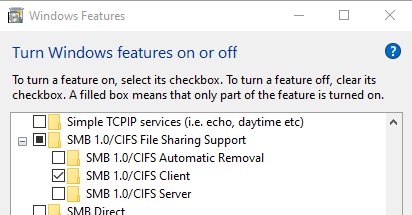
On the other hand, if your NAS is not capable of running SMB3, enable SMB1 on your computer as it is disabled by default in Win 10.
Dratsab: On the other hand, if your NAS is not capable of running SMB3, enable SMB1 on your computer as it is disabled by default in Win 10.
😐 Ideally you will want to avoid this, but if you really have to:
From the Control Panel, find "Turn Windows features on or off" & then disable "SMB 1.0/CIFS Automatic Removal" and enable "SMB 1.0/CIFS Client".

Or, from an elevated PowerShell prompt, you can run:
Enable-WindowsOptionalFeature -Online -FeatureName SMB1Protocol
as per MS KB article 2696547.
Please keep this GZ community vibrant by contributing in a constructive & respectful manner.
The problem with enabling the older SMB protocols is that they are very insecure and a common malware vector. If the NAS is so old it doesn't support SMB3, probably time to think about replacing the NAS.
I'm a geek, a gamer, a dad, a Quic user, and an IT Professional. I have a full rack home lab, size 15 feet, an epic beard and Asperger's. I'm a bit of a Cypherpunk, who believes information wants to be free and the Net interprets censorship as damage and routes around it. If you use my Quic signup you can also use the code R570394EKGIZ8 for free setup. Opinions are my own and not the views of my employer.
Thanks for the replies.
The comment about not being able to access NAS drives should have been more explicit. I can access the drives with no problem via Explorer and other programmes such as my own EPG Collector.
What didn't work is my media player which, on startup, issues a call to the .Net function GetDrives in the DriveInfo class. On Win 7 and earlier this would return a list of all drives including local drives, DVD drives and NAS drives.
However on Win 10 this did not include the NAS drives. This is with exactly the same code that runs OK on Win 7.
I poked around for most of yesterday trying to change the security on the mapped drives (unsuccessfully), running as administrator, UAC notifications switched off etc etc. Finally what did work was a registry change to switch off UAC altogether
HKEY_LOCAL_MACHINE\SOFTWARE\Microsoft\Windows\CurrentVersion\Policies\System\EnableLUA to 0.
Obviously I wouldn't do this on a machine that was for general use but this is a closed environment. On startup it loads my media player (which is all my own code) and it is the only user programme that runs. When the media player is closed it powers off the machine.
So I didn't really get to the bottom of why it didn't work but obviously something in UAC has been changed/tightened up which affects either mapped drives or network access in some way.
SJB:
Thanks for the replies.
The comment about not being able to access NAS drives should have been more explicit. I can access the drives with no problem via Explorer and other programmes such as my own EPG Collector.
What didn't work is my media player which, on startup, issues a call to the .Net function GetDrives in the DriveInfo class. On Win 7 and earlier this would return a list of all drives including local drives, DVD drives and NAS drives.
However on Win 10 this did not include the NAS drives. This is with exactly the same code that runs OK on Win 7.
I poked around for most of yesterday trying to change the security on the mapped drives (unsuccessfully), running as administrator, UAC notifications switched off etc etc. Finally what did work was a registry change to switch off UAC altogether
HKEY_LOCAL_MACHINE\SOFTWARE\Microsoft\Windows\CurrentVersion\Policies\System\EnableLUA to 0.
Obviously I wouldn't do this on a machine that was for general use but this is a closed environment. On startup it loads my media player (which is all my own code) and it is the only user programme that runs. When the media player is closed it powers off the machine.
So I didn't really get to the bottom of why it didn't work but obviously something in UAC has been changed/tightened up which affects either mapped drives or network access in some way.
Are you running the media player as admin? If so then the drive will not be mapped with UAC turned on, you need to think 2 users when you got UAC turn on, a normal user and an admin user, and if you map a drive as a normal users, it does not map it as an admin user, the best thing to do is load an admin cmd and use the net use command to check what mapped, you will find by default 0 drives mapped. Then map them with the /PERSISTENT:yes switch to map the drive in the admin cmd to keep them mapped.
I did know about the 2 users issue but didn't think it thru properly. According to some logging I do in my player it is currently running as Administrator so I think you may be correct.
I'll give it a go and report back.
SJB:
Thanks for the replies.
The comment about not being able to access NAS drives should have been more explicit. I can access the drives with no problem via Explorer and other programmes such as my own EPG Collector.
What didn't work is my media player which, on startup, issues a call to the .Net function GetDrives in the DriveInfo class. On Win 7 and earlier this would return a list of all drives including local drives, DVD drives and NAS drives.
However on Win 10 this did not include the NAS drives. This is with exactly the same code that runs OK on Win 7.
I poked around for most of yesterday trying to change the security on the mapped drives (unsuccessfully), running as administrator, UAC notifications switched off etc etc. Finally what did work was a registry change to switch off UAC altogether
HKEY_LOCAL_MACHINE\SOFTWARE\Microsoft\Windows\CurrentVersion\Policies\System\EnableLUA to 0.
Obviously I wouldn't do this on a machine that was for general use but this is a closed environment. On startup it loads my media player (which is all my own code) and it is the only user programme that runs. When the media player is closed it powers off the machine.
So I didn't really get to the bottom of why it didn't work but obviously something in UAC has been changed/tightened up which affects either mapped drives or network access in some way.
I would suggest if writing code, take the opportunity to read up about UAC and how it works. I think one is effectively trying to swim upstream against the current so to speak.
As mentioned before, when running in administrative mode one gets two identities - the elevated identity likely wont see the network location because it probably is not a trusted location in the context of this mode. However, the standard user identity likely will see them.
I understand DriveInfo runs non-elevated so it will be running in the user mode context. What happens when you run your app as a standard user with UAC set normally?
Also, as an aside - my view is Windows 10 is not Windows 7 so just because something worked on the old platform does not mean to say it should work on the new platform. As they say ‘correlation does not imply causation’.
Software Engineer
(the practice of real science, engineering and management)
A.I. (Automation rebranded)
Gender Neutral
(a person who believes in equality and who does not believe in/use stereotypes. Examples such as gender, binary, nonbinary, male/female etc.)
...they/their/them...
I think I understand what is going on now I know there are 2 identities.
When I was using Win 7, UAC was switched off in the registry. I don't remember doing this and the machine was second hand so it probably came that way. I only ever logged on one user (who was an administrator) and the drives were mapped to them ie at the admin privilege level.
When I upgraded to Win 10 it changed the registry (without asking me incidentally) so that UAC was now switched on. I have verified this happens by upgrading a second Win 7 machine and checking the registry setting before and after.
So once I had upgraded, logging on with the same user and running my media player would have resulted in it looking for the network drives at the user privilege level instead of the admin level and it won't have found them.
Out of interest I will play around with my drive mappings and app with UAC switched on, both in the registry and with notifications on, and see what happens. In practice I will probably switch UAC off as I don't want any notifications popping up and with those switched off I don't see any point in not switching it off in the registry.
you may want to try just logging in to a standard user account. You’ll only get the UAC popup if your application tries to access a privileged resource which by the sound of things one doesn’t need to do.
Software Engineer
(the practice of real science, engineering and management)
A.I. (Automation rebranded)
Gender Neutral
(a person who believes in equality and who does not believe in/use stereotypes. Examples such as gender, binary, nonbinary, male/female etc.)
...they/their/them...
It does use the registry so it may do and it also closes the machine down. Anyway I can run at user privilege and find out.
|
|