Geekzone: technology news, blogs, forums
Guest
Welcome Guest.
You haven't logged in yet. If you don't have an account you can register now.


SheriffNZ

677 posts

Ultimate Geek
+1 received by user: 322


#265477 23-Jan-2020 13:54
Send private message

Hi everyone


I've just picked up an old blank PC from my wife's work. I haven't regularly used my own laptop probably in 6 or 7 years as it got too old and slow. I use Windows machines for work every day.


I've checked the computer and it's Windows 10 compatible so I've just forked out the $250 for a Windows 10 licence on a USB drive which I intend installing tonight.


I know I'll have to get some anti-virus/firewall type software (or is the Windows one ok, or the free McAfee one I can get from Spark?).  As long as this computer works, it fits my requirements. We'll primarily just use it for things that are easier done or can only be done on a computer rather than our ios devices. It won't be used for video editing or any heavy gaming (although I'm sure my kids will want to play minecraft on it).


I have an office 365 subscription, primarily for the storage space it gave me with onedrive. I understand the computer has a 500GB HDD and I have well less than that in the cloud.


What else do I need to worry about? It's been a while since I've needed to worry about maintaining my own computer....


Also, what's the best way to wipe my old computer's hard drive? An axe?


Thanks in advance.


Robin


View this topic in a long page with up to 500 replies per page Create new topic
 1 | 2
wazzageek
1095 posts

Uber Geek
+1 received by user: 108

ID Verified
Trusted
Lifetime subscriber

  #2405277 23-Jan-2020 14:14
Send private message

I would consider upgrading the machine with an SSD - the difference between SSD & HDD is nothing short of amazing.


I'm comfortable with the antivirus / firewall built into Windows 10 (although I am also behind firewalls) - check the T&Cs of your bank if you use online banking (they may have specific requirements to help you decide on firewall / anti-virus).


The other thing that can cause issues is memory - ensure it has enough (it sounds like 4 - 8 GB will probably be OK for your use case)


Best way to wipe a computers harddrive? Shred it and then add it to the concrete of a new building going up.  (Shredding does require a somewhat specialist machine ...) :-)


Cheers!


Hammerer
2480 posts

Uber Geek
+1 received by user: 802

Lifetime subscriber

  #2405283 23-Jan-2020 14:20
Send private message

FYI, Windows doesn't stop running without a valid licence so you could have waited to see if there is an OEM Windows licence on the computer.


I use the Windows 10 security software without problem but you may want features that it doesn't have. I'm not sure about the McAfee software but it has been highly rated in the past.


Disk wiping software is often provided with partitioning software and disk utilities e.g. CCleaner. Here's an article on options from a publisher which, from memory, has a free partition manager that erases drives too: https://www.partitionwizard.com/partitionmagic/free-hard-drive-data-wipe-software-009.html


You can bash the drive if you want.


SheriffNZ

677 posts

Ultimate Geek
+1 received by user: 322


  #2405285 23-Jan-2020 14:24
Send private message

Thanks - Hammerer - While I haven't checked, I was told the computer was wiped before I was given it. I'll have a look at the CCleaner software. I remember I used the disk utility part on my old computer.


Wazzageek - thanks for the advice on the SSD/HDD difference. I'll see how the computer goes and how frustrated I get with it :) It's got 4GB of ram so it should be ok for my purposes. 


Hammerer
2480 posts

Uber Geek
+1 received by user: 802

Lifetime subscriber

  #2405304 23-Jan-2020 15:15
Send private message

SheriffNZ:


Thanks - Hammerer - While I haven't checked, I was told the computer was wiped before I was given it. I'll have a look at the CCleaner software. I remember I used the disk utility part on my old computer.


The licence codes are stored in non-volatile memory and are not removed by wiping the drive.


It sounds like you haven't had anything much to do with Windows for a decade. Features like this have been around for at least that long.


SheriffNZ

677 posts

Ultimate Geek
+1 received by user: 322


  #2405310 23-Jan-2020 15:31
Send private message

Hammerer:


SheriffNZ:


Thanks - Hammerer - While I haven't checked, I was told the computer was wiped before I was given it. I'll have a look at the CCleaner software. I remember I used the disk utility part on my old computer.


The licence codes are stored in non-volatile memory and are not removed by wiping the drive.


It sounds like you haven't had anything much to do with Windows for a decade. Features like this have been around for at least that long.


I haven't bought a new machine in a decade. I was told when buying the machine that I'd need to get a new licence as my wife's firm's IT company had returned the computer to "factory settings". 


Hammerer
2480 posts

Uber Geek
+1 received by user: 802

Lifetime subscriber

  #2405314 23-Jan-2020 15:46
Send private message

A reset to factory setting doesn't normally remove the OEM Windows licence stored with the firmware. An OEM license is usually added at the factory by the manufacturer.


Move to New Zealand's best fibre broadband service (affiliate link). Free setup code: R587125ERQ6VE. Note that to use Quic Broadband you must be comfortable with configuring your own router.
fearandloathing
537 posts

Ultimate Geek
+1 received by user: 206

ID Verified
Lifetime subscriber

  #2405316 23-Jan-2020 15:52
Send private message

I would stick with the built in windows defender on windows 10

Earbanean
1110 posts

Uber Geek
+1 received by user: 377


  #2405351 23-Jan-2020 16:14
Send private message

SheriffNZ:


I've just picked up an old blank PC from my wife's work...


Oh come on.  You nicked it, right?  And now you want help laundering it before selling it down the pub...😉


SheriffNZ

677 posts

Ultimate Geek
+1 received by user: 322


  #2405367 23-Jan-2020 16:31
Send private message

Earbanean:


SheriffNZ:


I've just picked up an old blank PC from my wife's work...


Oh come on.  You nicked it, right?  And now you want help laundering it before selling it down the pub...😉


Technically it was hers so under the matrimonial property act it was mine anyway :)


If I'm wrong on the licence point, I may need help selling that down at the pub...


trig42
5889 posts

Uber Geek
+1 received by user: 2094

ID Verified

  #2405371 23-Jan-2020 16:36
Send private message

We use Dell PCs at work, and we image them with our own copies of Windows (we have a volume license).


When they are done with though, we could wipe them and install Win10 (from a downloadable USB key) and they activate no problem using the original OEM license that came with the computer when purchased from Dell. Never have to enter a key.


wratterus
1687 posts

Uber Geek
+1 received by user: 678


  #2405373 23-Jan-2020 16:37
Send private message

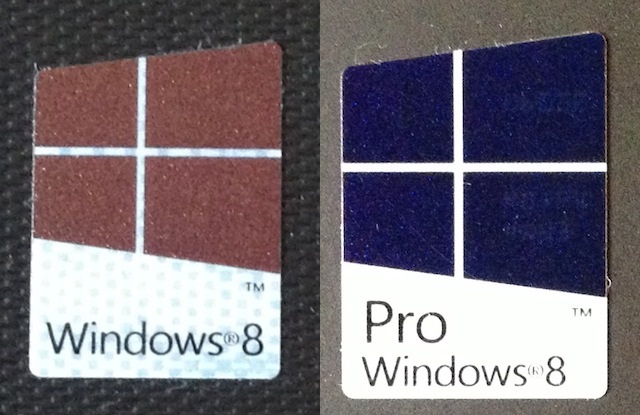
Yes, the PC should definitely have a Windows COA (license sticker), or a Win8/10 sticker like below. 


As long as that is the case, you don't need the new Windows license. You can create an install flash drive for free using the Media Creation Tool from MS, or if you've already unboxed the USB Win10 install drive you could use that, just don't use the key. I'd recommend making a new drive as it will be fully up to date. 


See if you can change the boot mode in the BIOS to UEFI before installing - most PCs 2nd gen Intel or newer will support this. 


IMO Eset AntiVirus is worth purchasing, but most people would get away with the built in free defender. You can get a month free trial of Eset NOD32 if you want to try it out. 


Want to support Geekzone and browse the site without the ads? Subscribe to Geekzone now (monthly, annual and lifetime options).
1101
3141 posts

Uber Geek
+1 received by user: 1143


  #2405772 24-Jan-2020 12:37
Send private message

Hammerer:


A reset to factory setting doesn't normally remove the OEM Windows licence stored with the firmware. An OEM license is usually added at the factory by the manufacturer.


Only on Brand name Win8/10 PC's : eg dell, acer, HP etc
Locally assembled Win8 PC's : nope, Win7 PC's : nope
If its ex corporate, it may now not have any (usable) Win lic .


Look for a Win 7,8,10 COA sticker or a Win8 sticker on the case .


SheriffNZ

677 posts

Ultimate Geek
+1 received by user: 322


  #2405802 24-Jan-2020 13:19
Send private message

Well, thanks for everyone's feedback. I went home last night and turned it on and Windows 10 was on it. I managed to return the copy I bought at JB Hifi for a refund. 


Everything seems to be working fine. I've set up onedrive, downloaded office, Spotify, Itunes etc. Managed to connect it to my Bose Speaker so I can now play some music I have which isn't on Spotify and due to the age of my old computer, I didn't bother getting off itunes when I upgraded my phone. 


I'm still playing with it and setting it up. It is a little slow at times but I can handle that (although it may be I was just trying to do a lot of things at once during setup). I'll have a look round at anti-virus software and the like but it sounds like it's not a priority.


I appreciate the help. If anyone has any further tips, please let me know.


Thanks.


SpartanVXL
1498 posts

Uber Geek
+1 received by user: 666


  #2405974 24-Jan-2020 13:52
Send private message

Standard setup for me is in-built win10 defender and an install of Malwarebytes anti-malware free version.

If you’re keen on getting real-time protection including browser protection then the paid version of MBAM ticks all the boxes.

If you know you’re not going to be doing much to get into trouble then stock defender is perfectly good to run. Gone are the days where third-party security was mandatory.

A lot of thing are now browser-based, and so the security coverage has shifted there. Firefox/chrome updates and security addons like ublock + matix or Noscript are far more effective in my opinion.

Item
1739 posts

Uber Geek
+1 received by user: 726

Subscriber

  #2406075 24-Jan-2020 14:17
Send private message

I would say unless you are engaging in riskier computer activities, i.e. "Acquiring" copyrighted media through "unofficial" sources, carrying out l33t h4ckz0rs or regularly browsing more esoteric or shady websites, the built in Windows Defender is more than enough.


If you do want extra protection, I am currently using BitDefender and it is working well.


.

 1 | 2
View this topic in a long page with up to 500 replies per page Create new topic


Geekzone Live »

Try automatic live updates from Geekzone directly in your browser, without refreshing the page, with Geekzone Live now.


Are you subscribed to our RSS feed? You can download the latest headlines and summaries from our stories directly to your computer or smartphone by using a feed reader.