Geekzone: technology news, blogs, forums
Guest
Welcome Guest.
You haven't logged in yet. If you don't have an account you can register now.


freitasm

BDFL - Memuneh
80646 posts

Uber Geek
+1 received by user: 41029

Administrator
ID Verified
Trusted
Geekzone
Lifetime subscriber

#30385 6-Feb-2009 10:25
Send private message

Just another fun thread for Windows Home Server users here...

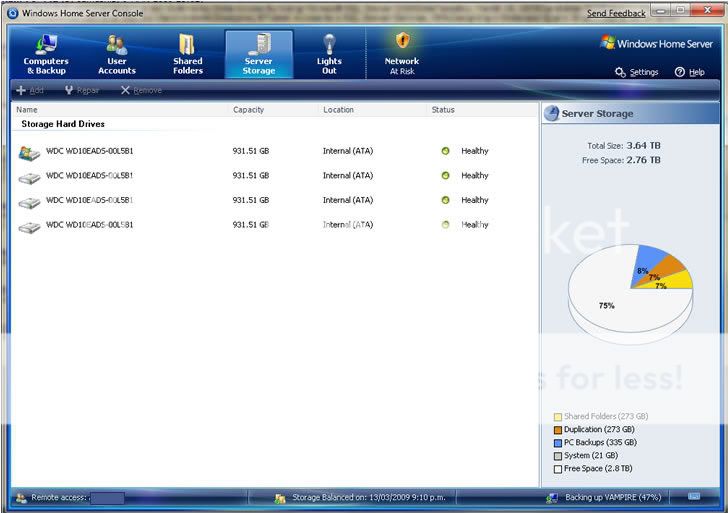
I am running a P4 HT desktop, 2.5GB RAM, two interal 160GB HDD and lots of external Seagate USB drives.

I like external drives because it's easy to manage in terms of adding/removing. Yesterday I've added another 1TB drive to the system and might start replacing all those 500GB drives with new 1TB drives.

Here's a screenshot (please keep size down if posting screenshots!)


Referral links: Quic Broadband (free setup code: R587125ERQ6VE) | Samsung | AliExpress | Wise | Sharesies 


Support Geekzone by subscribing (browse ads-free), or making a one-off or recurring donation through PressPatron.


Create new topic
gehenna
8667 posts

Uber Geek
+1 received by user: 3883

Moderator
Trusted
Lifetime subscriber

  #194505 6-Feb-2009 18:14
Send private message


I've only set up one folder to replicate for now, will do the rest over the weekend but have finally finished installing all drives and moving all data onto the server.  What a mission!


freitasm

BDFL - Memuneh
80646 posts

Uber Geek
+1 received by user: 41029

Administrator
ID Verified
Trusted
Geekzone
Lifetime subscriber

#194767 8-Feb-2009 19:04
Send private message

Come on... I am sure there are more Windows Home Server users here?

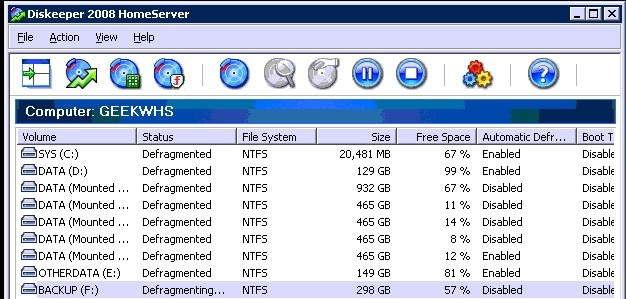
I am using Diskeeeper WHS and love to see that data nicely ordered:


Referral links: Quic Broadband (free setup code: R587125ERQ6VE) | Samsung | AliExpress | Wise | Sharesies 


Support Geekzone by subscribing (browse ads-free), or making a one-off or recurring donation through PressPatron.


DjShadow
4222 posts

Uber Geek
+1 received by user: 1322

ID Verified
Trusted
Subscriber

#194771 8-Feb-2009 19:27
Send private message

gonna play devils advocate here but have you got enough data to fill that much disk space? :)


freitasm

BDFL - Memuneh
80646 posts

Uber Geek
+1 received by user: 41029

Administrator
ID Verified
Trusted
Geekzone
Lifetime subscriber

#194775 8-Feb-2009 19:52
Send private message

Look at the "Free Space" column. Of course I speak for myself, not gehenna...


Referral links: Quic Broadband (free setup code: R587125ERQ6VE) | Samsung | AliExpress | Wise | Sharesies 


Support Geekzone by subscribing (browse ads-free), or making a one-off or recurring donation through PressPatron.


CYaBro
4708 posts

Uber Geek
+1 received by user: 1182

ID Verified
Trusted

  #194780 8-Feb-2009 20:00
Send private message

I have a copy of WHS (part of the MS Action Pack) but just haven't got around to installing it on a machine.
I used have a WHS but decided a NAS device was all I needed at the time.


Opinions are my own and not the views of my employer.


gehenna
8667 posts

Uber Geek
+1 received by user: 3883

Moderator
Trusted
Lifetime subscriber

  #194781 8-Feb-2009 20:02
Send private message


I've got replication running now, and have backed up a couple of computers so the space has rapidly diminished :)  Still, I'm happy to have near enough to a terabyte left having moved all my data to the WHS and replicated it for redundancy.  So to answer DjShadow - Yep I do :)


Support Geekzone with one-off or recurring donations Donate via PressPatron.
fastmikey
296 posts

Ultimate Geek
+1 received by user: 12

ID Verified

  #194974 9-Feb-2009 20:07
Send private message

At some point, once funds allow, this will get a rebuild...

This is my old desktop from a few years back, in a nice huge case with lots of space for more disks:

 - Athlon 1800+
 - 512MB RAM
 - 1x Seagate 7200.11 (doh for the firmware bug!) 500GB disk
 - 1x Hitachi 320GB disk
 - 1x Seagate 7200.10 320GB disk

Capture

In the not to distant future I intend on replacing the motherboard with a low end Athlon 64 (for 64 bit compatibility, needed for WHS 2), and 2GB of RAM - just built a WHS box for someone else with these specs and it flies with little power draw. Am just slowly increasing the disk as required (just added the 500GB disk and now I can enable more duplication!)

CYaBro
4708 posts

Uber Geek
+1 received by user: 1182

ID Verified
Trusted

  #194984 9-Feb-2009 20:50
Send private message

Any of you WHS users running the MediaPortal TVServer on it?
Is it even possible?
Don't need to be able to watch TV on it as we use a client for this.

If I could do that then I would be able to get rid of my TVServer PC, put the 400GB from this, and my two 750GB HDDs from the NAS into it as well, making a nice all-in-one unit to store all data, backups, TV recordings etc.


Opinions are my own and not the views of my employer.


browned
636 posts

Ultimate Geek
+1 received by user: 36


  #198727 2-Mar-2009 11:27
Send private message


Signature has most details about the home server, although some storage changes have been made recently.

Q6600, 4GB Ram. + VMware Server 2 running 4 plus VM's most of the time.


Cheers
db
p.s. Sorry if the pic is big.


Home Server: AMD Threadripper 1950X, 64GB, 56TB HDD, Define R6 Case, 10GbE, ESXi 6.7, UNRAID, NextPVR, Emby Server, Plex Server.
Lounge Media Center: NVIDIA Shield TV 16GB: Kodi18 with Titan MOD, Emby.
Kids Media Center: NVIDIA Shield TV 16GB: Kodi18 with Titan MOD, Emby.
Main PC: Ryzen 7 2700, 16GB RAM, RX 570, 2 x 24"


BartManGeek
187 posts

Master Geek


  #198763 2-Mar-2009 13:45
Send private message

I secured a LaCie Gigabit Ethernet 1TB and intalled Windows Home Server on it - after bumping the RAM to 1GB.


Now to add a USB HDD for server backups and all will be sweet!


Rural Geek - Technology Solutions

"On two occasions I have been asked [by members of Parliament!], 'Pray, Mr. Babbage, if you put into the machine wrong figures, will the right answers come out?' I am not able rightly to apprehend the kind of confusion of ideas that could provoke such a question." -- Charles Babbage

Lipex666
445 posts

Ultimate Geek
+1 received by user: 8

Trusted

  #200915 12-Mar-2009 22:07
Send private message

Finally got my Windows Home Server up and running.  Smile

Just got to move stuff off 4 machines and a lappy to the shared folders, sort duplicates of all our music and vids phew what a task.  Machine still doing first backups so showing lots of spare space for the moment.

Tversity is streaming to my good old DSM320 and just installed LightsOut.


PC Gear Computer System
Intel Core 2 Duo E5200 2.5GHz 800MHz FSB 2MB Cache
Adata 2GB DDR2-800 memory
Gigabyte GA-G31M-S2L board
GLI N226 Black case with GLI 500w PSU
ASUS DRW-2014L1 IDE
4 x WD 1TB 16MB Int SATA2 Green Power - WD2157

Photobucket


"The only way to learn some- thing is to do it"


Want to support Geekzone and browse the site without the ads? Subscribe to Geekzone now (monthly, annual and lifetime options).
ddustin
52 posts

Master Geek
+1 received by user: 1

Trusted

  #201141 13-Mar-2009 23:55
Send private message

You know what's really sad about several of the posts in this thread?  Multi-terabyte drive arrays with greater than 50% space available.  What the point of having the space if you don't use it?

My TV "drive' is 1TB, and currently has 100GB free.  My 3TB Films drive has 191 MB (yes, Metabyte) free.
I'm not runnign WHS due to limitations with regards to my requirements at home, so I'm not posting screenshots


PS:  I'm in the market for some high capicity drives at low cost :-)

CYaBro
4708 posts

Uber Geek
+1 received by user: 1182

ID Verified
Trusted

  #217211 23-May-2009 13:28
Send private message

Well I finally got around to building our WHS again!
Nothing flash, just made up of parts from old machines that it replaced. (A TV Server and NAS)

AMD Athlon64 3400+ - Socket 754
MSI Mainboard with SATA & GB LAN
2GB DDR-400 RAM
1x WD 160GB IDE - Not sure why I bothered with this drive, it just seemed a waste to leave it out.
1x Seagate 400GB SATA - This is a dedicated drive for Mediaportal timeshifting and recorded TV (Not added to WHS storage pool)
2x Seagate 1TB SATA - Photos, music, movies etc and backup data from other machines, which I have yet to set up
2x Nova-S-Plus DVB-S cards for Freeview via Sat - No HD here :(
400W Enermax PSU
128MB AGP card
PCI SATA Card - Needed as the mainboard only has 2 SATA ports

Mediaportal TV Server installed and working great so far, the client is an Asus Eee Box (connected to lounge TV) and our laptops.

WHS


Opinions are my own and not the views of my employer.


paul151
313 posts

Ultimate Geek
+1 received by user: 45

Trusted

  #217228 23-May-2009 15:19
Send private message

CYaBro: Well I finally got around to building our WHS again!
Nothing flash, just made up of parts from old machines that it replaced. (A TV Server and NAS)


Nice... welcome to the clan...you will find the WHS a very useful addition to your network.


Quic "Sprinter" UFB - Ref (free setup): R338237EFDIUJ


Agency BBS | fsxNet | Agency News | Total FM


davidcole
6099 posts

Uber Geek
+1 received by user: 1465

Trusted

  #217325 23-May-2009 21:22
Send private message

I would show a picture of my storage, but whoppity do thats not the important bit. The important but is the 4vm I have on there.

A linux server for squid proxy, squeeze center (running the music off WHS)
A Windows 7 VM for day to day use
A Windows 7 Vm for video processing (not always running)
A Windows 2003 Server for windows Server stuff (haven't found a use for it)
A Windows Home Server test machine, for buggering around with.


Previously known as psycik

Home Assistant: Gigabyte AMD A8 Brix, Home Assistant with Aeotech ZWave Controller, Raspberry PI, Wemos D1 Mini, Zwave, Shelly Humidity and Temperature sensors
Media:Chromecast v2, ATV4 4k, ATV4, HDHomeRun Dual
Server
Host Plex Server 3x3TB, 4x4TB using MergerFS, Samsung 850 evo 512 GB SSD, Proxmox Server with 1xW10, 2xUbuntu 22.04 LTS, Backblaze Backups, usenetprime.com fastmail.com Sharesies Trakt.TV Sharesight 


Create new topic


Geekzone Live »

Try automatic live updates from Geekzone directly in your browser, without refreshing the page, with Geekzone Live now.


Are you subscribed to our RSS feed? You can download the latest headlines and summaries from our stories directly to your computer or smartphone by using a feed reader.