Geekzone: technology news, blogs, forums
Guest
Welcome Guest.
You haven't logged in yet. If you don't have an account you can register now.


rossmcm

111 posts

Master Geek
+1 received by user: 11


#311526 24-Jan-2024 15:11

I bought a Crucial 1TB SSD MX500 and downloaded the recommended Acronis cloning software.  I accepted all the recommended defaults and the clone of the 1TB drive to the SSD went without a hitch, but after fitting the SSD in place of the HDD the P50 doesn't boot.


The first time it reported error 0xC0000225 and suggested I let it perform an automatic repair.  I did so, and ever since then, when I boot it reports it is trying to repair the PC and then gives up.


Diskpart reports the partitions on the original HDD as:
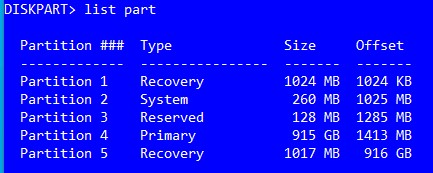


and on the SSD as:
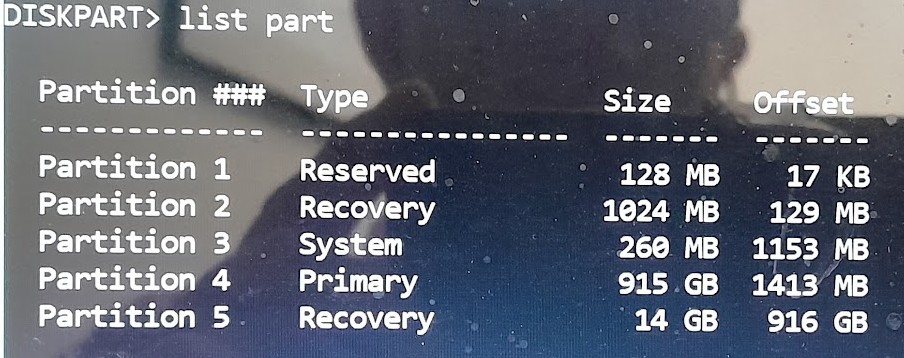


so it does seem to have messed with these during the clone.


I guess the next step is to rinse and repeat, possibly using Macrium instead, but any advice is appreciated.



Create new topic
Andib
1396 posts

Uber Geek
+1 received by user: 974

ID Verified
Trusted

  #3185907 24-Jan-2024 15:31
Send private message

I would create a windows bootable usb (https://support.microsoft.com/en-us/windows/create-installation-media-for-windows-99a58364-8c02-206f-aa6f-40c3b507420d) 
Boot from this and then select "Repair your computer". This should hopefully find your Windows install and fix what's broken. If that doesn't work I would re clone your drive. Personally, I've had a good run using Clonezilla but they're all much the same these days. Macrium is a good tool but I haven't had experience with it.


<# 
       .DISCLAIMER
       Anything I post is my own and not the views of my past/present/future employer.
#>


rossmcm

111 posts

Master Geek
+1 received by user: 11


  #3185914 24-Jan-2024 15:56

Thanks for the response. 


I was able to boot to a command prompt and tried


bootsec /rebuildbcd


but it failed to find any windows installation on the laptop.  The SSD contains the cloned windows installation, but the SSD is mapped as d: rather than c: for some reason.


I really want to avoid a reinstall of my applications if possible.  I might try Macrium instead.


rossmcm

111 posts

Master Geek
+1 received by user: 11


  #3190246 4-Feb-2024 11:40

Weird.  I re-cloned using macrium reflect again, but this time made sure that the destination partition arrangement was identical to the disk I was cloning from.  Clone of 1 TB took 4 hours and the SSD booted fine when swapped in.


Create new topic


Geekzone Live »

Try automatic live updates from Geekzone directly in your browser, without refreshing the page, with Geekzone Live now.


Are you subscribed to our RSS feed? You can download the latest headlines and summaries from our stories directly to your computer or smartphone by using a feed reader.