Geekzone: technology news, blogs, forums
Guest
Welcome Guest.
You haven't logged in yet. If you don't have an account you can register now.


allan

2073 posts

Uber Geek
+1 received by user: 899

ID Verified
Lifetime subscriber

#319771 31-May-2025 20:15
Send private message

Trying to assist a friend set up a new laptop and can't get past the Google security prompts when she tries to log into her Google/Gmail account. The primary issue is that she no longer uses a mobile phone, but in her Google account, her "Google Prompt" and "Recovery Phone" are still set to that mobile phone number 🙁


She still has her old laptop and she is still logged in on that and has access to her Gmail and Google account details there. I can see that she doesn't actually have 2FA turned on.


However, when attempting to log into her Google Account on her new laptop, it is of course wanting verification (text or phone call) on the phone that she no longer has. Simple I think, I'll just get her to use the "Use another phone or computer to finish signing in" - which then instructs you to go to https://go.co/verifyaccount on the phone/computer you are already signed in on - which then wants to verify via her mobile phone or "another phone or computer" and round in circles we go.


She has actually has had her Google recovery email address set to mine for some years, but I can't figure a way to tell her how to trigger the recovery email address, rather than a phone. I don't want to force her through a complete account recovery because it doesn't need that.


Anyone have any ideas? Am I missing something obvious?


Create new topic
mattwnz
20515 posts

Uber Geek
+1 received by user: 4795


  #3379510 31-May-2025 20:23
Send private message

Email Google support or phone them….  But maybe impossible


But yes I know what you mean and the problem you have got and don’t have any other solution. It is why I don’t get rid of old devices. 


richms
29097 posts

Uber Geek
+1 received by user: 10206

Trusted
Lifetime subscriber

  #3379519 31-May-2025 23:18
Send private message

This is unfortunalty all too common with google, and why I end up having to keep so many damn sim cards alive just because they will not let go of a phone number.


The one I set up when in AU to be able to get AU apps on the phone was a prick to get back into because it had the tempory number I was using when I was over there as the one used when I set it up, but thru some miracle after about 2 weeks it suddenly decided to let me use the recovery email address. The most annoying thing was I had not forgotten the password, it just randomly decided it wanted to SMS me to get into it.


Richard rich.ms

Asteros
363 posts

Ultimate Geek
+1 received by user: 189


  #3379642 1-Jun-2025 11:22
Send private message

I had this situation once. If I remember correctly, via the logged in device I deleted the phone number by clicking through to the Google account. I then added a new 2 factor authentication via an authentication app. You already have a recovery email setup so this shouldn't be necessary.


K8Toledo
1018 posts

Uber Geek
+1 received by user: 311


  #3379710 2-Jun-2025 05:19
Send private message

allan:


Trying to assist a friend set up a new laptop and can't get past the Google security prompts when she tries to log into her Google/Gmail account. The primary issue is that she no longer uses a mobile phone, but in her Google account, her "Google Prompt" and "Recovery Phone" are still set to that mobile phone number 🙁


She still has her old laptop and she is still logged in on that and has access to her Gmail and Google account details there. I can see that she doesn't actually have 2FA turned on.


However, when attempting to log into her Google Account on her new laptop, it is of course wanting verification (text or phone call) on the phone that she no longer has. Simple I think, I'll just get her to use the "Use another phone or computer to finish signing in" - which then instructs you to go to https://go.co/verifyaccount on the phone/computer you are already signed in on - which then wants to verify via her mobile phone or "another phone or computer" and round in circles we go.


She has actually has had her Google recovery email address set to mine for some years, but I can't figure a way to tell her how to trigger the recovery email address, rather than a phone. I don't want to force her through a complete account recovery because it doesn't need that.


Anyone have any ideas? Am I missing something obvious?


*Edit.....ur issue may be different...:)


I experienced a similar issue last week where the client on his PC was required to check his phone every gmail login, his wife's phone was to blame 


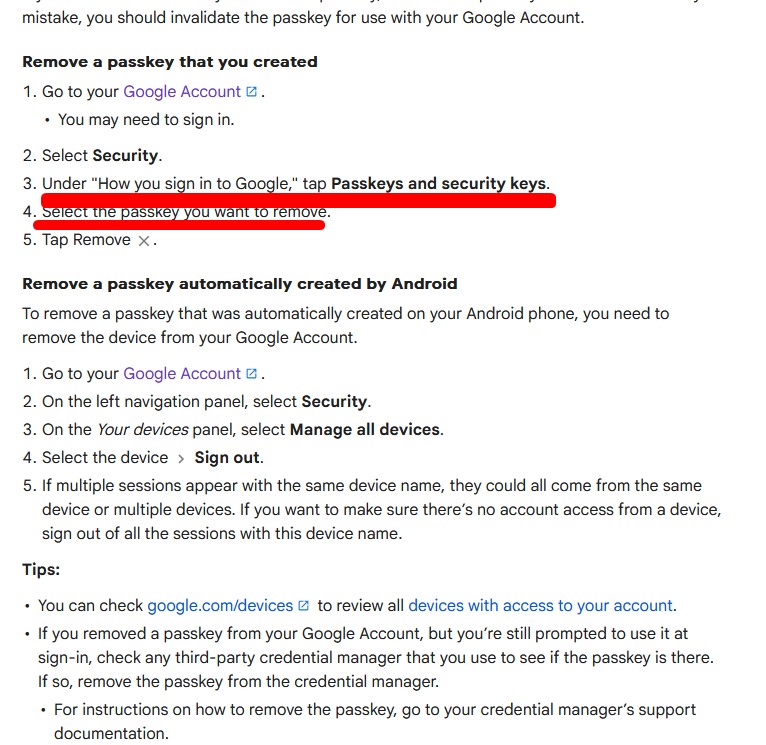
This is how I fixed it, removed passkey:


Create new topic


Geekzone Live »

Try automatic live updates from Geekzone directly in your browser, without refreshing the page, with Geekzone Live now.


Are you subscribed to our RSS feed? You can download the latest headlines and summaries from our stories directly to your computer or smartphone by using a feed reader.