Geekzone: technology news, blogs, forums
Guest
Welcome Guest.
You haven't logged in yet. If you don't have an account you can register now.


ShortyNZ

53 posts

Master Geek
+1 received by user: 6


#320319 31-Jul-2025 13:15
Send private message

Hi everyone


I am no expert, but I sometimes help my friend (who is 85, but pretty computer literate) with the odd thing she can’t figure out.


Earlier in the year, she reluctantly told me that she asked someone who was staying with her to “delete OneDrive” for her.  The result was that she could no longer find any trace of Outlook, and had been without it for a couple of months.  She had access to email via Spark/Xtra webmail, but she had a lot of historic email stored in personal folders on Outlook, so was mainly upset about that.


I managed to fix it easily enough; I found all the Outlook folders (as well as lots of other stuff she hadn’t intended to be deleted) in the Recycle Bin and just restored it all and everything worked fine again.


Recently, she asked me about (again) deleting OneDrive, as, although I had changed her settings to not default-save to OneDrive and to not backup to OneDrive, her documents still seemed to be going there.  She kept getting pop-ups asking her whether she wanted to share these files, which bothered her, as she didn’t really want anything in the cloud.  (I haven’t seen the pop-ups, so am not sure where they originate).


So my answer to this (rightly or wrongly) was to move her files and folders from OneDrive to C: or D: drives (she has an HP desktop PC like mine, which have a much bigger D: drive than C:), in the first instance.


Imagine my horror when I found this had created the same situation as before, and Outlook was then nowhere to be found/couldn't be opened.


Her Outlook data file had obviously been on OneDrive and I had moved it to C:, so I then copied that file back to OneDrive.


Her Outlook was restored intact (phew) BUT her send/receive function now returns an error message of:  “(0X8004010F): Outlook data file cannot be accessed”.


My Google searches seem to indicate that I should create a new profile for her, but I’m too scared to in case it messes with her saved historic email folders.


I will pay someone to fix it remotely online if I need to soon, but I thought I might try here first.  I am not super technically competent (probably obviousπŸ˜‰) so plain-ish language would be helpful πŸ˜‰ I know this reads like a comedy of errors, and I'll just have to suck that up πŸ˜‰


She lives a 15 minute drive away, so I’m afraid I don’t have the ability to give info off her PC on the spot, so to speak.  She is on Windows 11.


 Many thanks.


Filter this topic showing only the reply marked as answer Create new topic
freitasm
BDFL - Memuneh
80652 posts

Uber Geek
+1 received by user: 41038

Administrator
ID Verified
Trusted
Geekzone
Lifetime subscriber

  #3398701 31-Jul-2025 13:21
Send private message

You can have the Outlook files anywhere, but need to fix the location using the Control Panel | Mail applet.

Having said that, does she have any backup of these files at all? Because if you move out of OneDrive and the drive dies (or malware destroy the files), then she won't ever recover that again.


Referral links: Quic Broadband (free setup code: R587125ERQ6VE) | Samsung | AliExpress | Wise | Sharesies 


Support Geekzone by subscribing (browse ads-free), or making a one-off or recurring donation through PressPatron.


ShortyNZ

53 posts

Master Geek
+1 received by user: 6


  #3398705 31-Jul-2025 13:34
Send private message

Thanks.  I did check where it was pointing in the Control Panel/Email settiings and it seemed to be correct (after I moved it back to OneDrive).  But it just won't send/receive.


And yes, I did make a backup of it all before I started.  I'm just not sure if I'll know how to restore it from a backup if I mess it up with a new profile.


xpd

xpd
Geek of Coastguard
14116 posts

Uber Geek
+1 received by user: 4578

Retired Mod
ID Verified
Trusted
Lifetime subscriber

  #3398724 31-Jul-2025 14:44
Send private message

This is what I'd do... others may have different methods


If emails she wants to keep are currently showing in Outlook, best thing to do, is export the current mailbox to a PST (File -> Open & Export).


Save this to the C drive somewhere (C:\Backup\(filename.pst) other than the Documents / One Drive folders. Any emails in Outlook, are now backed up to a file no longer attached to Outlook.


If she does not use/need OneDrive, uninstall it.


Then go into Control Panel and go into Mail. Remove all profiles.


Then add a fresh one. Once added, it will download any mail on their server (Spark).


Then you can import or open the PST holding the "old" mail structure, and manipulate the emails as you want - move to the "new" Inbox or just keep as a separate PST. 


Moving them to the "new" Inbox is probably the better option if she does not have any backup system, as then at least theyre all held on Sparks server.


One system I do recommend to users who are not confident with PC's but want a backup system, is Backblaze. Its around $80 a year, and you install an agent on the PC, and it sits there backing up almost the entire PC all the time, so if anything is lost, you have a decent time window to get into Backblaze to recover it. But note, this is not per email, but per file - so if an email was deleted that was needed, you'd need to download the PST/OST file from Backblaze and attach it to Outlook as a folder to pull out the deleted emails.


XPD / Gavin


LinkTree


MadEngineer
4591 posts

Uber Geek
+1 received by user: 2570

Trusted

  #3398741 31-Jul-2025 15:25
Send private message

Possibly clicking one of the nags that Windows11 keeps providing for backups etc promoting OneDrive? 


including what happens with certain windows updates. 


You're not on Atlantis anymore, Duncan Idaho.

ShortyNZ

53 posts

Master Geek
+1 received by user: 6


  #3398746 31-Jul-2025 15:32
Send private message

Thank you.  That does sound a safer way of doing it if it needs a new profile.  She has alot of personal folders that must only be saved locally on her pc (I know she can't access them via webmail) but I don't suppose it would matter if they ended up on Sparks server (she hasn't done it that way specifically for privacy or anything; I think it's just the way she's filed them).  I'm not 100% confident about setting up a new profile, but my husband and I can often nut it out between us and these instructions should help.  Thanks again 😊


gabba
87 posts

Master Geek
+1 received by user: 16

Trusted

  #3398873 31-Jul-2025 18:17
Send private message

I've just had to do this - well sorta. After being unable to open outlook due to a number of weird error messages, I finally figured out that my profile was corrupt, but I learnt a bit of helpful stuff along the way!


Unfortunately you can't just copy the files and expect Outlook to figure that out, so there are a few things you need to do. If the outlook files are in .oft format (ie the extension is .oft) then you won't be able to use those files under a new profile.  They only work with the profile they are assigned to. In my case the profile was corrupt so I couldn't use the move tool.


If you need the data in those files you can convert them to .pst files and then can acess them if you need to. BUT if the email accounts are all IMAP accounts, the emails should still be on the server


If you can't use the move tool (search control panel, then search for mail in the control panel, and open Mail (Microsoft Outlook)), then here's another way to do it assuming you have IMAP accounts


https://learn.microsoft.com/en-us/troubleshoot/outlook/data-files/cannot-change-the-location-of-ost-file


I ended up  doing method 2 to set the default location to D:, restarting outlook, then doing method 1 to create a new profile. Then added all my email accounts to the new profile. All my accounts are IMAP so everything was just downloaded again.


As always take a backup of the original .ost files in case you need them later


Hope that helps! 


Want to support Geekzone and browse the site without the ads? Subscribe to Geekzone now (monthly, annual and lifetime options).
ANglEAUT
altered-ego
2436 posts

Uber Geek
+1 received by user: 842

Trusted
Lifetime subscriber

  #3398881 31-Jul-2025 18:55
Send private message

Happy to help remotely if required.


  1. Make sure your .pst / .ost / .oft files are not located in C:\Users\<username>\OneDrive.
  2. Move other user documents (.doc, .xls, *.pdf) out of the OneDrive folder & Out of 'My Documents'. OneDrive have a habit of moving 'My Documents' into the OneDrive folder.


  3. Use something like Christ Titus Tech WinUtil or CrapFixer or Winhance to help you FULLY remove OneDrive
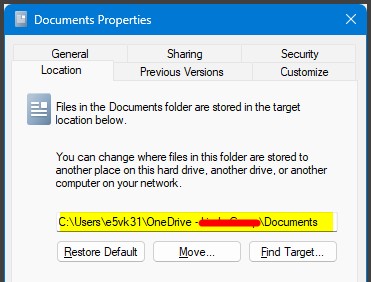
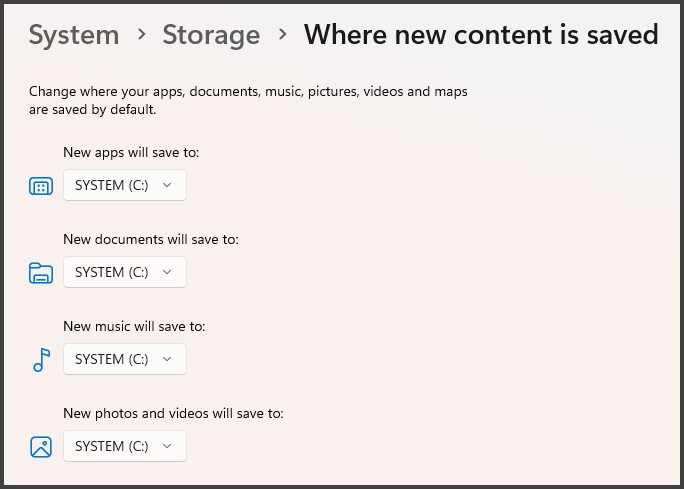
  4. Set document locations to sane standards. See point 2 & the 'Location' tab for the actual location of the Documents, Pictures, Music folders. Same goes for Storage in Settings
  5. Set a standard shortcut that points to sane Document folder at various locations such as on the Desktop, Downloads folder, etc. If the shortcut is used, that helps keep files in the right place going forward. It also helps to make the icon memorable. "If your files are not saved inside this icon, ..."


Please keep this GZ community vibrant by contributing in a constructive & respectful manner.


MadEngineer
4591 posts

Uber Geek
+1 received by user: 2570

Trusted

  #3398882 31-Jul-2025 18:58
Send private message

^I've seen that happen once on someone's machine, curious to know how.


You're not on Atlantis anymore, Duncan Idaho.

ShortyNZ

53 posts

Master Geek
+1 received by user: 6


  #3398927 31-Jul-2025 22:06
Send private message

Thanks very much for the suggestions on how to manage this - and I appreciate you've all made them easy to follow!


I am going to go back to her computer armed with it all and see how I get on.


Thanks again πŸ™‚


ANglEAUT
altered-ego
2436 posts

Uber Geek
+1 received by user: 842

Trusted
Lifetime subscriber

  #3399033 1-Aug-2025 10:57
Send private message

MadEngineer:


^I've seen that happen once on someone's machine, curious to know how.


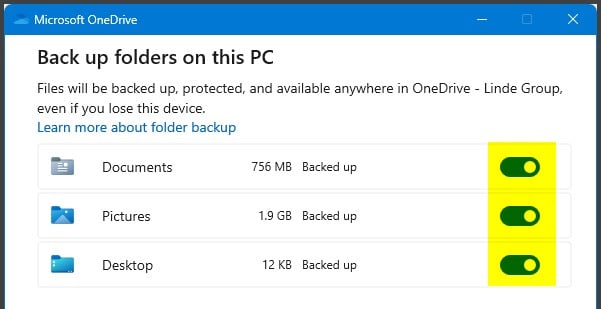
If you are referring to '2. ... OneDrive have a habit of moving 'My Documents' into the OneDrive folder', then this is the culprit: Back up your folders with OneDrive


OneDrive basically clicks the middle 'Move' button in my previous screenshot & those folder are moved from 'C:\Users\<username>\[Documents|Pictures|Desktop]' to 'C:\Users\<username>\OneDrive\[Documents|Pictures|Desktop]'


What's really annoying is if you enable that feature after using the PC for a while, all of your recently used document shortcuts break.


Please keep this GZ community vibrant by contributing in a constructive & respectful manner.


MadEngineer
4591 posts

Uber Geek
+1 received by user: 2570

Trusted

  #3399060 1-Aug-2025 13:17
Send private message

I'm talking one out of hundreds of people I've helped with setting up both OneDrive and Outlook.  Maybe it's a timing thing if they set up their Outlook before or after setting up OneDrive, or like you say if they've set everything up except that, then turn on "backup" later.  I'll have to do more checking.


You're not on Atlantis anymore, Duncan Idaho.


Shop now at Mighty Ape (affiliate link).
ShortyNZ

53 posts

Master Geek
+1 received by user: 6


  #3418541 24-Sep-2025 17:02
Send private message

I just wanted to come back with an update on what happened, by way of thanking you for your answers.


In the end, I DID use a paid techy person to help me, as I ended up feeling out of my depth.


He was very good and I think the best description of what he did was what xpd had outlined - he created a fresh profile, backed it up to her Spark web account, then sucked it all back from there into her fresh profile.


I possibly could have done this myself to that point, but to make it actually send/receive again, he had to mess around a fair bit with her POP3 settngs and I think port settings (which I can't seem to find now in order to describe it better).


He also completely removed OneDrive.


Thanks for all your help, which was helpful and quite educational for me πŸ˜‰ It also meant that when he was remotely fixing it all for me, I could more or less follow/understand what he was doing.


Filter this topic showing only the reply marked as answer Create new topic


Geekzone Live »

Try automatic live updates from Geekzone directly in your browser, without refreshing the page, with Geekzone Live now.


Are you subscribed to our RSS feed? You can download the latest headlines and summaries from our stories directly to your computer or smartphone by using a feed reader.