Geekzone: technology news, blogs, forums
Guest
Welcome Guest.
You haven't logged in yet. If you don't have an account you can register now.


Spirax

72 posts

Master Geek
+1 received by user: 7


#323054 20-Oct-2025 14:59
Send private message

For some reason there are a bunch of e-mails that will not delete.  Under All Mail I select a group of mail from the AA for example, do Shft/Delete, confirm deletion.  Go to Trash, delete the same mail.  Go back to All Mail and the files have reappeared.  I have checked Tbird for an answer but no help there.  Can anyone break this loop?


Thank you


View this topic in a long page with up to 500 replies per page Create new topic
 1 | 2
timmmay
20858 posts

Uber Geek
+1 received by user: 5350

Trusted
Lifetime subscriber

  #3426807 20-Oct-2025 20:15
Send private message

You have to delete them using the web interface, at least last time I checked. Thunderbird delete puts them into a folder called Trash or something, rather than Deleted Items. I probably have the names completely wrong but that's the general idea.


KiwiSurfer
1722 posts

Uber Geek
+1 received by user: 993

ID Verified
Lifetime subscriber

  #3426866 20-Oct-2025 22:32
Send private message

Last time I dealt with this, this was a known issue with the Gmail IMAP implementation. Didn't matter which IMAP client I used, there were certain emails (around 1 in every 1,000 or so) that would only delete via the web interface. The other 999 would delete fine via IMAP the usual way etc -- just not the odd one out. Played quite a bit of havoc when I migrated from Gmail to another IMAP server and is one reaosn I would never ever go back to Gmail. They really don't care about IMAP given they expect everyone to use the Gmail app/website.


rhy7s
673 posts

Ultimate Geek
+1 received by user: 147


Spirax

72 posts

Master Geek
+1 received by user: 7


  #3427027 21-Oct-2025 15:16
Send private message

Thanks rhy7s - how do I install it?


rhy7s
673 posts

Ultimate Geek
+1 received by user: 147


  #3427031 21-Oct-2025 15:47
Send private message

Settings > Add-ons and themes > Search for gbin in the "Find more add-ons field" > "Add to Thunderbird"


Spirax

72 posts

Master Geek
+1 received by user: 7


  #3428190 27-Oct-2025 11:16
Send private message

rhy7s


Found GTrash, added to TBird, restarted but can't find out how to use it.  Tried deleting 55 Woolworths promos but to no avail.  Help please


Shop now for Dell laptops and other devices (affiliate link).
rhy7s
673 posts

Ultimate Geek
+1 received by user: 147


  #3428215 27-Oct-2025 13:18
Send private message

Are you using the button or Shift + Alt + Del as per https://reviewers.addons.thunderbird.net/en-gb/thunderbird/addon/gtrash/ ?


Spirax

72 posts

Master Geek
+1 received by user: 7


  #3428220 27-Oct-2025 13:39
Send private message

No button rhy7s and shift-alt-delete has no effect.


rhy7s
673 posts

Ultimate Geek
+1 received by user: 147


  #3428322 27-Oct-2025 21:19
Send private message

You don't have a button on individual messages like this:


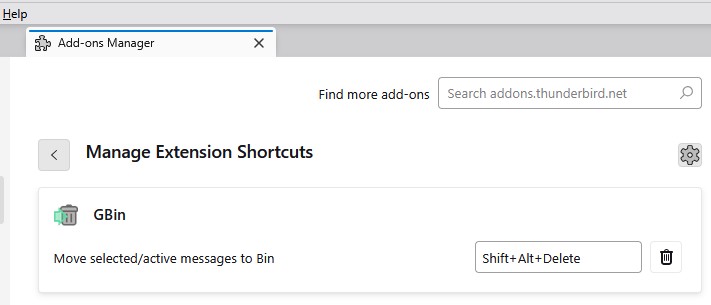
Under Tools > Add-ons and Themes > (Cog Icon) > Manage Extension Shortcuts is the following combination shown?


When selecting messages and then using the Shift+Alt+Del combination you don't see the message get marked as deleted with a strike-through and then disappear from that label and then show up in the Bin label?


Spirax

72 posts

Master Geek
+1 received by user: 7


  #3428467 28-Oct-2025 14:21
Send private message

Get to that result but no "to bin" icon.  shift/alt/delete has no effect.  I am using Win 11 if that has any relevance.


rhy7s
673 posts

Ultimate Geek
+1 received by user: 147


  #3428470 28-Oct-2025 14:27
Send private message

If you don't mind deleting messages from everywhere they exist, you could move them to Gmail's bin manually or set that as the action for delete in that account's settings.


Shop now for Dell laptops and other devices (affiliate link).
Spirax

72 posts

Master Geek
+1 received by user: 7


  #3428473 28-Oct-2025 14:36
Send private message

No, even that does not work.  Selected a number of emails, dragged them to trash, opened trash, selected all, shift/deleted.  This emptied trash but the emails reappear in the all emails folder.  Did the same with bin - same result.


Spirax

72 posts

Master Geek
+1 received by user: 7


  #3428477 28-Oct-2025 15:16
Send private message

Sorted


Went to account settings/delete/remove it immediately. Deleted 100s of unwanted emails then reset delete to "Move it to this folder...


Thanks for your input.


Metamorphic
55 posts

Master Geek
+1 received by user: 59

ID Verified

  #3428556 28-Oct-2025 18:50
Send private message

rhy7s:


Install the Gbin add-on https://reviewers.addons.thunderbird.net/en-gb/thunderbird/addon/gtrash/


This is great, thank you. I had no idea this extension existed. 


Spirax

72 posts

Master Geek
+1 received by user: 7


  #3428754 29-Oct-2025 11:31
Send private message

I spoke too soon.  When I switched on this morning all the "deleted" emails are back.  GBin does not appear, shift/alt/delete does not work and delete under account settings also does not work.  I'm at my wits end.  Any other suggestions?


 1 | 2
View this topic in a long page with up to 500 replies per page Create new topic


Geekzone Live »

Try automatic live updates from Geekzone directly in your browser, without refreshing the page, with Geekzone Live now.


Are you subscribed to our RSS feed? You can download the latest headlines and summaries from our stories directly to your computer or smartphone by using a feed reader.