Geekzone: technology news, blogs, forums
Guest
Welcome Guest.
You haven't logged in yet. If you don't have an account you can register now.


michaelmurfy

meow
13579 posts

Uber Geek
+1 received by user: 10910

Moderator
ID Verified
Trusted
Lifetime subscriber

#230346 20-Feb-2018 10:47
Send private message

I am not an Apple expert by any means however my 2009 iMac 27" is being a little dodgy (Core i7, 16gb ram) - it freezes with this graphics glitch where the mouse still works (the mouse goes on top of everything). I can still SSH into the iMac however rebooting / shutting it down via SSH doesn't do anything. The kernel logs show the following:


bash-3.2# dmesg | tail
Sandbox: Microsoft Word(1914) deny(1) nvram-get BSD Name
Sandbox: storeuid(1918) deny(1) file-read-data /private/var/db/mds/messages/502/se_SecurityMessages
Sandbox: Microsoft Word(1914) deny(1) mach-lookup com.apple.decalog4.incoming
0 [Level 7] [Facility messagetracer] [com.apple.message.domain com.apple.kernel.32bit_exec] [com.apple.message.signature mdworker32,launchd,,com.apple.mdworker32] [com.apple.message.summarize YES]
Sandbox: fseventsd(53) System Policy: deny(1) file-read-metadata /private/var/folders/yf/fbtz70y124v4nldn2vvk1cbm0000gp/0/com.apple.LaunchServices.dv
Google Chrome He[1935] triggered unnest of range 0x7fff4dc00000->0x7fff4de00000 of DYLD shared region in VM map 0x2cb94c987ed952d9. While not abnormal for debuggers, this increases system memory footprint until the target exits.
Mail[1892] Unable to quarantine: 1
Google Chrome He[1937] triggered unnest of range 0x7fff4dc00000->0x7fff4de00000 of DYLD shared region in VM map 0x2cb94c987f1202d9. While not abnormal for debuggers, this increases system memory footprint until the target exits.
Google Chrome He[1938] triggered unnest of range 0x7fff4dc00000->0x7fff4de00000 of DYLD shared region in VM map 0x2cb94c988191fcd9. While not abnormal for debuggers, this increases system memory footprint until the target exits.


And here is a photo of the screen when it goes into this crashed state:
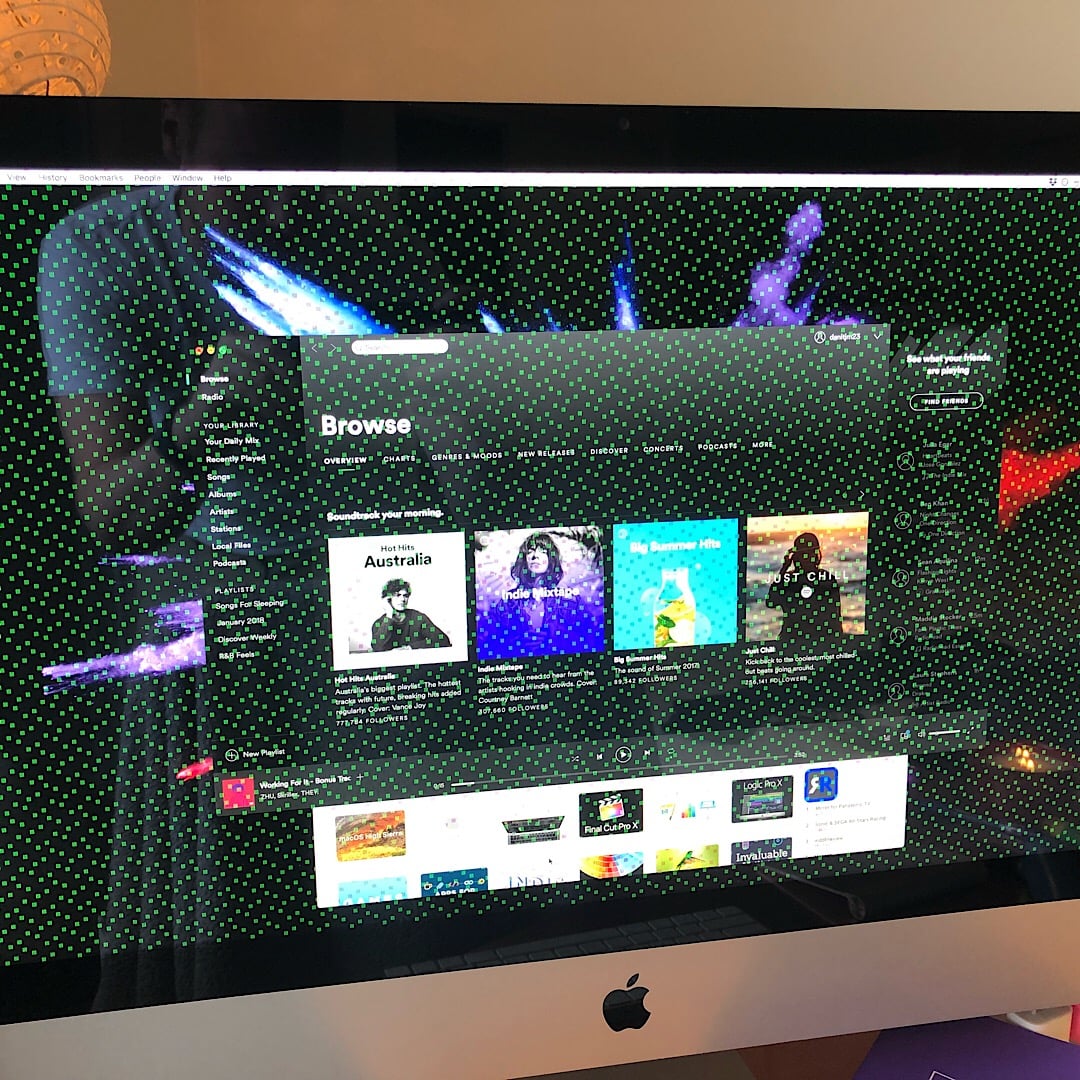


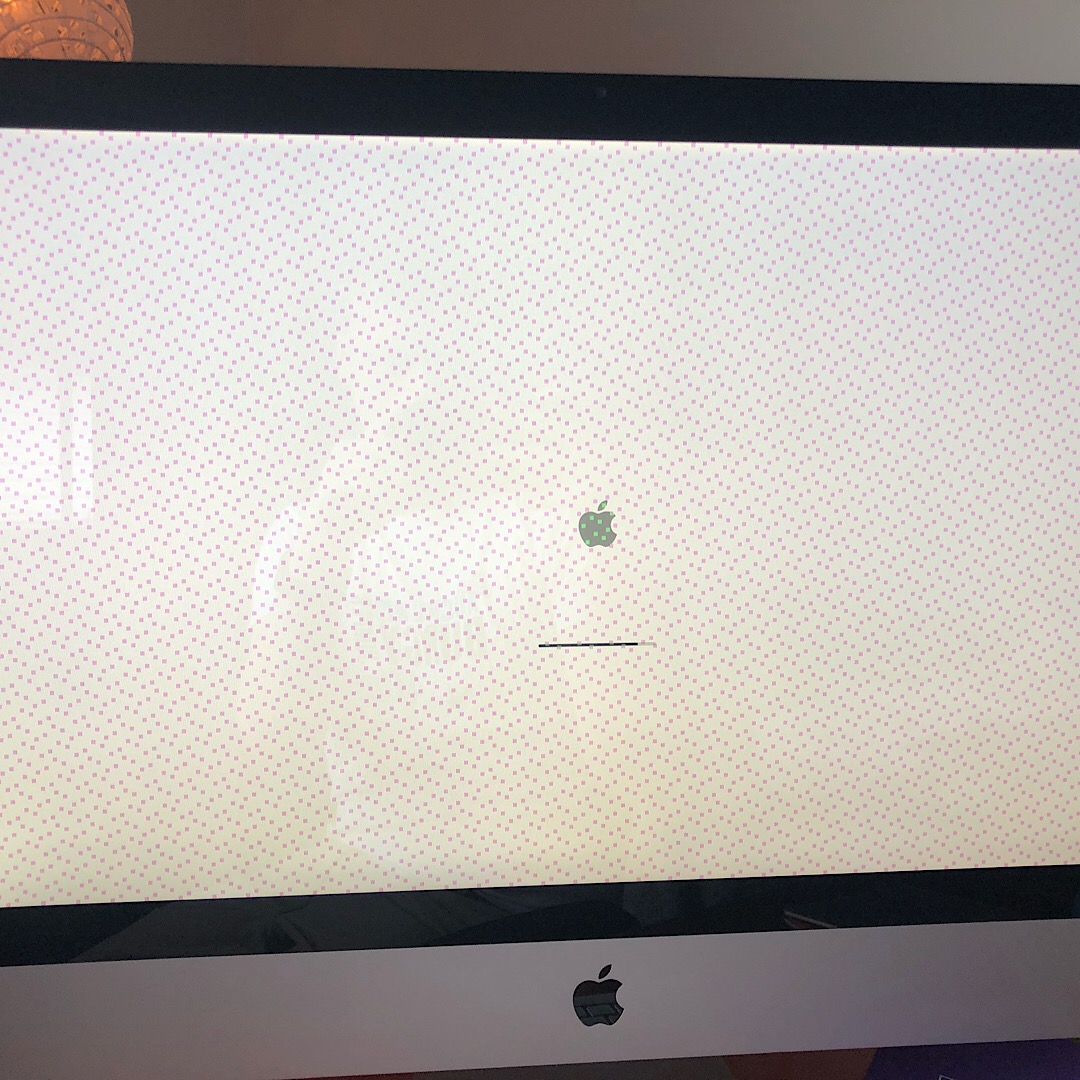
Anything I can try? I think I should just do a reinstall. Doesn't seem to be the GPU however I may be incorrect here. Been working well up until the latest OSX update.




Michael Murphy | https://murfy.nz
Referral Links: Quic Broadband (use R122101E7CV7Q for free setup)

Are you happy with what you get from Geekzone? Please consider supporting us by subscribing.
Opinions are my own and not the views of my employer.


Create new topic
Item
1739 posts

Uber Geek
+1 received by user: 726

Subscriber

  #1960838 20-Feb-2018 11:39
Send private message

Have you tried both an NVRAM and PRAM reset? Would always do this first.


If that doesn't help, could well be he VGA card is on its way out or at least overheating


.


michaelmurfy

meow
13579 posts

Uber Geek
+1 received by user: 10910

Moderator
ID Verified
Trusted
Lifetime subscriber

  #1960898 20-Feb-2018 12:04
Send private message

Yep did a NVRAM and PRAM reset a number of times.


It is now showing up during boot so appears it is the GPU. Looks like I will be taking it apart and re balling the GPU (something I really didn't want to do). It boots (responds over SSH) but can't do anything on screen.


Michael Murphy | https://murfy.nz
Referral Links: Quic Broadband (use R122101E7CV7Q for free setup)

Are you happy with what you get from Geekzone? Please consider supporting us by subscribing.
Opinions are my own and not the views of my employer.


MikeB4
MikeB4
18775 posts

Uber Geek
+1 received by user: 12766

ID Verified
Trusted
Subscriber

  #1960914 20-Feb-2018 12:28
Send private message

have you tried booting to a live Nix OS and see if the same behavior occurs? 


Here is a crazy notion, lets give peace a chance.


robertsona
176 posts

Master Geek
+1 received by user: 109

Subscriber

  #1960921 20-Feb-2018 12:42
Send private message

I have a similar model iMac, bought second hand. I soon had some weird graphics behaviour, then just a black screen. It seems that model era has a reputation for GPUs being heat affected. I found a Youtube video on pulling out and stripping the GPU, and then reflowing in the kitchen oven. It worked - for a week or so. Ended up getting a friend to do it using a "professional" reflowing oven, using a fairly intense temperature profile. I've had nil issues since.


Also, I use Macs fan Control to set temperature limits for the various components.


michaelmurfy

meow
13579 posts

Uber Geek
+1 received by user: 10910

Moderator
ID Verified
Trusted
Lifetime subscriber

  #1960933 20-Feb-2018 13:03
Send private message

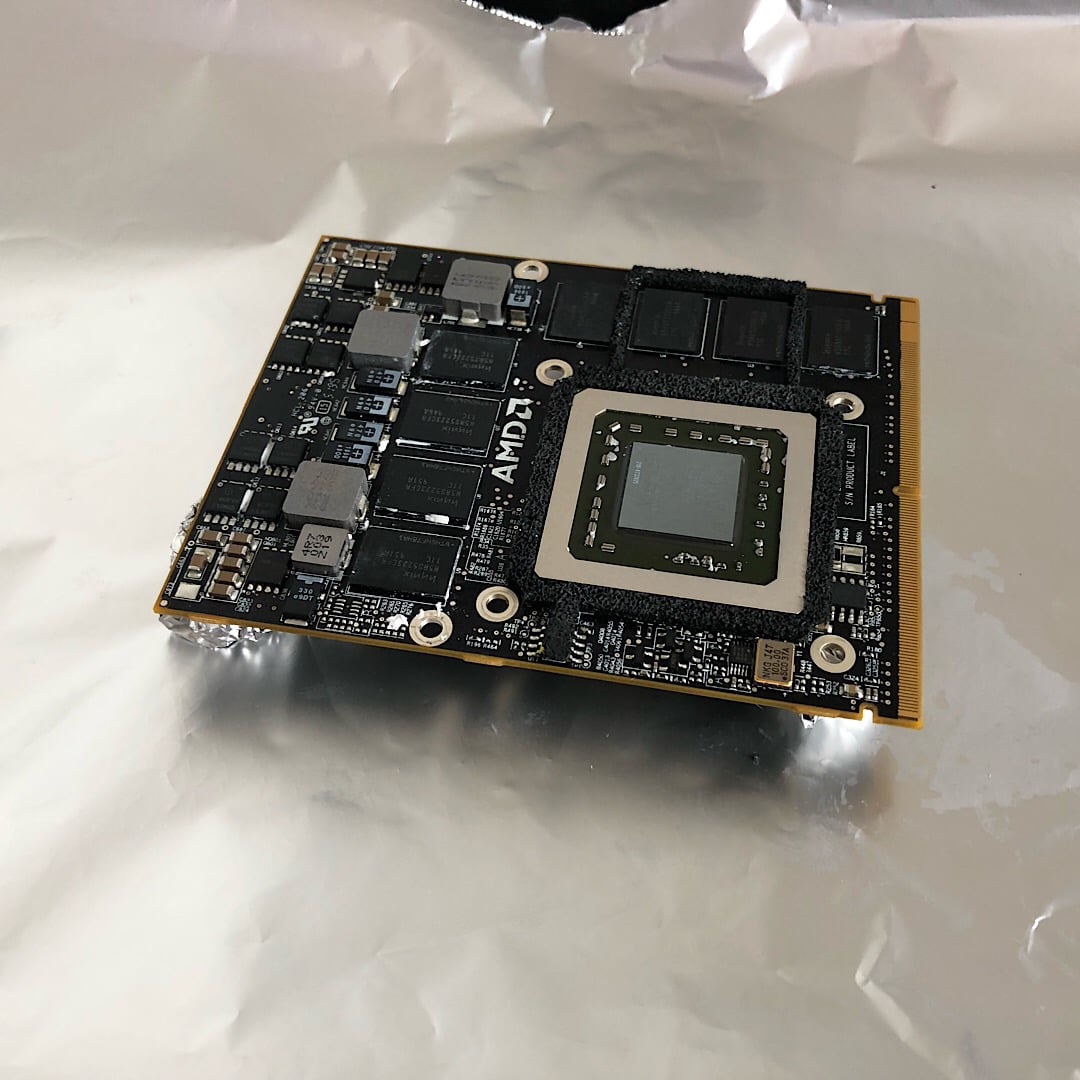
Right - so disassembled the iMac and pulled out the graphics card. Going to bake it for 10mins at 200*C. Got nothing to lose! During disassembly I found the GPU had very loose screws so it may have already been done in the past. It is a good chance to clear out the dust and re-apply thermal paste while I am at it.


Michael Murphy | https://murfy.nz
Referral Links: Quic Broadband (use R122101E7CV7Q for free setup)

Are you happy with what you get from Geekzone? Please consider supporting us by subscribing.
Opinions are my own and not the views of my employer.


michaelmurfy

meow
13579 posts

Uber Geek
+1 received by user: 10910

Moderator
ID Verified
Trusted
Lifetime subscriber

  #1960997 20-Feb-2018 14:44
Send private message

Baked the GPU for approx. 12mins at 200*C in the oven (first attempt at this) - applied new thermal paste, reassembled and behold!


Was a good afternoon project.


Michael Murphy | https://murfy.nz
Referral Links: Quic Broadband (use R122101E7CV7Q for free setup)

Are you happy with what you get from Geekzone? Please consider supporting us by subscribing.
Opinions are my own and not the views of my employer.


Shop now for Lenovo laptops and other devices (affiliate link).
wellygary
8810 posts

Uber Geek
+1 received by user: 5287


  #1961001 20-Feb-2018 14:51
Send private message

michaelmurfy:


Baked the GPU for approx. 12mins at 200*C in the oven (first attempt at this) - applied new thermal paste, reassembled and behold!


The good old oven reflow "shake'n'bake" - did something similar to a old El Gato USB TV tuner a few years ago, its been solid ever since,  


Benjip
977 posts

Ultimate Geek
+1 received by user: 524

ID Verified

  #1961003 20-Feb-2018 14:52
Send private message

And a bit of T Swift to boot!


I'm impressed. I didn't even know the GPUs were "serviceable" without destroying the iMacs (I've replaced HDDs before, that's about it).


michaelmurfy

meow
13579 posts

Uber Geek
+1 received by user: 10910

Moderator
ID Verified
Trusted
Lifetime subscriber

  #1961009 20-Feb-2018 14:59
Send private message

Benjip:


And a bit of T Swift to boot!


I'm impressed. I didn't even know the GPUs were "serviceable" without destroying the iMacs (I've replaced HDDs before, that's about it).


Got to test it somehow :)


Yes this is a 2009 iMac with a removable graphics card. It is quite tough to do (many small parts) however this iMac has had many repairs by myself - it was bought broken some time ago, had to solder a new LCD header on the motherboard (something that took over 2hrs with solder paste) along with many other small repairs in its lifetime but it is now going on to 5 years since I've had it and I've been able to repair it each time.


Is an excellent machine - I just cringe when I have to repair something internally as it is so hard to pull apart!


Michael Murphy | https://murfy.nz
Referral Links: Quic Broadband (use R122101E7CV7Q for free setup)

Are you happy with what you get from Geekzone? Please consider supporting us by subscribing.
Opinions are my own and not the views of my employer.


Create new topic


Geekzone Live »

Try automatic live updates from Geekzone directly in your browser, without refreshing the page, with Geekzone Live now.


Are you subscribed to our RSS feed? You can download the latest headlines and summaries from our stories directly to your computer or smartphone by using a feed reader.