Geekzone: technology news, blogs, forums
Guest
Welcome Guest.
You haven't logged in yet. If you don't have an account you can register now.


Hatch

816 posts

Ultimate Geek
+1 received by user: 57


#288571 8-Jul-2021 21:49
Send private message

I have outlook for IOS on my phone working for office emails and calendar. 


However I cannot get the outlook app on Mac OSX working, I get an error when trying to log into Office 365.


Is there anyway I can collect information from the IOS app to work on the Mac OSX equivalent? 


If I understand correction we are using an exchange server via Office 365 at our office.


IT guy won't help


Create new topic
nzlogan
78 posts

Master Geek
+1 received by user: 21

ID Verified

  #2741605 9-Jul-2021 06:15
Send private message

What error do you get?


And would you be able to check your license? Use these instructions. It could be that your license doesn't allow you to use the Outlook desktop app (if it's an E3 license).


sir1963
3428 posts

Uber Geek
+1 received by user: 3756

Subscriber

  #2741619 9-Jul-2021 07:39
Send private message

The IT guy is a jerk.


Why not use Apple Mail, I have used it on an exchange server for years.


Hatch

816 posts

Ultimate Geek
+1 received by user: 57


  #2741635 9-Jul-2021 08:26
Send private message

nzlogan:

What error do you get?


And would you be able to check your license? Use these instructions. It could be that your license doesn't allow you to use the Outlook desktop app (if it's an E3 license).


The error I get is:

The mailbox being accessed doesn't have a valid account state ('ProtocolDisabled').


I somehow managed to get my iPhone outlook app working a month ago, but via the Mac app I can’t even log into OWA, I get as far as confirming the email address, and after I enter the password i get the above message.

I’d be happy with the iOS app on MacBook (m1 cpu) if that was even feasible.

iPhone app still works fine and syncs with office.


Hatch

816 posts

Ultimate Geek
+1 received by user: 57


  #2741636 9-Jul-2021 08:27
Send private message

sir1963:

The IT guy is a jerk.


Why not use Apple Mail, I have used it on an exchange server for years.


That would be fine, I’ll look into it if I can get the necessary exchange/365 settings to set it up.

Hatch

816 posts

Ultimate Geek
+1 received by user: 57


  #2741668 9-Jul-2021 09:43
Send private message

nzlogan:


And would you be able to check your license? Use these instructions. It could be that your license doesn't allow you to use the Outlook desktop app (if it's an E3 license).


This is what I get under subscriptions:


Microsoft 365 Business Premium


Windows Update for Business Deployment Service


Universal Print


Power Virtual Agents for Office 365


Common Data Service for Teams


Project for Office (Plan E5)


Common Data Service


Microsoft Azure Multi-Factor Authentication


Cloud App Security Discovery


Azure Active Directory Premium P1


Microsoft Kaizala Pro


Office Shared Computer Activation


Whiteboard (Plan 1)


Insights by MyAnalytics


RETIRED - Microsoft Invoicing


Data Loss Prevention


Azure Rights Management


Azure Information Protection Premium P1


Exchange Online Archiving for Exchange Online


Microsoft StaffHub


To-Do (Plan 1)


Microsoft Bookings


Microsoft Intune


Microsoft Forms (Plan E1)


Microsoft Stream for O365 E1 SKU


Yammer Enterprise


Microsoft Teams


Sway


Office for the web


SharePoint (Plan 1)


Microsoft Planner


Power Apps for Office 365


The latest desktop version of Office


RETIRED - Outlook Customer Manager


Skype for Business Online (Plan 2)


Power Automate for Office 365


Exchange Online (Plan 1)


Azure Active Directory


Microsoft Intune


Windows 10 Business


I see that I am logged into office.com and can see attachments that have been sent via email to me, but when I click on the attachment or try and use the Outlook web app I get the same error message as above. 

myopinion
939 posts

Ultimate Geek
+1 received by user: 112


  #2741677 9-Jul-2021 09:57
Send private message

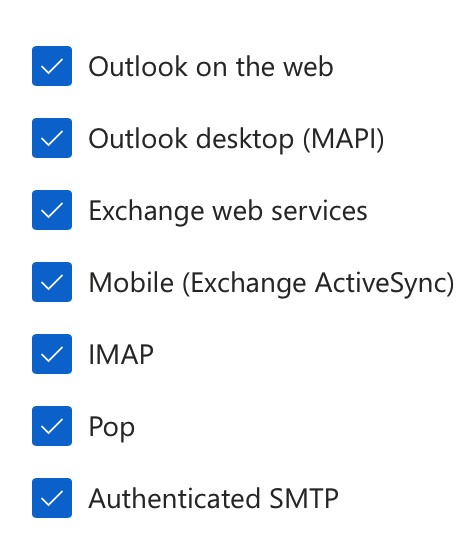
Sounds like you need to log into the Office 365 admin area, Users, Mail, Email Apps, Manage email apps and then tick all of them.


Shop now for Dell laptops and other devices (affiliate link).
Hatch

816 posts

Ultimate Geek
+1 received by user: 57


  #2741735 9-Jul-2021 10:09
Send private message

myopinion:


Sounds like you need to log into the Office 365 admin area, Users, Mail, Email Apps, Manage email apps and then tick all of them.


Thank you, but:


Switch to an account that has permission


Your account (_______) doesn’t have permission to view or manage this page in the Microsoft 365 admin center.


I'll have to ask the IT guy to allow other web access I guess. Odd that mobile is ok but nothing else is. 


Create new topic


Geekzone Live »

Try automatic live updates from Geekzone directly in your browser, without refreshing the page, with Geekzone Live now.


Are you subscribed to our RSS feed? You can download the latest headlines and summaries from our stories directly to your computer or smartphone by using a feed reader.