Geekzone: technology news, blogs, forums
Guest
Welcome Guest.
You haven't logged in yet. If you don't have an account you can register now.


krispienz

56 posts

Master Geek
+1 received by user: 2


#302256 10-Nov-2022 14:14
Send private message

Chrome is no-longer supported.


Create new topic

gzt

gzt
18672 posts

Uber Geek
+1 received by user: 7808

Lifetime subscriber

  #2994381 10-Nov-2022 14:17
Send private message

Firefox?


gzt

gzt
18672 posts

Uber Geek
+1 received by user: 7808

Lifetime subscriber

michaelmurfy
meow
13579 posts

Uber Geek
+1 received by user: 10910

Moderator
ID Verified
Trusted
Lifetime subscriber

  #2994385 10-Nov-2022 14:31
Send private message

It would be good if you could give a little more context instead of just adding a subject with no other information.


What device are you using and can this be upgraded past Yosemite?


Lastly, as others mentioned, Firefox appears to be still supported but Yosemite has been unsupported since 2017 and is also not getting software updates so you should consider either moving to Linux if you wish to use existing legacy hardware or upgrading to a newer mac.


Michael Murphy | https://murfy.nz
Referral Links: Quic Broadband (use R122101E7CV7Q for free setup)

Are you happy with what you get from Geekzone? Please consider supporting us by subscribing.
Opinions are my own and not the views of my employer.


FineWine
3111 posts

Uber Geek
+1 received by user: 2440

Trusted
Nurse (R)
Lifetime subscriber

  #2994389 10-Nov-2022 14:40
Send private message

You might find this site helpful:


Mac OS Compatibility Guide


Which versions of macOS does your Mac support?


https://eshop.macsales.com/guides/Mac_OS_X_Compatibility


Whilst the difficult we can do immediately, the impossible takes a bit longer. However, miracles you will have to wait for.


krispienz

56 posts

Master Geek
+1 received by user: 2


  #2994392 10-Nov-2022 14:59
Send private message

I was on Safari 8.0.8 and for some reason couldn't type anything in the body, I'm on my daughter's chromebook now.  For some reason I can't upgrade from Yosemite.  I formatted/erased the Macintosh HD as I was having trouble with the disk and it wouldn't boot.  Ended up with Mountain Lion instead of Yosemite.  I had to install Yosemite back.  Chrome started working again until I allowed an update.  I did have Firefox before the Disk wipe and OS reinstall.  Now I can't install any browser I try including Firefox, other versions of Chrome and Opera.


krispienz

56 posts

Master Geek
+1 received by user: 2


  #2994394 10-Nov-2022 15:03
Send private message

 Model Name:   iMac
  Model Identifier:     iMac13,1
  Processor Name:       Intel Core i5
  Processor Speed:      2.7 GHz
  Number of Processors: 1
  Total Number of Cores:        4
  L2 Cache (per Core):  256 KB
  L3 Cache:     6 MB
  Memory:       8 GB
  Boot ROM Version:     IM131.010A.B09
  SMC Version (system): 2.9f8
  Serial Number (system):       C17JW4TEDNCR
  Hardware UUID:        F62C807D-51D0-5EC7-A5CB-38E65A5D78F2
--


Shop now for Lego sets and other gifts (affiliate link).
krispienz

56 posts

Master Geek
+1 received by user: 2


  #2994397 10-Nov-2022 15:11
Send private message

Found an old version that works for now.  Firefox 65.0.2, When I'm on Geekzone, it just gives me comfort that someone is there in the background while I sort these problems out even if I find my own solutions.  Thanks everyone!


FineWine
3111 posts

Uber Geek
+1 received by user: 2440

Trusted
Nurse (R)
Lifetime subscriber

  #2994405 10-Nov-2022 15:46
Send private message

Your model iMac13,1 should be able to go to a maximum of Catalina macOS 10.15.x and this is my own maximum for my iMac 14.2.


Anyway the latest version of Firefox 106.0.5 will run on Catalina.


To upgrade to Catalina macOS 10.15.x: https://apps.apple.com/us/app/macos-catalina/id1466841314?mt=12


  1. Click the link to open the App Store page for that macOS. 
  2. In the App Store, click the Get button to begin downloading the macOS installer.
  3. After downloading to your Applications folder, the installer opens automatically. Follow the on screen instructions to install macOS.


Whilst the difficult we can do immediately, the impossible takes a bit longer. However, miracles you will have to wait for.


FineWine
3111 posts

Uber Geek
+1 received by user: 2440

Trusted
Nurse (R)
Lifetime subscriber

  #2994406 10-Nov-2022 16:08
Send private message

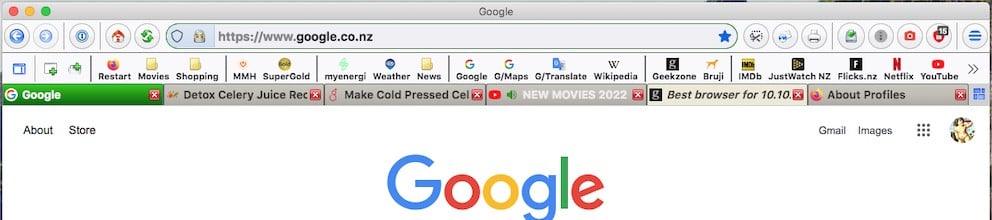
PS: if you do not like Firefox tabs on top (above address bar) then Firefox is very customisable to change this and a bunch of other stuff. Here is what mine looks like after modification with css code:


Whilst the difficult we can do immediately, the impossible takes a bit longer. However, miracles you will have to wait for.


krispienz

56 posts

Master Geek
+1 received by user: 2


  #2994413 10-Nov-2022 17:06
Send private message

Thank you. Might upgrade to el catalina later. Firefox profiles are a bit clunky but it will have to do.

Brumfondl
1198 posts

Uber Geek
+1 received by user: 524

Trusted
Subscriber

  #2994466 10-Nov-2022 21:35
Send private message

You might need to upgrade to El Capitan (10.11) before you can go to Catalina.


This site might be useful:
How to Upgrade to macOS Catalina - TechCommuters


Create new topic


Geekzone Live »

Try automatic live updates from Geekzone directly in your browser, without refreshing the page, with Geekzone Live now.


Are you subscribed to our RSS feed? You can download the latest headlines and summaries from our stories directly to your computer or smartphone by using a feed reader.