Geekzone: technology news, blogs, forums
Guest
Welcome Guest.
You haven't logged in yet. If you don't have an account you can register now.


FineWine

3115 posts

Uber Geek
+1 received by user: 2447

Trusted
Nurse (R)
Lifetime subscriber

#311167 20-Dec-2023 13:07
Send private message

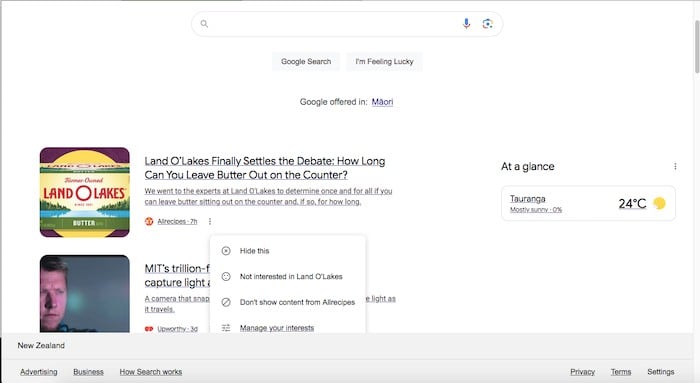
I have just noticed that when I call upon Google search in macOS Firefox 121.0.0 it is now force feeding me adverts below the search entry bar area. This is before I even have my search term results. πŸ‘ΏπŸ˜ 


You can click on the small vertical 3 dot menu next to EACH advert and so no but I want to turn them all off and never see any of them again - how do I do this ??



Whilst the difficult we can do immediately, the impossible takes a bit longer. However, miracles you will have to wait for.


Create new topic

This is a filtered page: currently showing replies marked as answers. Click here to see full discussion.

Aaron2222
220 posts

Master Geek
+1 received by user: 111


  #3173651 20-Dec-2023 13:25
Send private message

Click the "Settings" link in the bottom-right cornect, then "Search settings". Go to the "Other settings" tab, then disable "Show Discover on home page".


Create new topic


Geekzone Live »

Try automatic live updates from Geekzone directly in your browser, without refreshing the page, with Geekzone Live now.


Are you subscribed to our RSS feed? You can download the latest headlines and summaries from our stories directly to your computer or smartphone by using a feed reader.