Geekzone: technology news, blogs, forums
Guest
Welcome Guest.
You haven't logged in yet. If you don't have an account you can register now.


Filter this topic showing only the reply marked as answer View this topic in a long page with up to 500 replies per page Create new topic
1 | 2 | 3
littleheaven

2130 posts

Uber Geek
+1 received by user: 327


  #1796084 7-Jun-2017 18:09
Send private message

Okay, I've gone into LAN-IPTV and gone to the LAN Port section and changed the ISP Profile to Manual, then in the Internet section I've changed VID to 10. (following some instructions I've just Googled). But when I hit Apply it says "IPTV Port Number is the same as the Dual WAN LAN Port Number". 


Geek girl. Freelance copywriter and editor at Unmistakable.co.nz.


Stu

Stu
Hammered
8743 posts

Uber Geek
+1 received by user: 2409

Moderator
ID Verified
Trusted
Lifetime subscriber

  #1796086 7-Jun-2017 18:11
Send private message

Unless you need Dual WAN, I'd go into the WAN settings and disable it.


People often mistake me for an adult because of my age.


Keep calm, and carry on posting.


Referral Links: Sharesies


Are you happy with what you get from Geekzone? If so, please consider supporting us by subscribing.


No matter where you go, there you are.


littleheaven

2130 posts

Uber Geek
+1 received by user: 327


  #1796095 7-Jun-2017 18:15
Send private message

Thanks so much for your help. It's disabled, but the instructions I was following said to set Primary WAN to Ethernet WAN - Lan Port 4. What should it be?


Geek girl. Freelance copywriter and editor at Unmistakable.co.nz.


Stu

Stu
Hammered
8743 posts

Uber Geek
+1 received by user: 2409

Moderator
ID Verified
Trusted
Lifetime subscriber

  #1796096 7-Jun-2017 18:16
Send private message

Try WAN


People often mistake me for an adult because of my age.


Keep calm, and carry on posting.


Referral Links: Sharesies


Are you happy with what you get from Geekzone? If so, please consider supporting us by subscribing.


No matter where you go, there you are.


Stu

Stu
Hammered
8743 posts

Uber Geek
+1 received by user: 2409

Moderator
ID Verified
Trusted
Lifetime subscriber

  #1796097 7-Jun-2017 18:17
Send private message

And ensure the WAN port on the ASUS is what you've got connected to the ONT


People often mistake me for an adult because of my age.


Keep calm, and carry on posting.


Referral Links: Sharesies


Are you happy with what you get from Geekzone? If so, please consider supporting us by subscribing.


No matter where you go, there you are.


littleheaven

2130 posts

Uber Geek
+1 received by user: 327


  #1796098 7-Jun-2017 18:24
Send private message

Yes, success! Thank you sooooo much!


Geek girl. Freelance copywriter and editor at Unmistakable.co.nz.


Move to New Zealand's best fibre broadband service (affiliate link). Free setup code: R587125ERQ6VE. Note that to use Quic Broadband you must be comfortable with configuring your own router.

Stu

Stu
Hammered
8743 posts

Uber Geek
+1 received by user: 2409

Moderator
ID Verified
Trusted
Lifetime subscriber

  #1796099 7-Jun-2017 18:25
Send private message

Most welcome. Enjoy the fibre speed!


People often mistake me for an adult because of my age.


Keep calm, and carry on posting.


Referral Links: Sharesies


Are you happy with what you get from Geekzone? If so, please consider supporting us by subscribing.


No matter where you go, there you are.


littleheaven

2130 posts

Uber Geek
+1 received by user: 327


  #1796104 7-Jun-2017 18:49
Send private message

It's awesome! One more question if I may... would there be any reason why the Ethernet connection to my solar panels isn't working now? They're reporting no internet connectivity but my AppleTV which is also Ethernet connected seems fine.

Edit - false alarm, they're back online!


Geek girl. Freelance copywriter and editor at Unmistakable.co.nz.


Stu

Stu
Hammered
8743 posts

Uber Geek
+1 received by user: 2409

Moderator
ID Verified
Trusted
Lifetime subscriber

  #1796107 7-Jun-2017 18:57
Send private message

Sweet! Problem averted.


People often mistake me for an adult because of my age.


Keep calm, and carry on posting.


Referral Links: Sharesies


Are you happy with what you get from Geekzone? If so, please consider supporting us by subscribing.


No matter where you go, there you are.


littleheaven

2130 posts

Uber Geek
+1 received by user: 327


  #1796140 7-Jun-2017 19:46
Send private message

Maybe I didn't have the Ethernet cable plugged in correctly (despite re-seating it twice). I'm so happy I can keep using my beloved router - it cost a bomb and it's so fast. Thanks once again.


Geek girl. Freelance copywriter and editor at Unmistakable.co.nz.


DarthKermit
5346 posts

Uber Geek
+1 received by user: 3317

Trusted

  #1796168 7-Jun-2017 20:23
Send private message

What speed fibre did ya get?


Do you have any pics of your install today?


Shop now for Dell laptops and other devices (affiliate link).
littleheaven

2130 posts

Uber Geek
+1 received by user: 327


  #1796290 7-Jun-2017 22:38
Send private message

I got the 100/20 for now, and I'm getting full speed when I run a test, so that's fantastic. I didn't take any pics, but I can, if you want to see any. Ita a fairly neat job, and I'm happy that everything got put where I wanted it.


Geek girl. Freelance copywriter and editor at Unmistakable.co.nz.


DarthKermit
5346 posts

Uber Geek
+1 received by user: 3317

Trusted

  #1796603 8-Jun-2017 13:06
Send private message

Yes thanks, would be good to see your install as so many have wide variations in quality.


And welcome to the (UFB) club. laughing


littleheaven

2130 posts

Uber Geek
+1 received by user: 327


  #1796613 8-Jun-2017 13:15
Send private message

No worries. I just need to get a shorter cable from ONT (on wall) to router (on bookcase) and pop some cable clips on the back of the bookcase to keep the associated other cables tidy, and then I'll snap some shots of the ONT and the outside work. I am so happy to be in the UFB club! And, credit where it's due, Spark were awesome today. I got an email from them advising I could apply online for my free Netflix, but it wouldn't work. I rang and chatted to James (?) who did me an epic deal including upgrading my speed for no extra cost. So now I'll be getting 200/20 as soon as my plan switches over. I've been a customer for 21 years straight, and I feel like my loyalty was rewarded :)


Geek girl. Freelance copywriter and editor at Unmistakable.co.nz.


littleheaven

2130 posts

Uber Geek
+1 received by user: 327


  #1796832 8-Jun-2017 17:36
Send private message

Okay, hopefully I've managed to do this correctly! Here are the pics of my fibre install. 


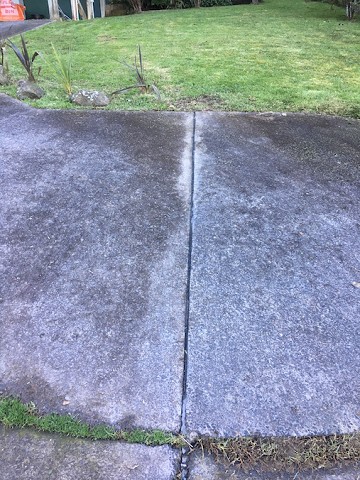
This is the fibre coming in from the road. I live up a long driveway shared by 3 other houses, all of whom had to provide consent, hence the 99 days it took to complete the whole process. Chorus laid the cable up the side of the drive until it curved off to the left, and then they went along the existing gap between the concrete slabs to reach my front garden.


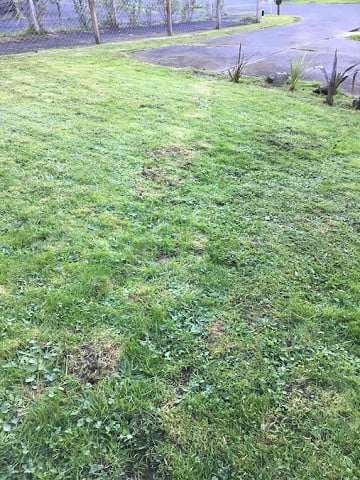
This is the trench across the garden - barely visible. It's been down about 2 weeks, but you could hardly see it from day one. It's the slightly lighter line through the grass.


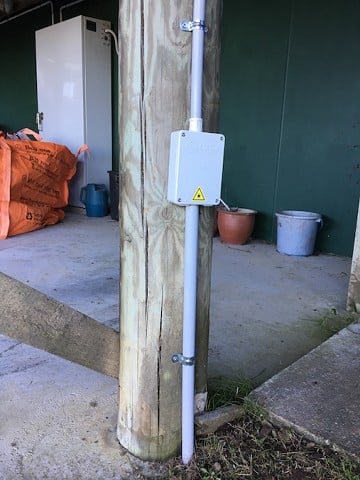
Here's the ETP, on one of the supporting poles for the front of the house. The cable from the ETP runs up the pole to the carport ceiling and across it to the point beneath the living room floor where it goes up through the floorboards. The white cabinet in the background contains the inverter and battery for my SunGenie solar system which provides a UPS for the powerpoint the ONT is plugged into.


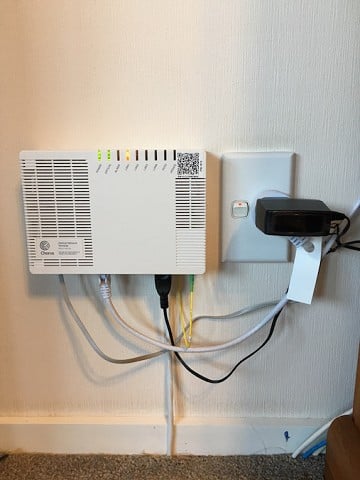
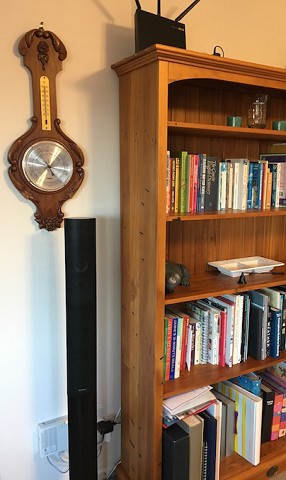
This is the ONT, mounted on the living room wall beside the powerpoint which is on my critical load circuit. Just to the right of the photo, you can see the edge of the bookcase that the router sits on. The Ethernet cables you can see poking out of the ground and running behind the bookcase are for the old VDSL line (now carrying the phone signal from the ONT to my house wiring), the data connection to the Sungenie system, and a cable that runs along beneath the floor (on the carport ceiling) and pops back up on the other side of the room behind the TV , where my AppleTV, PS3 and HTPC are connected to the router via a network switch. All the cabling for everything is hidden as much as possible behind the bookcase, held in place with command cable hooks. It's not the tidiest installation ever, but I really wanted the ONT there, and it's semi-hidden by a tall speaker.


And here is the finished product, with my beloved ASUS RT-AC68U situated on the top of the bookcase, which is as close as it can get to the centre of my 2-storey house (for maximum wi-fi penetration).


Overall, I'm pretty happy with it, after hearing the horror stories. It would have been better if I'd had a convenient cupboard to tuck it away in, but I don't, so this was the next best option. If I get sick of looking at it, I can always shuffle the furniture around so something more solid sits in front of it.


Geek girl. Freelance copywriter and editor at Unmistakable.co.nz.


1 | 2 | 3
Filter this topic showing only the reply marked as answer View this topic in a long page with up to 500 replies per page Create new topic


Geekzone Live »

Try automatic live updates from Geekzone directly in your browser, without refreshing the page, with Geekzone Live now.


Are you subscribed to our RSS feed? You can download the latest headlines and summaries from our stories directly to your computer or smartphone by using a feed reader.