


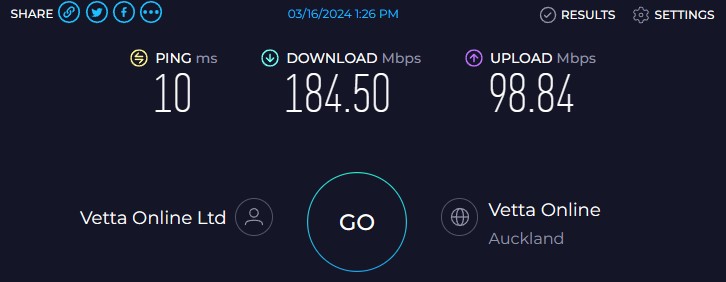
Hey, I've noticed I'm not getting good speeds. I'm on Quic Sprinter 900/400 plan. When testing to them I get
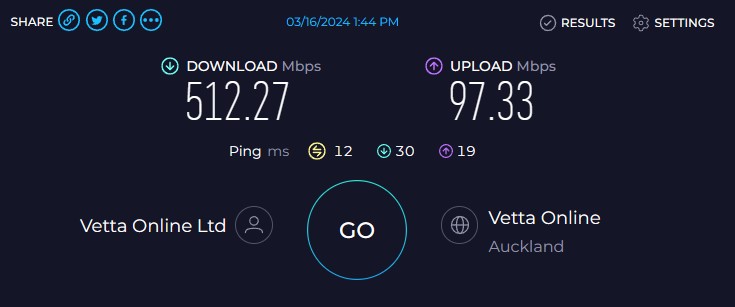
tried other browsers, around the same result plus other devices and the app which is worse.
When testing to Chorus fibre lab I get close to my connection speed
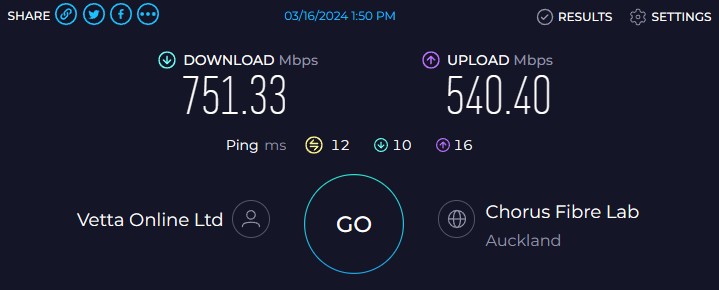
which makes me think it's less likely something on my end but not 100% sure.
(Also to note I've just had Tuatahi First Fibre tech out because the external termination point had broken open from old age and the weather. When he had replaced it, he noticed a fault and tested inside at the ONT then moved onto the pole outside which when he moved the wire that went to mine it broke. He replaced it, tested and the readings were fine now which he said would have been affecting my speeds and connectivity.)
Which is why I'm thinking it's less likely something on my end, but I could be missing something.
I'm testing from windows 10 pc to Spark modem HG659b on PPPoE to ONT all through Ethernet. (All the cables are newish replaced recently, plus doing the diagnostics tests in the intel PROSet Adapter Configuration Utility all come back fine, Cable tests, connection tests and hardware tests.)
Nic is Intel® I219V, 1 x Gigabit LAN Controller(s). Also have tired Network reset on windows where it uninstalled and reinstalled the drivers, all up to date.
Would someone from Quic be able to have a look at my connection from their end?
Had seen on some other posts about TCP Global Parameters, Receive Window Auto-Tuning Level to normal. I looked and mine is set to that.
(I'm in the Whanganui region.)



 ID Verified
 Trusted
