Geekzone: technology news, blogs, forums
Guest
Welcome Guest.
You haven't logged in yet. If you don't have an account you can register now.


sidefx

3775 posts

Uber Geek
+1 received by user: 1295

Trusted

#280510 19-Dec-2020 07:27
Send private message

I just moved into a new house and sadly because it's up a RoW looks like fibre install might take a while so I'm on DSL for now.

Can anyone help with finding where the copper meets house? The photo below is the closest I can find so far. Do I need to keep tracing from here? I want disconnect everything and connect modem direct to incoming pair.

Edit: on further inspection looks like this is tv aereal. Any suggestions on finding ETP? I can't find anything obvious




"I was born not knowing and have had only a little time to change that here and there."         | Octopus Energy | Sharesies
              - Richard Feynman


View this topic in a long page with up to 500 replies per page Create new topic
 1 | 2
cyril7
9075 posts

Uber Geek
+1 received by user: 2499

ID Verified
Trusted
Subscriber

  #2624196 19-Dec-2020 08:06
Send private message

Hi typically near the power meter or at least where the power enters the building.

Cyril


andrewNZ
2487 posts

Uber Geek
+1 received by user: 1461
Inactive user


  #2624199 19-Dec-2020 08:33
Send private message

Some older hoises don't have an ETP as such. The cable is just connected at the first jackpoint or in the roof.

My house, it's in the roof near the power entry. My incoming phone line is overhead.

cyril7
9075 posts

Uber Geek
+1 received by user: 2499

ID Verified
Trusted
Subscriber

  #2624201 19-Dec-2020 08:38
Send private message

Hi, Andrew is correct, in many older homes even where underground there is no ETP the cable just appears from out of the ground. ETP was not really a thing till the mid 80s


Cyril


sidefx

3775 posts

Uber Geek
+1 received by user: 1295

Trusted

  #2624205 19-Dec-2020 08:38
Send private message

Thanks @cyril7 (and @AndrewNZ, crosspost:) ). The house was built in the 70s, as was my previous house which had no ETP. Is it likely this one has no ETP either? I can't find anything obvious outside at all. The jackpoint below is nearest to power meter. I think the white cable on left is likely incoming pair? The other seem to lead to an extension to the house built in the 80s.

Click to see full size


"I was born not knowing and have had only a little time to change that here and there."         | Octopus Energy | Sharesies
              - Richard Feynman


cyril7
9075 posts

Uber Geek
+1 received by user: 2499

ID Verified
Trusted
Subscriber

  #2624209 19-Dec-2020 08:52
Send private message

Hi no the white cable is internal, the wires coming from the larger hole in the middle/rear of the wall socket are the external ones, although the tan wire is missing, also it seems someone has split the pairs (not that it matters too much for voice but DSL might be upset) the pairs are white/tan and yellow/black


Edit: does the external cable pull toward you any or is it tight.


Cyril


nztim
4012 posts

Uber Geek
+1 received by user: 2710

ID Verified
Trusted
TEAMnetwork
Subscriber

  #2624433 19-Dec-2020 19:58
Send private message

cyril7:

Hi no the white cable is internal, the wires coming from the larger hole in the middle/rear of the wall socket are the external ones, although the tan wire is missing, also it seems someone has split the pairs (not that it matters too much for voice but DSL might be upset) the pairs are white/tan and yellow/black


Edit: does the external cable pull toward you any or is it tight.


Cyril


Someone has done a DIY job, or before the days DSL the tan wire might have been broken so NZPO just used the other wire


Any views expressed on these forums are my own and don't necessarily reflect those of my employer. 


Shop now on AliExpress (affiliate link).
nickb800
2735 posts

Uber Geek
+1 received by user: 829

Trusted

  #2624520 20-Dec-2020 06:17
Send private message

nztim:
cyril7:


Hi no the white cable is internal, the wires coming from the larger hole in the middle/rear of the wall socket are the external ones, although the tan wire is missing, also it seems someone has split the pairs (not that it matters too much for voice but DSL might be upset) the pairs are white/tan and yellow/black


Edit: does the external cable pull toward you any or is it tight.


Cyril


Someone has done a DIY job, or before the days DSL the tan wire might have been broken so NZPO just used the other wire


Seems unlikely that it would be DIY, as there is no ETP, so they would have had to DIY at the pedestal to liven the wrong two wires. IME very few people are game to DIY at the pedestal


sidefx

3775 posts

Uber Geek
+1 received by user: 1295

Trusted

  #2624754 21-Dec-2020 08:01
Send private message

cyril7:

Hi no the white cable is internal, the wires coming from the larger hole in the middle/rear of the wall socket are the external ones, although the tan wire is missing, also it seems someone has split the pairs (not that it matters too much for voice but DSL might be upset) the pairs are white/tan and yellow/black


Edit: does the external cable pull toward you any or is it tight.


Cyril


Nope external cable is completely immovable :(

Just spotted this socket has M on it while all the others in the house have 2 or S on them, so I guess definitely the master.

I've disconnected the white cable as we don't need all the extra daisy chained ones.

DSL does not want to connect though. Is it worth connecting the black one instead of white to see if it works? Are they connected to the correct pins? Unfortunately I don't have any old phones to test it anymore. Below is how it currently is connected:

Click to see full size

Otherwise I guess I'll ring ISP, go through their troubleshooting and get a visit from chorus.


Edit: or am I better off just scotchloking incoming pair direct to cable into modem?


"I was born not knowing and have had only a little time to change that here and there."         | Octopus Energy | Sharesies
              - Richard Feynman


cyril7
9075 posts

Uber Geek
+1 received by user: 2499

ID Verified
Trusted
Subscriber

  #2624756 21-Dec-2020 08:08
Send private message

Hi, just realised that its probably missing the black wire rather than mis wired, as someone has wired the yellow as the 3rd bell wire. So try putting the black wire back into the mid slot next to the yellow.


Cyril


sidefx

3775 posts

Uber Geek
+1 received by user: 1295

Trusted

  #2624760 21-Dec-2020 08:34
Send private message

Sadly that didn't seem to do the trick. Any suggestions before I got onto hold with ISP 😁


"I was born not knowing and have had only a little time to change that here and there."         | Octopus Energy | Sharesies
              - Richard Feynman


nztim
4012 posts

Uber Geek
+1 received by user: 2710

ID Verified
Trusted
TEAMnetwork
Subscriber

  #2624767 21-Dec-2020 08:49
Send private message

OP where are you located?


Any views expressed on these forums are my own and don't necessarily reflect those of my employer. 


Shop now on Samsung phones, tablets, TVs and more (affiliate link).
sidefx

3775 posts

Uber Geek
+1 received by user: 1295

Trusted

  #2624779 21-Dec-2020 08:57
Send private message

Warkworth


"I was born not knowing and have had only a little time to change that here and there."         | Octopus Energy | Sharesies
              - Richard Feynman


Bung
6733 posts

Uber Geek
+1 received by user: 2926

Subscriber

  #2624780 21-Dec-2020 08:57
Send private message

sidefx:>Nope external cable is completely immovable :(

Just spotted this socket has M on it while all the others in the house have 2 or S on them, so I guess definitely the master.

I've disconnected the white cable as we don't need all the extra daisy chained ones.

DSL does not want to connect though. Is it worth connecting the black one instead of white to see if it works? Are they connected to the correct pins? Unfortunately I don't have any old phones to test it anymore. Below is how it currently is connected:

Click to see full size

Otherwise I guess I'll ring ISP, go through their troubleshooting and get a visit from chorus.


Edit: or am I better off just scotchloking incoming pair direct to cable into modem?


If that is an old master jack the working socket pins are connected to the middle slots on the krone strips. These are not commoned like 2 wire versions. As shown neither wire will reach the modem.

Edit if you are not using the other 2 wire jacks, use one to replace the old master.

nztim
4012 posts

Uber Geek
+1 received by user: 2710

ID Verified
Trusted
TEAMnetwork
Subscriber

  #2624804 21-Dec-2020 09:26
Send private message

Damm if you we closer I could have had a look, as @bung has said get rid of the master/secondary jacks, it is probably easier to just order wiring from your RSP for circa $250 they will install a new Cat6 outlet for xDSL and bypass any old internal wiring


Any views expressed on these forums are my own and don't necessarily reflect those of my employer. 


sidefx

3775 posts

Uber Geek
+1 received by user: 1295

Trusted

  #2624828 21-Dec-2020 10:14
Send private message

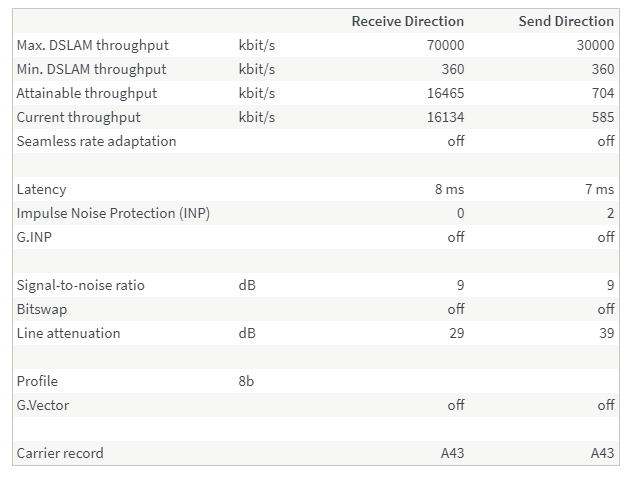
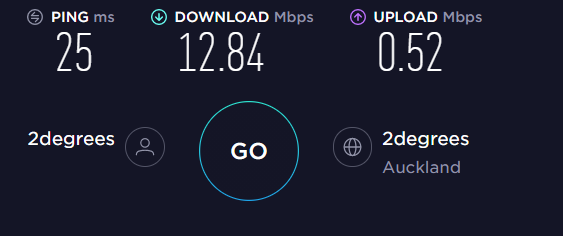
Got it working but yeah I think the wiring is a bit dodgy! Basically I reconnected it as per original photo and it now works in 2 secondary jackpoints at either end of the house. Still doesn't work in the old "master" socket.  I suspect all the other jackpoints might also be daisy chained so there's like 6 jacks.


So now... can someone tell me how bad this is and whether just connecting modem direct to the incoming pair or something would be worth doing until Fibre is installed?


(Lucky I have a backup skinny 4G modem! because this is pretty slow ;D   TBH I'm wondering if it might be better just to upgrade skinny 4G connection to unlimited because it runs a lot better than this and live on that until we get the Fibre  - Fibre is in the street but because we're up a RoW might take weeks or I guess maybe longer to get installed)


Click to see full size


Click to see full size


"I was born not knowing and have had only a little time to change that here and there."         | Octopus Energy | Sharesies
              - Richard Feynman


 1 | 2
View this topic in a long page with up to 500 replies per page Create new topic


Geekzone Live »

Try automatic live updates from Geekzone directly in your browser, without refreshing the page, with Geekzone Live now.


Are you subscribed to our RSS feed? You can download the latest headlines and summaries from our stories directly to your computer or smartphone by using a feed reader.