Geekzone: technology news, blogs, forums
Guest
Welcome Guest.
You haven't logged in yet. If you don't have an account you can register now.


m2geek

154 posts

Master Geek
+1 received by user: 30


#323405 29-Nov-2025 01:55
Send private message

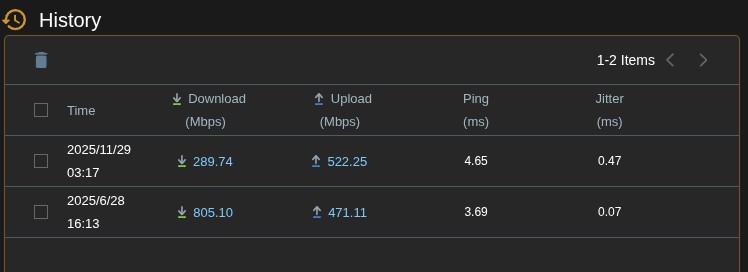
As the subject says - we're on OneNZ for fibre (not my choice) and in the last week or so our download speeds have TANKED.

We used to easily hit the max speeds up and down, now, our upload speed is Regularly higher than the Download speed. I've spoken to the callcentre and they won't do anything and say it's fine - when it Clearly isn't.

IS this just me, or is there a wider issue? 
Done all the usual troubleshooting of rebooting hardware, even Resetting hardware... 

I may have to resort to going into a physical Store so they'll actually have it looked at rather than attempt to gaslight me over the phone/IMs.

We have one of the "old" grey vodafone huawei routers connected to the ONT.

Any suggestions/info anyone can share? Thanks!


Mod edit MM: removed unnecessary company descriptor


View this topic in a long page with up to 500 replies per page Create new topic
 1 | 2
Linux
12173 posts

Uber Geek
+1 received by user: 8469

Trusted
Lifetime subscriber

  #3438404 29-Nov-2025 07:01
Send private message

Are you testing over Wi-Fi or Ethernet and where are you testing to?


When you called OneNZ did you tell them to log a fault?


gehenna
8667 posts

Uber Geek
+1 received by user: 3883

Moderator
Trusted
Lifetime subscriber

  #3438437 29-Nov-2025 11:29
Send private message

You haven't posted enough info to isolate the issue to the line or to your environment behind the ONT/router.  What the contact centre sees as the status of the connection might not be what you see on the internal network and through the gateway.  As said above, you need to test with a device that's connected directly to the router via ethernet to eliminate wifi as an issue, then do a range of speed tests to different servers on different ISPs and see how they average. If you see poor performance across a range of destinations while connected via ethernet, the contact centre needs to know that before they have enough information to advise next steps or escalate to a field tech.  This would be the same of any ISP and their respective contact centres.  There's simply too many variables in every home for an ISP to know every answer to every home's symptoms.  You need to help them to help you by providing as much info as you can.  If you don't have the resources to do that kind of testing (e.g. no ethernet cables, no devices with ethernet, etc) then tell them that too so they can provide options.


m2geek

154 posts

Master Geek
+1 received by user: 30


  #3438450 29-Nov-2025 12:49
Send private message

Linux:


Are you testing over Wi-Fi or Ethernet and where are you testing to?


When you called OneNZ did you tell them to log a fault?


Over ethernet, testing via local speedtests (Ookla, Cloudflare, and downloading directly from an NZ linux repo and Steam) - I asked OneNZ to log a fault and they flat out blew me off and said it's fine there is nothing wrong.

I'm annoyed I deleted all my old screenshots of speedtests, this is the only proof I have that its fallen off


the difference between nerds & geeks is that geeks get it done!


gehenna
8667 posts

Uber Geek
+1 received by user: 3883

Moderator
Trusted
Lifetime subscriber

  #3438461 29-Nov-2025 13:51
Send private message

Is your ethernet negotiating the correct link speed?


MaxineN
Max
2049 posts

Uber Geek
+1 received by user: 1662

ID Verified
Trusted
Subscriber

  #3438464 29-Nov-2025 13:56
Send private message

Have we booted up a USB Live of some Linux distro and tested again?


You need to prove it's not you. No front line can tell it's not you unless:


A. You have a DN8245 and you did a iperf3 test (it has a built in iperf3 client and server btw).


B. You had a Deco and you did a speed test.


C. You've gone direct to the ONT and eliminated your OS AND your internal network.


The exception to this rule is if your fibre is absolutely degraded... then maybe... but Chorus (or the LFC) could also push back and say no it's fine and within levels.


Ramblings from a mysterious lady who's into tech. Warning I may often create zingers.


m2geek

154 posts

Master Geek
+1 received by user: 30


  #3438513 29-Nov-2025 14:07
Send private message

MaxineN:


Have we booted up a USB Live of some Linux distro and tested again?


You need to prove it's not you. No front line can tell it's not you unless:


A. You have a DN8245 and you did a iperf3 test (it has a built in iperf3 client and server btw).


B. You had a Deco and you did a speed test.


C. You've gone direct to the ONT and eliminated your OS AND your internal network.


The exception to this rule is if your fibre is absolutely degraded... then maybe... but Chorus (or the LFC) could also push back and say no it's fine and within levels.


I've tested it on multiple devices, two running Linux (Arch, and Debian) and one on Windows 11 - tried several ethernet cables, they're all running fine. The router is one of the older "Vodafone Ultra Hub" grey things made by Huawei - it's not a DN8245.

What do you mean by gone directly to the ONT.


the difference between nerds & geeks is that geeks get it done!


Stream your favourite shows now on Apple TV (affiliate link).
m2geek

154 posts

Master Geek
+1 received by user: 30


  #3438515 29-Nov-2025 14:08
Send private message

gehenna:


Is your ethernet negotiating the correct link speed?


Yes, I've changed cables out everywhere


the difference between nerds & geeks is that geeks get it done!


MaxineN
Max
2049 posts

Uber Geek
+1 received by user: 1662

ID Verified
Trusted
Subscriber

  #3438520 29-Nov-2025 14:27
Send private message

m2geek:


MaxineN:


Have we booted up a USB Live of some Linux distro and tested again?


You need to prove it's not you. No front line can tell it's not you unless:


A. You have a DN8245 and you did a iperf3 test (it has a built in iperf3 client and server btw).


B. You had a Deco and you did a speed test.


C. You've gone direct to the ONT and eliminated your OS AND your internal network.


The exception to this rule is if your fibre is absolutely degraded... then maybe... but Chorus (or the LFC) could also push back and say no it's fine and within levels.


I've tested it on multiple devices, two running Linux (Arch, and Debian) and one on Windows 11 - tried several ethernet cables, they're all running fine. The router is one of the older "Vodafone Ultra Hub" grey things made by Huawei - it's not a DN8245.

What do you mean by gone directly to the ONT.


Ultrahub was by Technicolor, but it doesn't matter.


Direct to the ONT means plugging in an ethernet cable between the ONT and your desktop of choice. This is easily done in Linux where you disable automatic IP for the interface itself, you add a VLAN interface and set it to 10 with DHCP. Then you'll connect as your desktop will have a public IP.
Then you can test again as you've eliminated your internal network, the ultra hub and Windows.
If you pull what you're paying for, then the fault is the Ultra Hub(but One NZ aren't going to replace it).
If you still pull crap speeds then document it and push hard (but politely, please don't call them professional gaslighters, they are only trained in what they know, not what you and I and anyone else on this forum knows) to log a fault.


Ramblings from a mysterious lady who's into tech. Warning I may often create zingers.


m2geek

154 posts

Master Geek
+1 received by user: 30


  #3438525 29-Nov-2025 15:06
Send private message

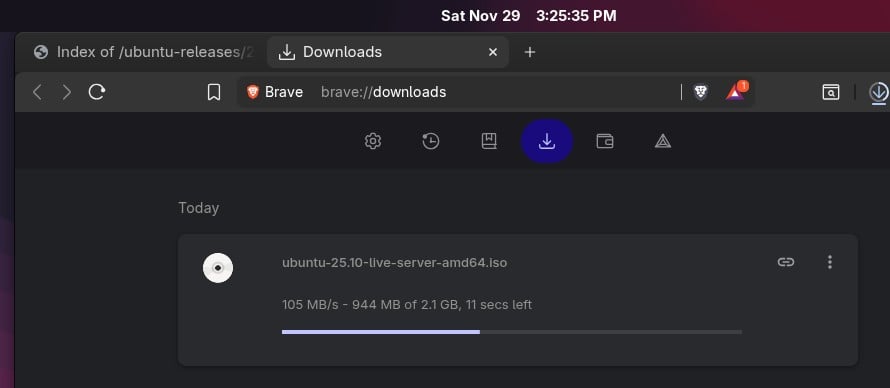
OK I so I did as you recommended with my laptop, and it's Definitely the Ultrahub being the issue, speedtests, downloads etc - all max out at like 910Mbps 

I have another router I could use - an Asus AX3000 - how do I set that one up to replace the ultrahub in the meantime, I've never used it for fibre before.


the difference between nerds & geeks is that geeks get it done!


MaxineN
Max
2049 posts

Uber Geek
+1 received by user: 1662

ID Verified
Trusted
Subscriber

  #3438526 29-Nov-2025 15:10
Send private message

m2geek:


OK I so I did as you recommended with my laptop, and it's Definitely the Ultrahub being the issue, speedtests, downloads etc - all max out at like 910Mbps 

I have another router I could use - an Asus AX3000 - how do I set that one up to replace the ultrahub in the meantime, I've never used it for fibre before.


First you need to find IPTV setting which exists under LAN > You can set it for NZ UFB or Manual and put the Internet VID to 10.


Then you need to go to WAN and do Automatic IP/IPoE/DHCP. This will get you IPv4. IPv6 my memory is a bit faded here (and this is not my choice of router anymore, it will just work though).


Ramblings from a mysterious lady who's into tech. Warning I may often create zingers.


m2geek

154 posts

Master Geek
+1 received by user: 30


  #3438527 29-Nov-2025 15:18
Send private message

MaxineN:


m2geek:


OK I so I did as you recommended with my laptop, and it's Definitely the Ultrahub being the issue, speedtests, downloads etc - all max out at like 910Mbps 

I have another router I could use - an Asus AX3000 - how do I set that one up to replace the ultrahub in the meantime, I've never used it for fibre before.


First you need to find IPTV setting which exists under LAN > You can set it for NZ UFB or Manual and put the Internet VID to 10.


Then you need to go to WAN and do Automatic IP/IPoE/DHCP. This will get you IPv4. IPv6 my memory is a bit faded here (and this is not my choice of router anymore, it will just work though).


Did that, up and running - However - Curiously - the speeds are borked this way too... 

Now i'm at a loss lol.


the difference between nerds & geeks is that geeks get it done!


Shop now for Dell laptops and other devices (affiliate link).
MaxineN
Max
2049 posts

Uber Geek
+1 received by user: 1662

ID Verified
Trusted
Subscriber

  #3438528 29-Nov-2025 15:22
Send private message

m2geek:


MaxineN:


m2geek:


OK I so I did as you recommended with my laptop, and it's Definitely the Ultrahub being the issue, speedtests, downloads etc - all max out at like 910Mbps 

I have another router I could use - an Asus AX3000 - how do I set that one up to replace the ultrahub in the meantime, I've never used it for fibre before.


First you need to find IPTV setting which exists under LAN > You can set it for NZ UFB or Manual and put the Internet VID to 10.


Then you need to go to WAN and do Automatic IP/IPoE/DHCP. This will get you IPv4. IPv6 my memory is a bit faded here (and this is not my choice of router anymore, it will just work though).


Did that, up and running - However - Curiously - the speeds are borked this way too... 

Now i'm at a loss lol.


Did we use the same ethernet cable when we did our direct testing?
Did we also use the same laptop (running linux as well?) to do that testing?


AX3000 does gig just fine over DHCP... hell it will do gig over PPPoE which is not what I could have said about it's predecessors. You still have something funky with your setup, and here in lies the trouble with testing and validating you're getting the speeds you're paying for when you go beyond 500mbps... 


Ramblings from a mysterious lady who's into tech. Warning I may often create zingers.


m2geek

154 posts

Master Geek
+1 received by user: 30


  #3438531 29-Nov-2025 15:39
Send private message


Did we use the same ethernet cable when we did our direct testing?
Did we also use the same laptop (running linux as well?) to do that testing?


AX3000 does gig just fine over DHCP... hell it will do gig over PPPoE which is not what I could have said about it's predecessors. You still have something funky with your setup, and here in lies the trouble with testing and validating you're getting the speeds you're paying for when you go beyond 500mbps... 


Something very bizarre going on. 

This is via router same cables 


And then try again a few minutes later and it's back to running in the mid 50s.


the difference between nerds & geeks is that geeks get it done!


m2geek

154 posts

Master Geek
+1 received by user: 30


  #3438532 29-Nov-2025 15:41
Send private message

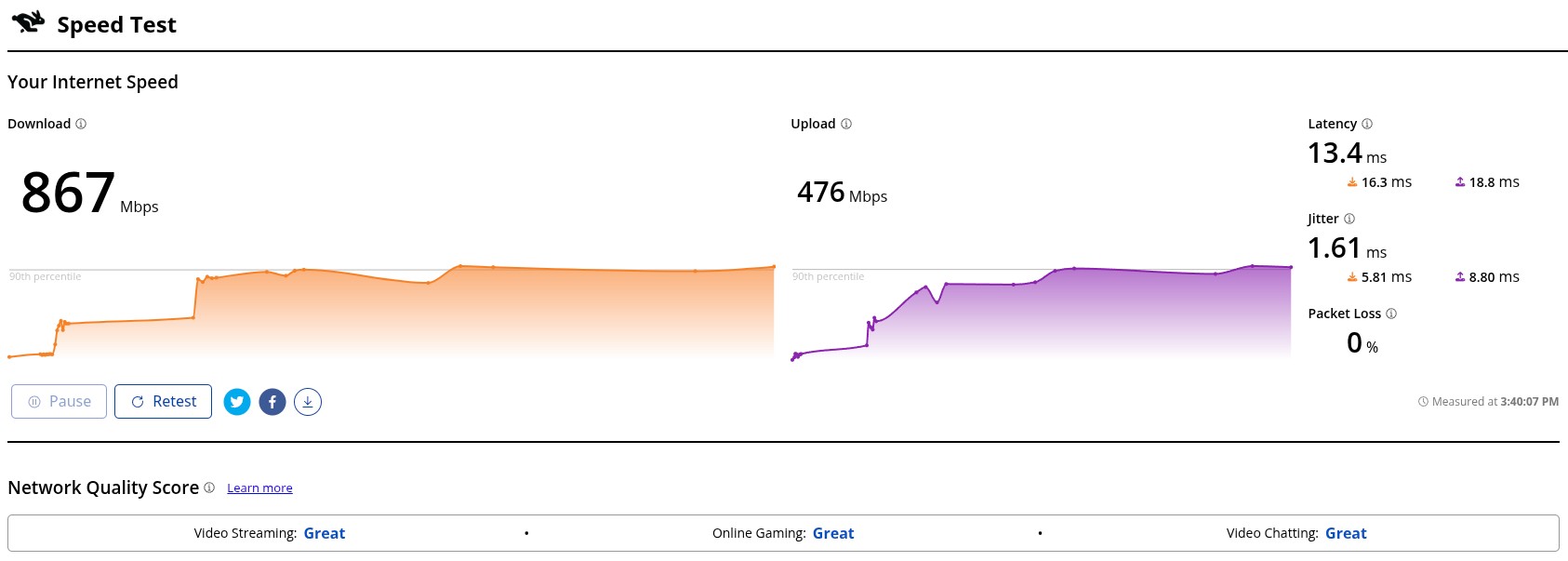
Finally got a good speedtest on Cloudflare's tester.

No packetloss, everything looks gucci.


the difference between nerds & geeks is that geeks get it done!


m2geek

154 posts

Master Geek
+1 received by user: 30


  #3438533 29-Nov-2025 15:43
Send private message

Then I get another dirty Ookla test


the difference between nerds & geeks is that geeks get it done!


 1 | 2
View this topic in a long page with up to 500 replies per page Create new topic


Geekzone Live »

Try automatic live updates from Geekzone directly in your browser, without refreshing the page, with Geekzone Live now.


Are you subscribed to our RSS feed? You can download the latest headlines and summaries from our stories directly to your computer or smartphone by using a feed reader.