Geekzone: technology news, blogs, forums
Guest
Welcome Guest.
You haven't logged in yet. If you don't have an account you can register now.


mdf

mdf

3566 posts

Uber Geek
+1 received by user: 1519

Trusted

#293505 26-Jan-2022 19:13
Send private message

I'm trying to plug a USB-A notebook in to a USB-C travel dock. This USB-A notebook has been successfully plugged in to docks in the office - the office dock uses a chunky USB-C to A adapter that is attached to the USB-C cable, something along these lines:
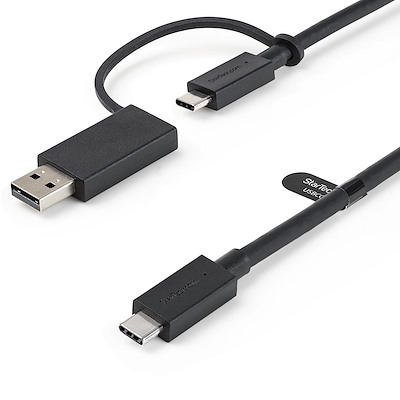


I've got a small (cheap) USB-C travel dock at home and a small (very cheap) USB C to A adapter. This doesn't seem to do much of anything when the dock is plugged in to the notebook via the adapter. The dock works fine in USB-C notebooks.


Is this likely to be a problem with the dock (possibly not getting enough power from a USB-A port?) or the adapter (possibly not passing power or sufficient data bandwidth)? If the adapter, is there a certain spec that will let it work with a small dock?


Basically I'm just looking to reduce the number of cables that need plugging in and out on the occassions where this particular notebook needs to be used at home. I know I'm not getting power/charging via a USB-A port.


Alternatively, can anyone suggest the right terms to be looking for a smallish (cough, not too spendy) hub that will support both USB-A and -C notebooks?


Create new topic

This is a filtered page: currently showing replies marked as answers. Click here to see full discussion.

tchart
2397 posts

Uber Geek
+1 received by user: 579

ID Verified
Trusted

  #2856891 26-Jan-2022 20:46
Send private message

Hybrid usb-a/usb-c docks usually run displaylink technology. Most of the logic is in the displaylink chips so basically any usb will work.

Usb-c docks however leave the logic up for the host. So it's not likely to work via usb-a especially anything to do with display. This is why many usb-c adaptors are cheaper.

Also many low end laptops will have a usb-c port but it will not do display over usb and is therefore just a glorified usb-a port with a different shape.

Using an A to C adaptor you may be lucky and things like network adaptors and ethernet will work but display will not work.

Create new topic


Geekzone Live »

Try automatic live updates from Geekzone directly in your browser, without refreshing the page, with Geekzone Live now.


Are you subscribed to our RSS feed? You can download the latest headlines and summaries from our stories directly to your computer or smartphone by using a feed reader.