Geekzone: technology news, blogs, forums
Guest
Welcome Guest.
You haven't logged in yet. If you don't have an account you can register now.


lapimate

353 posts

Ultimate Geek
+1 received by user: 28

Trusted
Lifetime subscriber

#130778 27-Sep-2013 14:31
Send private message

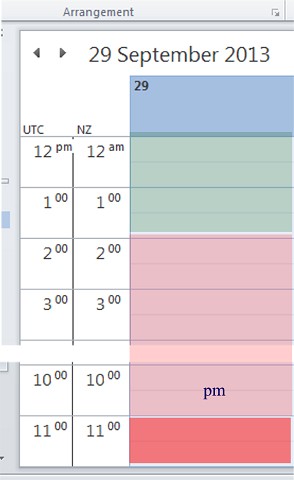
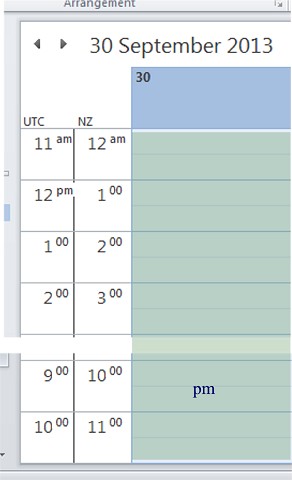
Microsoft Outlook 2010 (Windows) seems not to present the NZ (or any?) Daylight Saving adjustment properly. This Sunday (29 Sep) NZ switches to Daylight Saving at 2am (which thereby becomes 3am) yet Outlook Calendar does not switch from NZST to NZDT until 21 hours late at midnight 29/30. Outlook 2010 keeps its internal time records in UTC to keep track of international appointments and time-zone changes. On the extracts below the green shading shows when Outlook’s NZ time is the correct UTC, and the pink when Outlook is showing the wrong NZ time (cf UTC). The NZ time column for 29 Sep should show … 1am, 3am ... For NZ time no one hour interval 0200--0259 exists on 29 Sep this year and the last hour of that NZ 23-hour “day” should be UTC 1000-1059.


There is also a matching Outlook 2010 Calendar error at the end of NZDT in April.

Create new topic
Oblivian
7345 posts

Uber Geek
+1 received by user: 2117

ID Verified

  #903819 27-Sep-2013 15:37
Send private message

Got 2010 SP1? Seeing multiple DST issues relating to 2010s built in smart adjustments around GMT and crossovers causing all sorts of issues if the timezone on the PC has ever been changed (which is generally done during personalisation)

And mentions because of these smarts, if you read the calendar in mobile devices you have to ensure to set the rules bias to outlook to keep it in check.


lapimate

353 posts

Ultimate Geek
+1 received by user: 28

Trusted
Lifetime subscriber

  #904568 29-Sep-2013 16:20
Send private message

Oblivian: Got 2010 SP1? ...

Thanks, yes: 14.0.7106.5001 (32-bit) ie Microsoft Office 2010 SP2 I believe.

 ... if you read the calendar in mobile devices you have to ensure to set the rules bias to outlook to keep it in check.

Yes, that matter alerted me to the issue.

Create new topic


Geekzone Live »

Try automatic live updates from Geekzone directly in your browser, without refreshing the page, with Geekzone Live now.


Are you subscribed to our RSS feed? You can download the latest headlines and summaries from our stories directly to your computer or smartphone by using a feed reader.
