Geekzone: technology news, blogs, forums
Guest
Welcome Guest.
You haven't logged in yet. If you don't have an account you can register now.


per0w

17 posts

Geek


#153906 12-Oct-2014 12:43
Send private message

Hi guys,

So this has been driving me nuts for the past month or so and i cannot for the love of god find out what the issue is.
I have tested all Hardware. Checked all temperatures. Re-installed Win 7 64bit. Re-installed BF4. and it will constantly restart the PC anywhere between 15 & 35 mins while playing. i would have thought it was a temperature issue or a faulty piece of hardware, but it only happens in BF4.

I have an intensive log file from AIDA64 but cannot post the link. its a csv file, any idea on posting this for you guys to look at?

I have 6GB Corsair DDR3 and i have tested each module separately using MEMTEST86. Also run Intels CPU diagnostics and all comes back okay. Sandisk SSD has also come back with no errors using HDTune PRO. i put the graphics card through the intensive test using Furmark. Am using a 650W Coolermaster V650. updated bios to latest version. All drivers are up to date as well.

Again it only crashes playing bf4.

any help or ideas is much appreciated.

QuadCore Intel Core i7-2600
Asus P8Z68-V Pro
Sapphire Radeon HD 6950 Video Adapter
Corsair DDR3 6GB
Sandisk 120GB SSD
Coolermaster V650 PSU
WIN7 Home Premium 64bit


Create new topic

gzt

gzt
18679 posts

Uber Geek
+1 received by user: 7809

Lifetime subscriber

  #1152157 12-Oct-2014 12:49
Send private message

I have an intensive log file from AIDA64 but cannot post the link. its a csv file, any idea on posting this for you guys to look at?

Pastebin.

Sapphire Radeon HD 6950 Video Adapter

Have you tried with the original driver disk that came with the card? Yes it will be really old.


Coil
6614 posts

Uber Geek
+1 received by user: 2153
Inactive user


  #1152162 12-Oct-2014 12:56
Send private message

I bet its a faulty ram stick.
I had the same issue, Cause BF4 seems to use 3GB + sometimes it will load into the faulty ram and bang.

per0w

17 posts

Geek


  #1152166 12-Oct-2014 13:01
Send private message

Thanks gzt, I will try and find the original CD or download original driver.
as for the log file, i have posted the dropbox link on pastebin. "per0w log file".

Thanks mate,
Sam


per0w

17 posts

Geek


  #1152192 12-Oct-2014 14:04
Send private message

Hi TimA,

Tested all sticks individually and they all came back okay. 6 passes on each. 
I also, mixed the sticks up two at a time and tried bf4 again to try eliminate a dodgy stick. but bf4 still crashed.

gzt, tried an old driver but still same crash after 2 odd minutes. PC restarts itself.

also, to eliminate SSD, i tried a fresh copy of WIN7 and BF4 on a 160GB HDD and it still caused crashes.

charsleysa
597 posts

Ultimate Geek
+1 received by user: 125


  #1152200 12-Oct-2014 14:23
Send private message

How many GB does your graphics card have?
Have you tried running it at native monitor resolution with the lowest graphics?


Regards
Stefan Andres Charsley

per0w

17 posts

Geek


  #1152278 12-Oct-2014 16:56
Send private message

Hi Stefan,

Its a 2GB card and i have the monitor resolution set to the recommended setting 1920 x 1080. Also reduced the graphics settings(medium) in bf4 to a lower setup and still crashing.
Have spent weeks troubleshooting this bloody thing! driving me nuts!


Support Geekzone with one-off or recurring donations Donate via PressPatron.
Coil
6614 posts

Uber Geek
+1 received by user: 2153
Inactive user


  #1152279 12-Oct-2014 16:59
Send private message

Bad HDD sector?

charsleysa
597 posts

Ultimate Geek
+1 received by user: 125


  #1152280 12-Oct-2014 17:00
Send private message

Ok so this may be a long shot but may work.

Please connect your monitor to your graphics card.

Now open up Device Manager, find the Intel HD Graphics driver and disable it.

Reboot PC and try to play BF4 again.


Regards
Stefan Andres Charsley

macuser
2120 posts

Uber Geek
+1 received by user: 506


  #1152285 12-Oct-2014 17:08
Send private message

Are you sure it's not punkbuster?  That can kick you if it thinks you're running hacking software, autohotkey for example.

ArcticSilver
731 posts

Ultimate Geek
+1 received by user: 148


  #1152291 12-Oct-2014 17:18
Send private message

per0w: Hi Stefan,

Its a 2GB card and i have the monitor resolution set to the recommended setting 1920 x 1080. Also reduced the graphics settings(medium) in bf4 to a lower setup and still crashing.
Have spent weeks troubleshooting this bloody thing! driving me nuts!


Check if your "non paged pool" memory in task manager is higher than 400MB's, if it is you most probably have a memory leak. This would explain the delay in having the issue (as the memory fills up) and the crash.

Make sure you check it after playing for a while, to see if it goes up significantly.

I have this problem off and on with BF4 and my 6970.

per0w

17 posts

Geek


  #1152293 12-Oct-2014 17:23
Send private message

TimA, I tested 2 hardrives and both produce same result.

Stefan, I dont have a Intel HD graphics driver installed?

 installed drivers

Macuser, surely punkbuster wouldn't force a complete restart on my PC? I would think to have been given a message of some sort..


Shop now for Dell laptops and other devices (affiliate link).
charsleysa
597 posts

Ultimate Geek
+1 received by user: 125


  #1152294 12-Oct-2014 17:26
Send private message

per0w: Stefan, I dont have a Intel HD graphics driver installed?

 installed drivers


It should be under Display Adapters not System Devices.


Regards
Stefan Andres Charsley

per0w

17 posts

Geek


  #1152302 12-Oct-2014 17:42
Send private message

Stefan, yes i only have "AMD Radeon HD 6900 series" installed there.

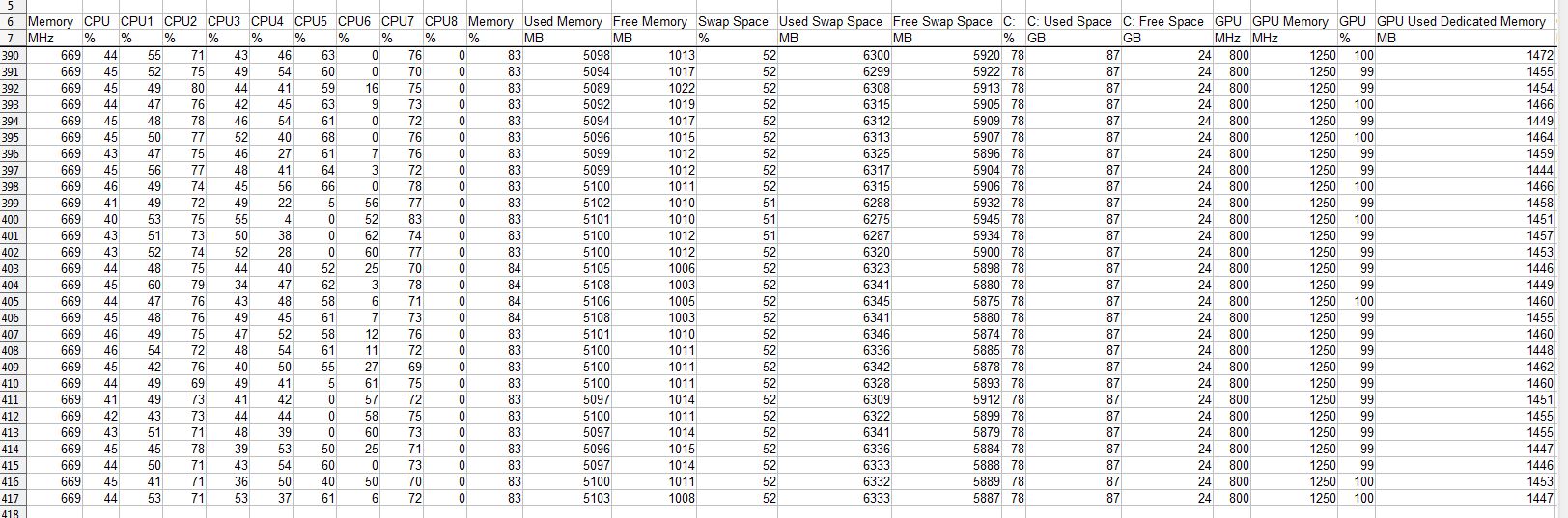
Arctic Silver, below is the logged report using AIDA64. this is the last line it wrote before the crash/restart. i have it in a csv file on pastebin under "per0w log file" if you wana have a look.?
AIDA64 logging

ArcticSilver
731 posts

Ultimate Geek
+1 received by user: 148


  #1152307 12-Oct-2014 17:52
Send private message

per0w: Stefan, yes i only have "AMD Radeon HD 6900 series" installed there.

Arctic Silver, below is the logged report using AIDA64. this is the last line it wrote before the crash/restart. i have it in a csv file on pastebin under "per0w log file" if you wana have a look.?


That all looks normal to me, but it does not show non-paged pool, it would pay to check that considering the known memory leak issues.

charsleysa
597 posts

Ultimate Geek
+1 received by user: 125


  #1152309 12-Oct-2014 18:00
Send private message

So there are 101 things you could try, but if this only occurs with Battlefield 4 and nothing else then its likely to be a Driver issue, a DirectX issue, or simply a Battlefield 4 bug which you cannot fix.

Things I would recommend:

Reinstall DirectX 11 from the BattleField 4 directory

Reinstall Catalyst Drivers and try version 13.2

Reinstall BattleField 4


Regards
Stefan Andres Charsley

Create new topic


Geekzone Live »

Try automatic live updates from Geekzone directly in your browser, without refreshing the page, with Geekzone Live now.


Are you subscribed to our RSS feed? You can download the latest headlines and summaries from our stories directly to your computer or smartphone by using a feed reader.