Geekzone: technology news, blogs, forums
Guest
Welcome Guest.
You haven't logged in yet. If you don't have an account you can register now.


Morgenmuffel

639 posts

Ultimate Geek
+1 received by user: 58

Lifetime subscriber

#293494 26-Jan-2022 11:30
Send private message

Ok Sons computer is not booting up, keeps crashing out with a fault of


Page Fault in Non-Paged Area and mentions win32.sys, the monitor also looks screwy with streaky lines


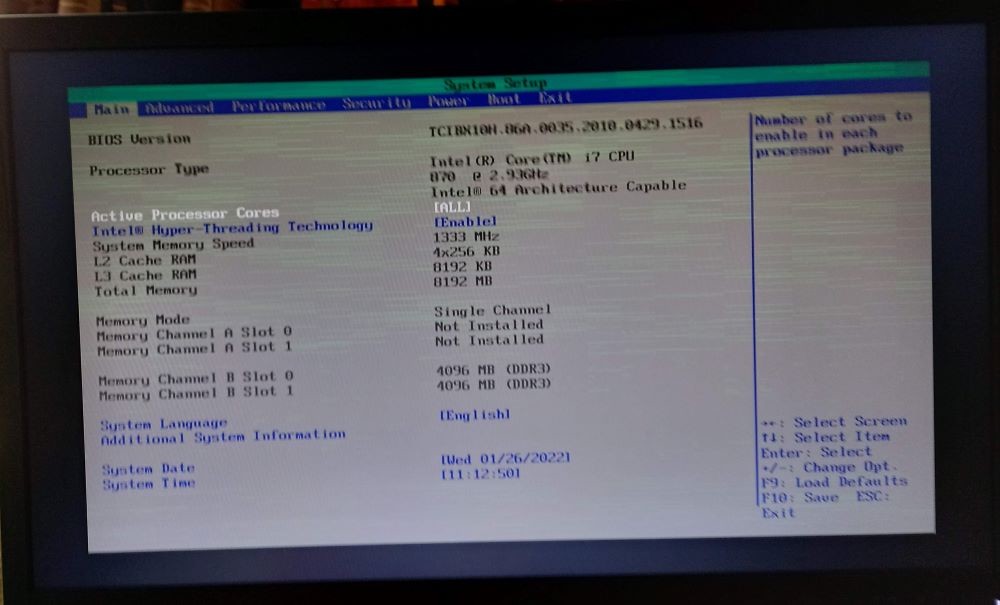
see here for a picture in the bios


The graphics card is a nvidia 460, am I right in thinking it may be toast;


edit-------------------------------------------------------------


Updated as forgot to put picture in


-swapped out cable


-found there are 4  memory sticks in the computer so trying those


- I know its not worth repairing, but hopefully its a cheap replacement from trademe or something




'We love to buy books because we believe we’re buying the time to read them.' WARREN ZEVON


View this topic in a long page with up to 500 replies per page Create new topic
 1 | 2
timmmay
20858 posts

Uber Geek
+1 received by user: 5350

Trusted
Lifetime subscriber

  #2856536 26-Jan-2022 11:38
Send private message

It's worth trying another graphics card. Could be motherboard, RAM, CPU, anything really. Might not be worth fixing for a computer that might be ten years old if you have to buy parts.


trig42
5889 posts

Uber Geek
+1 received by user: 2094

ID Verified

  #2856537 26-Jan-2022 11:39
Send private message

That could be a disk fault, in could be a RAM fault, or it could be a hardware issue (eg. graphics card).


If you can get it to a command prompt, you could try a scandisk /r


If you can remove one of the RAM modules at a time to see if it boots, that may tell you.


If you can boot it to Safe mode, it may tell you that a driver or other piece of hardware is causing it.


Have any updates just been done? Rolling back if you can get to system restore may solve that.


jamesrt
1663 posts

Uber Geek
+1 received by user: 941

ID Verified
Trusted
Lifetime subscriber

  #2856545 26-Jan-2022 11:43
Send private message

I would have thought myself that "page fault in non-paged" is more indicative of RAM failure rather than Graphics card.


You could try some of these suggestions: https://www.tomshardware.com/how-to/how-to-test-ram


However, as timmmay said, it really could be almost anything...  


timmmay
20858 posts

Uber Geek
+1 received by user: 5350

Trusted
Lifetime subscriber

  #2856552 26-Jan-2022 11:50
Send private message

You could try a Linux USB boot drive to see if that works, to eliminate the Windows install as the problem.


MikeB4
MikeB4
18775 posts

Uber Geek
+1 received by user: 12765

ID Verified
Trusted
Subscriber

  #2856557 26-Jan-2022 11:54
Send private message

what timmmay said 


It will soon show if its hardware or a borked driver


Here is a crazy notion, lets give peace a chance.


robjg63
4161 posts

Uber Geek
+1 received by user: 1425

Subscriber

  #2856558 26-Jan-2022 11:54
Send private message

It looks like there are 2 x 4GB memory chips from your screenshot.


You could try removing one memory stick and see if it boots ok.


If not swap them around and try the other stick.


Might help see if its memory that is the issue.


Nothing is impossible for the man who doesn't have to do it himself - A. H. Weiler


HP


Shop now for HP laptops and other devices (affiliate link).
Morgenmuffel

639 posts

Ultimate Geek
+1 received by user: 58

Lifetime subscriber

  #2856583 26-Jan-2022 12:33
Send private message

what i have done so far


- swapped out cable (made no difference)


- found there are 4  memory sticks in the computer so trying those 1 by 1 (made no difference)


- tried a different graphics card, streakiness is gone, but now crashes out on different BSOD critical process crashed


i did briefly manage to get in using safe boot but when I went to setting I managed to BSOD it


'We love to buy books because we believe we’re buying the time to read them.' WARREN ZEVON


Morgenmuffel

639 posts

Ultimate Geek
+1 received by user: 58

Lifetime subscriber

  #2856605 26-Jan-2022 13:05
Send private message

Ok, so i have uninstalled the nvidia drivers, I can consistently get into windows however the network doesn't work nd obviously the screen is shrunk, in fact I can't access any of the network/setting dialogs etc either nothing happens when I try to open them, or the setting box closes.


Could i be stuck in safe boot mode? I am sure just rebooting used to clear it


'We love to buy books because we believe we’re buying the time to read them.' WARREN ZEVON


DeepBlueSky
549 posts

Ultimate Geek
+1 received by user: 67


  #2856650 26-Jan-2022 14:02
Send private message

Hi Morgenmuffel,


Seems Like your having fun;


Now that you have uninstalled the Video drivers does the computer boot normally if so and you have you network working again for the replaced video card note the model and download the drivers.


Looking at the original pics check your memory slots as your running both Memory DIMMS next to each other shows as Single channel in the BIOS.  Dual channel is prefered may make the computer run a bit faster too so either slot 2 and slot 4 or slot 1 and slot 3.


If for some reason you have issues you could download teh drivers using a different PC save to Thumb Drive and install from this in Safemode.


1101
3141 posts

Uber Geek
+1 received by user: 1143


  #2856655 26-Jan-2022 14:07
Send private message

I would try a complete wipe & reload of Win10 .


Start from a fresh install . That at least eliminates  Win corruption , fiddling or installed Crud .


Also run some sort of HD test , as mentioned above . 
Then run memory tests to make sure the memory controller & slots on the MB are OK
Try another vid card , another power supply .


If its 10years old, it may simply be the motherboard failing


timmmay
20858 posts

Uber Geek
+1 received by user: 5350

Trusted
Lifetime subscriber

  #2856658 26-Jan-2022 14:11
Send private message

Use a Linux boot USB to get Windows out of the equation. If that works, reinstall Windows. If not, probably toss it unless you can work out the faulty party by trial and error.


Shop now for Lego sets and other gifts (affiliate link).
Kookoo
869 posts

Ultimate Geek
+1 received by user: 407

Trusted

  #2856668 26-Jan-2022 14:39
Send private message

  • Assuming that nothing has changed about the machine (e.g. your kid didn't add random RAM sticks he got from TradeMe or something)?
  • It's a pretty old machine, so what windows version is it running? Was it trying to run an update? If you can get into safe mode, can you roll back the update?
  • One thing no one mentioned so far is a blown capacitor. You've got a fairly old machine, so quite possible it's a cap issue. Check if any of the capacitors on the motherboard are blown - instead of a cylindrical shape they're be kind of expanded, or the top is arching up. If it's a cap issue - it's pretty much a toast.


Hello, Ground!

Morgenmuffel

639 posts

Ultimate Geek
+1 received by user: 58

Lifetime subscriber

  #2856686 26-Jan-2022 15:07
Send private message

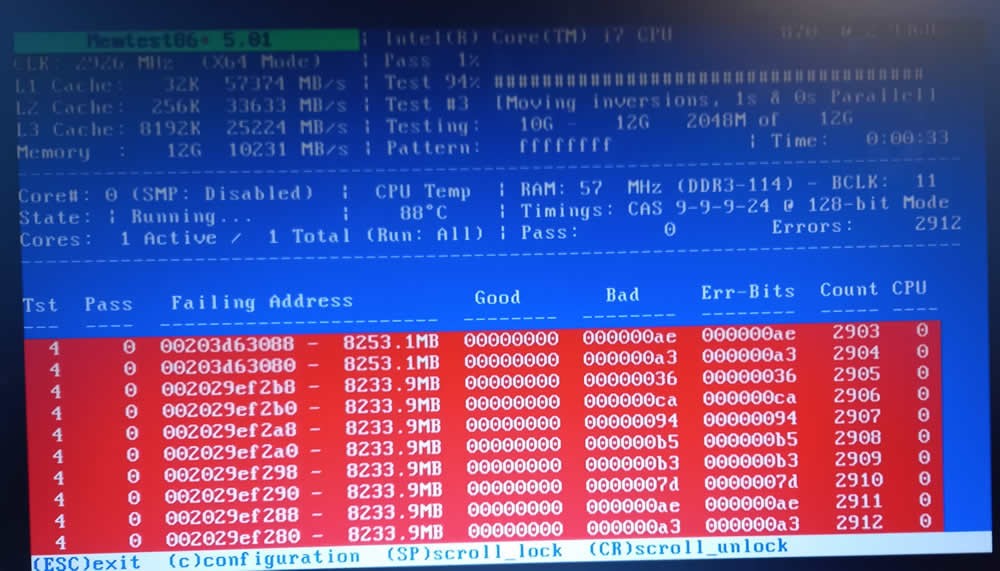
finally managed to get thee bootable usb to boot


Memtest - me thinks there may be a stuffed stick or two


'We love to buy books because we believe we’re buying the time to read them.' WARREN ZEVON


Morgenmuffel

639 posts

Ultimate Geek
+1 received by user: 58

Lifetime subscriber

  #2856688 26-Jan-2022 15:09
Send private message

running windows 10, wouldn't allow me to roll anything back either quality or feature updates


Nothing has been added


I had a quick look for anything obvious on the motherboard


'We love to buy books because we believe we’re buying the time to read them.' WARREN ZEVON


trig42
5889 posts

Uber Geek
+1 received by user: 2094

ID Verified

  #2856690 26-Jan-2022 15:14
Send private message

Your original BIOS photo in this post showed that the computer only had two RAM sticks installed - you are stating further down that it has four.


It certainly looks like RAM (or the ram slots) is the problem.


If BIOS only see two RAM sticks, but you see four, that is your problem.


 1 | 2
View this topic in a long page with up to 500 replies per page Create new topic


Geekzone Live »

Try automatic live updates from Geekzone directly in your browser, without refreshing the page, with Geekzone Live now.


Are you subscribed to our RSS feed? You can download the latest headlines and summaries from our stories directly to your computer or smartphone by using a feed reader.