Geekzone: technology news, blogs, forums
Guest
Welcome Guest.
You haven't logged in yet. If you don't have an account you can register now.


kiwifidget

"Cookie"
3640 posts

Uber Geek
+1 received by user: 1969

Lifetime subscriber

#318154 21-Dec-2024 12:12
Send private message

The facts:


Synology DS1621+ , DSM 7.2.2-72806 Update2


6 drives - 3x8TB, 3x10TB = 40TB Volume1 (SHR), the only storage pool.


The snowflake bit:
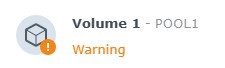


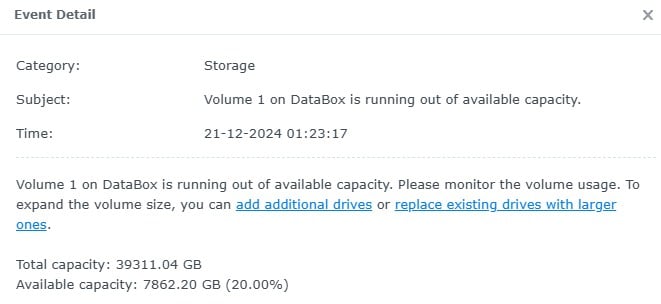
Surely it's a bit early to be having a meltdown?


Delete cookies?! Are you insane?!


Filter this topic showing only the reply marked as answer Create new topic
Behodar
11094 posts

Uber Geek
+1 received by user: 6071

Trusted
Lifetime subscriber

  #3323010 21-Dec-2024 12:21
Send private message

It warns at 20%. You should be able to "acknowledge" the warning and restore the status to Healthy.


gcorgnet
1096 posts

Uber Geek
+1 received by user: 273

ID Verified

  #3323011 21-Dec-2024 12:22
Send private message

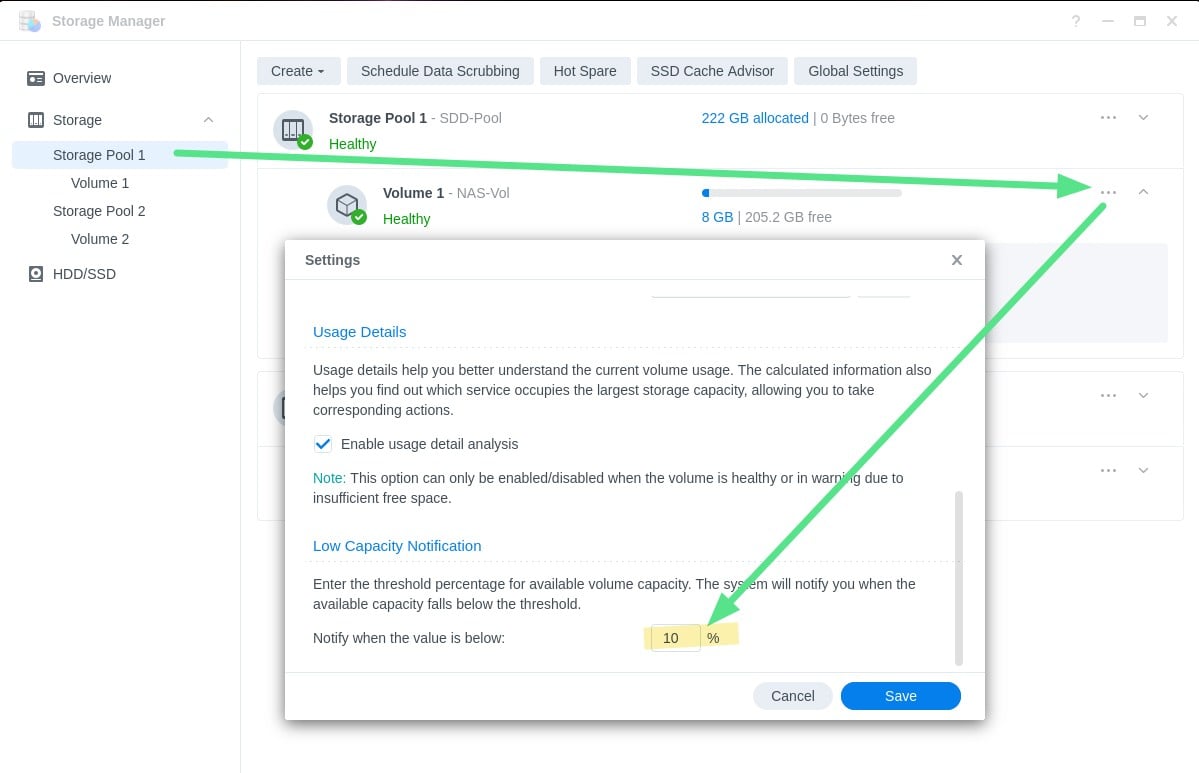
This value (20%) is configurable somewhere from memory and must be defaulting to 20% to give you an early warning.
You should be able to change it to only warn you later on. 
I guess it all depends how fast you fill it up...


Jase2985
13730 posts

Uber Geek
+1 received by user: 6202

ID Verified
Lifetime subscriber

  #3323033 21-Dec-2024 14:34
Send private message

go you storage manager, select the volume, select the three dots at the end of the volume and you can configure the warning in there


freitasm
BDFL - Memuneh
80646 posts

Uber Geek
+1 received by user: 41030

Administrator
ID Verified
Trusted
Geekzone
Lifetime subscriber

  #3323049 21-Dec-2024 17:09
Send private message

You should pay attention to these, because it grows really fast depending on settings - if you have Immutable Snapshots enabled for example you may run out of space and have no way of reclaiming storage from these until the Immutable period lapses.


Make sure to clear recycle bins - or even create a task for that.


But don't ignore it. Replacing drives doesn't always bring more storage because you can only do one at a time, rebuilding takes time and you won't be able to do it if there's no space left.


Referral links: Quic Broadband (free setup code: R587125ERQ6VE) | Samsung | AliExpress | Wise | Sharesies 


Support Geekzone by subscribing (browse ads-free), or making a one-off or recurring donation through PressPatron.


SomeoneSomewhere
1882 posts

Uber Geek
+1 received by user: 1086

Lifetime subscriber

  #3323050 21-Dec-2024 17:40
Send private message

20% is a reasonable time to start looking for deals on drives and considering upgrade paths, rather than saying "oh s*** I can't save" and sprinting down to PBTech.


Some/most filesystems work better with a reasonable amount of free space to limit fragmentation and other undesirables. Hitting 90-95% often results in a decent performance hit.


And as BDFL says, it's not necessarily easy or fast to just buy 6x16TB and swap them straight in, especially if the array is near-full and you don't want to lose redundancy. It looks like you may already be too full to remove one of the 8TB drives from the array. 


ANglEAUT
altered-ego
2436 posts

Uber Geek
+1 received by user: 841

Trusted
Lifetime subscriber

  #3323059 21-Dec-2024 18:48
Send private message

kiwifidget: ... Surely it's a bit early to be having a meltdown? ...


No, not really. Really depends on your use case.Synology are erring on the side of caution. They'd rather people search for a solution earlier than complain that 'Synology lost their data'.


Just for media storage, 7862GB could last you a good while still. With replication & snapshots, that could disappear faster then expected.


As stated by gcorgnet & Jase2985, you can configure the warning threshold of your storage volume.


Please keep this GZ community vibrant by contributing in a constructive & respectful manner.


HP


Shop now for HP laptops and other devices (affiliate link).
kiwifidget

"Cookie"
3640 posts

Uber Geek
+1 received by user: 1969

Lifetime subscriber

  #3323061 21-Dec-2024 19:30
Send private message

I did spend a bit of time looking for the place to change the warning threshold.


Never noticed the 3 weeny dots hiding in the bottom right corner!


But I do take on board that I need to address the storage issue, and apparently it's going to be raining tomorrow, so that's that sorted!


The entire NAS also gets backed up to a cheap-ish array of disks shoe-horned into a Win10 pc running Drivepool, a measure I setup after my Drobo died once upon a time.


Delete cookies?! Are you insane?!


freitasm
BDFL - Memuneh
80646 posts

Uber Geek
+1 received by user: 41030

Administrator
ID Verified
Trusted
Geekzone
Lifetime subscriber

  #3336166 27-Jan-2025 11:46
Send private message

As for my previous reply, make sure you do not run out of space on your NAS. IF you get to zero the NAS won't be able to start or even add capacity later.


Referral links: Quic Broadband (free setup code: R587125ERQ6VE) | Samsung | AliExpress | Wise | Sharesies 


Support Geekzone by subscribing (browse ads-free), or making a one-off or recurring donation through PressPatron.



Filter this topic showing only the reply marked as answer Create new topic


Geekzone Live »

Try automatic live updates from Geekzone directly in your browser, without refreshing the page, with Geekzone Live now.


Are you subscribed to our RSS feed? You can download the latest headlines and summaries from our stories directly to your computer or smartphone by using a feed reader.