Geekzone: technology news, blogs, forums
Guest
Welcome Guest.
You haven't logged in yet. If you don't have an account you can register now.


quickymart

14940 posts

Uber Geek
+1 received by user: 13953

ID Verified

#323582 17-Dec-2025 18:31
Send private message

Ahoy,


I have some very old text files (dating back to the 90s) that have some assignments from my high school days that I'd like to open.


Way back in the DOS days I used to have a reader that would open them and allow them to be viewed. However in the era of Windows this doesn't open/work properly when I try to run it, never mind opening the file.


Is there any way to convert this to a .TXT or even .DOC/.DOCX file? I tried opening it in Word or Notepad and all I got was code and/or gibberish, no readable text at all.


edit, I think this is the file type: https://filext.com/file-extension/HTX


(if this is in the wrong place please feel free to move it - I wasn't sure which was the best subforum).


Thanks in advance 🙂


View this topic in a long page with up to 500 replies per page Create new topic
 1 | 2 | 3
networkn
Networkn
32862 posts

Uber Geek
+1 received by user: 15453

ID Verified
Trusted
Lifetime subscriber

  #3445036 17-Dec-2025 18:47
Send private message

From memory these were index files which sat BESIDE txt files. They aren't likely readable in the way you are trying to. 


They were sometimes used to compress text which came from an editor. 


What else was in the directory with those files? 


quickymart

14940 posts

Uber Geek
+1 received by user: 13953

ID Verified

  #3445045 17-Dec-2025 19:49
Send private message

A whole lot of other text files, but they have nothing to do with the HTX files I'm trying to open, eg, it's not txtfile1.txt and txtfile1.htx (is that what you mean?)


BarTender
3629 posts

Uber Geek
+1 received by user: 2572

ID Verified
Trusted
Lifetime subscriber

  #3445095 17-Dec-2025 20:26
Send private message

Sure it's not just a standard HTML file? https://docs.fileformat.com/web/htx/


Tried loading it in Notepad++?


But it could be a binary format. So try it with xxd or a site like this https://tomeko.net/online_tools/file_to_hex.php?lang=en


quickymart

14940 posts

Uber Geek
+1 received by user: 13953

ID Verified

  #3445098 17-Dec-2025 20:51
Send private message

No I don't think it's a standard HTML file. Tried opening it in Notepad++ and it just showed a whole heap of code and gibberish.


Tried the Tokemo site you linked to and it converted it to a whole document of "0x07, 0x40, 0x7B, 0x60, 0x71, 0x6F..." with different values after each X. I thought this might be ASCII so I thought I'd run the output through an ASCII to text converter but the one I tried timed out 🙁


Is that an ASCII format though?


yitz
2238 posts

Uber Geek
+1 received by user: 594


  #3445099 17-Dec-2025 21:11
Send private message

I think you're supposed to do a Google search of the file header in hex code for example "07 40 7b file type"


Can you not remember the name of the program?


e.g. Hyper Studio? but that's Mac I think.


quickymart

14940 posts

Uber Geek
+1 received by user: 13953

ID Verified

  #3445101 17-Dec-2025 21:42
Send private message

Some digging shows it might have been a program called "HyperText", if that's any help?


Shop now for Lego sets and other gifts (affiliate link).
fe31nz
1294 posts

Uber Geek
+1 received by user: 423


  #3445115 17-Dec-2025 23:36
Send private message

If you still have a copy of the program that read them, then just install DOS in a virtual machine and read them there.


quickymart

14940 posts

Uber Geek
+1 received by user: 13953

ID Verified

  #3445126 18-Dec-2025 07:46
Send private message

I do have DOSBox, so I'll give this a try tonight 🤞


ANglEAUT
altered-ego
2436 posts

Uber Geek
+1 received by user: 841

Trusted
Lifetime subscriber

  #3445494 19-Dec-2025 00:27
Send private message

quickymart: ... Tried opening it in Notepad++ and it just showed a whole heap of code and gibberish. ...


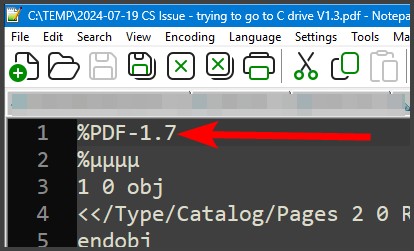
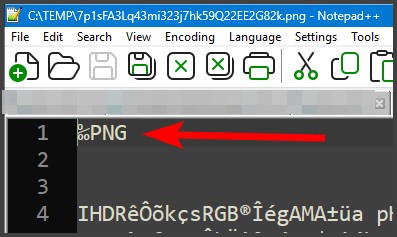
Please paste a screenshot of the first few lines when opening with Notepad++. The first few bytes often give an indication of the type of file.


Please keep this GZ community vibrant by contributing in a constructive & respectful manner.


quickymart

14940 posts

Uber Geek
+1 received by user: 13953

ID Verified

  #3445757 19-Dec-2025 19:40
Send private message

Does this help?


Behodar
11094 posts

Uber Geek
+1 received by user: 6071

Trusted
Lifetime subscriber

  #3445759 19-Dec-2025 19:43
Send private message

"The original program was generated with a tool called HyperHelper made by Azarona software, which seems pretty obscure in it’s own right" - random blog post


Shop now at Mighty Ape (affiliate link).
BarTender
3629 posts

Uber Geek
+1 received by user: 2572

ID Verified
Trusted
Lifetime subscriber

  #3445763 19-Dec-2025 20:51
Send private message

Internet Archive? https://archive.org/details/msdos_shareware_fb_HHV20


Looks like what you want.


Also: http://cd.textfiles.com/smsharew/PROG/ - http://cd.textfiles.com/smsharew/PROG/HHV30B.ZIP


xxd MAN.HTX 


00000000: 3052 0200 3052 0200 1752 0200 e000 0000 0R..0R...R......


00000010: 5f00 0000 6372 6f73 2f72 6573 2c01 0000 _...cros/res,...


00000020: 4879 7065 7248 656c 7065 7220 332e 3061 HyperHelper 3.0a


00000030: 2043 6f70 7972 6967 6874 2863 2920 3139 Copyright(c) 19


00000040: 3838 2d31 3939 3120 417a 6172 6f6e 6120 88-1991 Azarona


00000050: 536f 6674 7761 7265 0059 1281 c3c9 01bf Software.Y......


00000060: 0000 00b5 3e00 0000 0400 00d8 00a2 1900 ....>...........


00000070: 0064 00d9 0045 0007 004e 0016 00fd fffd .d...E...N......


00000080: ff3b 0201 002e 0000 0000 0000 0000 0000 .;..............


00000090: 0000 0000 0000 0000 0000 0000 0000 0000 ................


000000a0: 0048 7970 6572 4865 6c70 6572 2033 2e30 .HyperHelper 3.0


000000b0: 204f 6e6c 696e 6520 4d61 6e75 616c 002b Online Manual.+


quickymart

14940 posts

Uber Geek
+1 received by user: 13953

ID Verified

  #3445764 19-Dec-2025 20:58
Send private message

Thanks for the link - downloaded and extracted it. I'm using Windows 10, by the way.


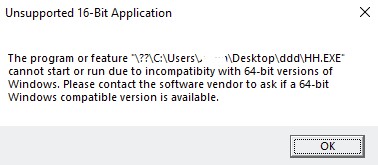
Tried running it under Windows 95 compatibility, no go. Tried from the command prompt as well but it said this:


Any suggestions where I'm going wrong?


BarTender
3629 posts

Uber Geek
+1 received by user: 2572

ID Verified
Trusted
Lifetime subscriber

  #3445766 19-Dec-2025 21:00
Send private message

You will probably need something like Dosbox - https://www.dosbox.com/ or https://dosbox-x.com/ to emulate dos.


"If it were me" I would throw the exe into Ghidra, and get the source file format and then throw the decompiled source at ChatGPT/Claude and see what it can figure out for the file format.


quickymart

14940 posts

Uber Geek
+1 received by user: 13953

ID Verified

  #3445771 19-Dec-2025 21:44
Send private message

Might need to move this thread to the Windows forum now.


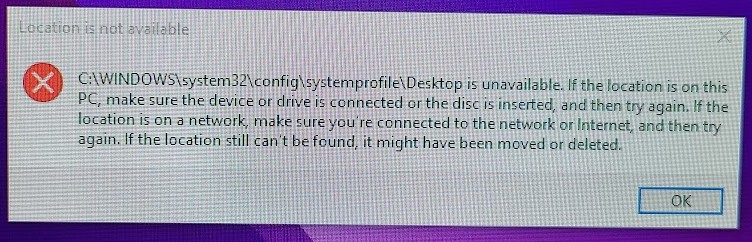
I tried installing the app you mentioned above (as well as a few others) to try and get into this file. I also ran Malware Bytes to make sure there was nothing dodgy on my machine, It was running a little slow so I restarted and now I get this:


I had quite a few icons on the desktop which are all gone, all my shortcuts are missing/not working...have I lost everything? 😢


(As an aside I checked and found the same folder on my Windows 11 laptop, which also has a few desktop icons but on the laptop it's empty. I've run Malware Bytes before too but never had this happen either).


 1 | 2 | 3
View this topic in a long page with up to 500 replies per page Create new topic


Geekzone Live »

Try automatic live updates from Geekzone directly in your browser, without refreshing the page, with Geekzone Live now.


Are you subscribed to our RSS feed? You can download the latest headlines and summaries from our stories directly to your computer or smartphone by using a feed reader.