Geekzone: technology news, blogs, forums
Guest
Welcome Guest.
You haven't logged in yet. If you don't have an account you can register now.


Devonboy

30 posts

Geek
+1 received by user: 6


#324036 18-Feb-2026 21:46
Send private message quote this post

Last week I was asked by Outlook if I wanted to do an Auto Archive. On previous occasions of this I have gone to settings to check what this would do and changed some settings to, hopefully, protect a set of saved emails that I wanted to keep long term. This time I just said YES, so it went ahead and actioned the auto archive for me.


Now I find that I have lost all those old emails, going back several years, all the history gone.


I've search the desktop and cannot find any .pst files which I hoped would still hold the old data. I also don't have any backup pst files. I used to save them as a back up but it's now all synchronised on the cloud.


So, is there anyway I can retrieve this old data? Does Microsoft still keep everyone's emails somewhere on a server that I can access to restore the emails that I have lost?


View this topic in a long page with up to 500 replies per page Create new topic
 1 | 2

pdh

pdh
441 posts

Ultimate Geek
+1 received by user: 289


  #3462831 19-Feb-2026 03:36
Send private message quote this post

Have you looked for a file called 'archive.pst' - possibly to be found in 
   C:\Users\YourUsername\Documents\Outlook Files\


Dynamic
4015 posts

Uber Geek
+1 received by user: 1851

ID Verified
Trusted
Lifetime subscriber

  #3463303 20-Feb-2026 11:30
Send private message quote this post

I agree with the previous poster that you're looking for a PST file on your computer, though the folder path they indicate may not be correct.


Typically when Outlook creates an auto archive, it mounts that archive file so you can see the content.  In your list of folders on the left hand side of Outlook, scroll to the bottom of the list.  You should see the Archive folders (and will likely need to click the wee triangle on the left to open that branch of folders.


This may be a timely reminder that if this stuff is important to you, having a regular backup of your entire computer is important.


“Don't believe anything you read on the net. Except this. Well, including this, I suppose.” Douglas Adams


Devonboy

30 posts

Geek
+1 received by user: 6


  #3463321 20-Feb-2026 12:38
Send private message quote this post

Hi there and thank you for your response.


Unfortunately, and this was the first place I looked at, there is nothing there except one message from Quora that I subscribe to dated 13/08/2025. Why that one message I cannot for the life of me fathom, but that really is all. With the triangle clicked to open the tree, there is no tree.


I agree that a back of of everything is the best. I've just not needed to save this separately since all emails became synced on the cloud, so became very open to this mistake.


I presume, from your suggestion, that there is no other way of getting all that history back?


M.


geek3001
220 posts

Master Geek
+1 received by user: 330

ID Verified
Subscriber

  #3463326 20-Feb-2026 13:04
Send private message quote this post

Have you searched ALL drives on the computer for any other PST file(s), ie: *.pst ?


I am not familiar with newer 201x versions of Outlook, so someone else may want to chime in and correct me, but am reasonably familiar with earlier 200x versions of Outlook that exhibited very annoying issues with emails being archived actually ending up being deleted.


Assuming you have not already done so, try the following:


  • Check the Deleted Items folder for any sub-folders that may be related to whatever happened at the time the archiving process ran.
  • Check Outlook menus for any options that can un-hide folders.
  • Check Outlook menus for any options to retrieve or recover deleted items.

Do not perform any repair or compact operations on the present Outlook data file, as the missing items may still be available in it (marked as archive/deleted but not actually removed yet). Someone else with better knowledge than I may have a suggestion as to how to recover that info from the version you are running.


Dynamic
4015 posts

Uber Geek
+1 received by user: 1851

ID Verified
Trusted
Lifetime subscriber

  #3463327 20-Feb-2026 13:05
Send private message quote this post

Hit your Start button in Windows, and search using the word COMMAND to find the Command Prompt.  Click on this to start it.  It will be a black and white text window.


More detailed instructions: How to Open the Command Prompt in Windows 8, 10, and 11


Type in cd\ and hit enter.  This will move your 'focus' back to the top of the C drive on your computer instead of in a subfolder.


Then type dir *.pst /s and hit enter.  This will search through the list of files in each folder (the directory) and including all subfolders (/s)on your computer that your account on the computer has access to and list any PST (Outlook data files) that it finds (the *.pst bit).


Paste the results below for us to help review.  You should be able to copy and paste by clicking and dragging your mouse across the text, and once the relevant text is highlighted let go of your mouse and then hit enter to copy it.  The size of the file is a little bit relevant if you can easily capture this.  You should be able to scroll up if needed.  You may need to tidy up the formatting a bit when pasting, but we should be able to work it out.


When I do the same on my computer, the results are below.  The bold bits are the bits you type and are my emphasis.  You may have multiple PST files in a variety of folders.


Microsoft Windows [Version 10.0.26200.7840]
(c) Microsoft Corporation. All rights reserved.


C:\Users\Mike>cd\


C:\>dir *.pst /s
 Volume in drive C has no label.
 Volume Serial Number is CCD2-ED14


 Directory of C:\Users\Mike\AppData\Local\Microsoft\Outlook


08/07/2025  06:58 am           271,360 Internet Calendar Subscriptions.pst
               1 File(s)        271,360 bytes


     Total Files Listed:
               1 File(s)        271,360 bytes
               0 Dir(s)  27,966,545,920 bytes free


C:\>


“Don't believe anything you read on the net. Except this. Well, including this, I suppose.” Douglas Adams


Behodar
11094 posts

Uber Geek
+1 received by user: 6070

Trusted
Lifetime subscriber

  #3463329 20-Feb-2026 13:13
Send private message quote this post

Note that it's normal if it pauses for a considerable time after the "Volume Serial Number" line. Be patient and wait for it to complete the search.


Shop now on AliExpress (affiliate link).
sqishy
530 posts

Ultimate Geek
+1 received by user: 193


  #3463332 20-Feb-2026 13:25
Send private message quote this post

Maybe check the Web URL under 'Archive' folder?


trig42
5889 posts

Uber Geek
+1 received by user: 2094

ID Verified

  #3463335 20-Feb-2026 13:44
Send private message quote this post

I wonder, if you can't find Archive.pst on your computer, if it has done it online (do you have a 365 subscription)?


If not, can you kick off another archive and check the setting again - it should show in there where it is putting them?


Devonboy

30 posts

Geek
+1 received by user: 6


  #3463398 20-Feb-2026 20:49
Send private message quote this post

To Dynamic
Thank you for your work through. The results are shown below and are not exciting.


Microsoft Windows [Version 10.0.26200.7840]
(c) Microsoft Corporation. All rights reserved.


C:\Users\waldr>cd/


C:\>dir .pst/s
 Volume in drive C is Windows-SSD
 Volume Serial Number is F036-2F99
File Not Found


C:\>


......................


To Behodar
Thanks for the tip. It didn't take too long.


.....................


To Sqishy
A bit more explanation is needed for me, please.


.....................


To Trig42
What procedure should I follow to get your suggestion working?


....................


Thanks to all.
M.


cddt
1965 posts

Uber Geek
+1 received by user: 1904


  #3463404 20-Feb-2026 21:35
Send private message quote this post

Devonboy:


C:\>dir .pst/s


Looks like you missed a vital asterisk! 


Ruphus
469 posts

Ultimate Geek
+1 received by user: 181


  #3463405 20-Feb-2026 21:35
Send private message quote this post

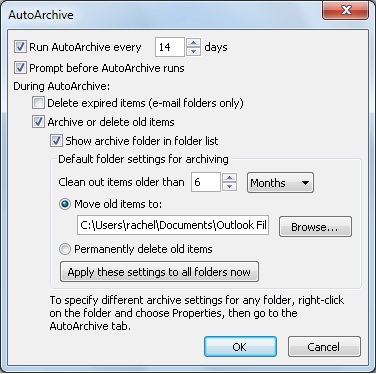
If you go into the AutoArchive settings in Outlook, what is the option that is set for the default folder settings for archiving?


AutoArchive settings dialog box


Is it set to move items to a folder, or to permanently delete old items?


To find this setting, in Outlook;


  1.  

    Click File > Options > Advanced.


  2.  

    Under AutoArchive, click AutoArchive Settings.


These are the settings for the entire mailbox. Individual AutoArchive settings can be configured for each folder in your mailbox too. To check that;


  1.  

    In the Navigation Pane's folder list, right-click the folder you want to change, and click Properties.


  2.  

    On the AutoArchive tab, choose the options you want.


You might also need to check for permanently deleted emails. This will help with that. Outlook 2016 is now referred to as Classic Outlook.


Recover and restore deleted items in Outlook - Microsoft Support


Shop now for Dyson appliances (affiliate link).
Devonboy

30 posts

Geek
+1 received by user: 6


  #3463409 20-Feb-2026 21:58
Send private message quote this post

Thank you Rufus


Unfortunately the setting is Delete Old Items > all folders.


I'm not sure now why this setting has been chosen but presume when I've looked at these settings in the past to handle this function I must have chosen the wrong one.


But, I realised this had happened and I am still hoping that the emails are still held somewhere in the cloud. After all, thousands of emails have been recovered from a certain disgraced financier and his 'friends'. 


M.


Devonboy

30 posts

Geek
+1 received by user: 6


  #3463415 20-Feb-2026 22:39
Send private message quote this post

I did miss that asterisk.


However the new result is still not very hopeful.


Microsoft Windows [Version 10.0.26200.7840]
(c) Microsoft Corporation. All rights reserved.


C:\Users\waldr>cd/


C:\>dir *.pst/s
 Volume in drive C is Windows-SSD
 Volume Serial Number is F036-2F99


 Directory of C:\Users\waldr\Documents\Corel\Corel Content\Bitmap Presets\Bumpmap


31/12/2022  12:21 pm               806 Last Used.pst
               1 File(s)            806 bytes


     Total Files Listed:
               1 File(s)            806 bytes
               0 Dir(s)  192,836,579,328 bytes free


C:\>


Behodar
11094 posts

Uber Geek
+1 received by user: 6070

Trusted
Lifetime subscriber

  #3463428 21-Feb-2026 07:34
Send private message quote this post

cddt:


Devonboy:


C:\>dir .pst/s


Looks like you missed a vital asterisk! 


@Dynamic, you have the asterisk in the example but not in the actual text. You might want to update that for anyone else who stumbles upon the thread later.


Devonboy

30 posts

Geek
+1 received by user: 6


  #3463692 22-Feb-2026 19:28
Send private message quote this post

I've interrogated Microsoft's Help pages about this issue and it appears that there is a Recover emails under the FOLDER tab. This is in the new Outlook but I don't see it in the Classic Outlook that I am using. Other explanations also seem to indicate I can go to the relevant email folder and right click to find and restore deleted items.


Non of the above appears visible to me on my version of Outlook 2016.


Is there anything more I can do to find all the lost emails?


M


 1 | 2
View this topic in a long page with up to 500 replies per page Create new topic


Geekzone Live »

Try automatic live updates from Geekzone directly in your browser, without refreshing the page, with Geekzone Live now.


Are you subscribed to our RSS feed? You can download the latest headlines and summaries from our stories directly to your computer or smartphone by using a feed reader.