Geekzone: technology news, blogs, forums
Guest
Welcome Guest.
You haven't logged in yet. If you don't have an account you can register now.


EviLClouD

301 posts

Ultimate Geek
+1 received by user: 65


#324133 3-Mar-2026 21:39
Send private message quote this post

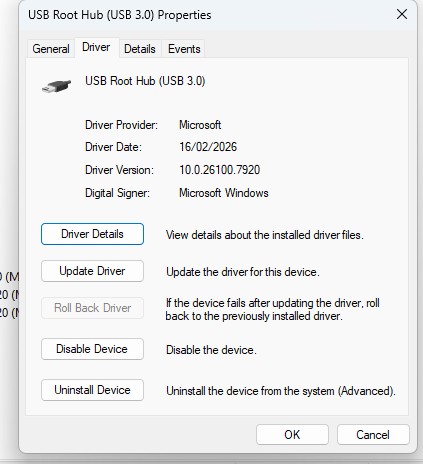
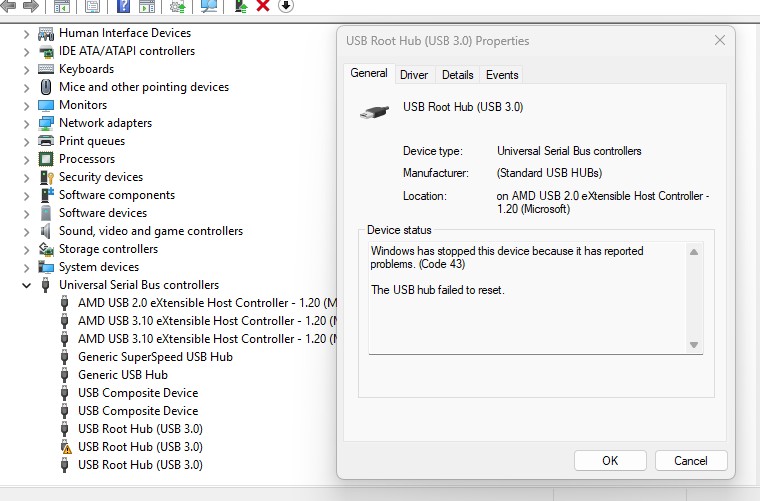
Hey all, just wondering if anyone knows why one of my USB Root Hub's has stopped working? It's fine when the computer turns on, then maybe after 5 mins it makes the sound where a device has been unplugged.


It appears to only impact a specific USB Root Hub (2nd to last in list) and none of the other USB controllers on the list. I've installed the latest drivers and AMD chipset.


Is there a way to identify what or where this USB Root Hub is and how to resolve please?


Motherboard is a Asrock B650M PG Riptide WiFi.


Thanks in advance


Create new topic

gzt

gzt
18674 posts

Uber Geek
+1 received by user: 7809

Lifetime subscriber

  #3466585 3-Mar-2026 21:43
Send private message quote this post

Hit the disable device button, restart, see how many usb ports continue to work?


Lias
5655 posts

Uber Geek
+1 received by user: 3978

ID Verified
Trusted
Lifetime subscriber

  #3466592 3-Mar-2026 23:03
Send private message quote this post

It's late and I'm tired so this is very basic, but couple of possible causes:


Might be a USB device you own is glitching


Might be a partial failure of your motherboard (e.g. one of the actual USB hubs dead/dying)


Start with checking the event logs, lookup the hardware ID of the hub, check it's hardware ID and parent etc


I'm a geek, a gamer, a dad, a Quic user, and an IT Professional. I have a full rack home lab, size 15 feet, an epic beard and Asperger's. I'm a bit of a Cypherpunk, who believes information wants to be free and the Net interprets censorship as damage and routes around it. If you use my Quic signup you can also use the code R570394EKGIZ8 for free setup. Opinions are my own and not the views of my employer.


EviLClouD

301 posts

Ultimate Geek
+1 received by user: 65


  #3466593 3-Mar-2026 23:06
Send private message quote this post

gzt: Hit the disable device button, restart, see how many usb ports continue to work?


So i have a total of 7 USB-A and 1 USB-C on rear and 2 USB-A and 1 USB-C on front of case.


Prior to disabling i tested them all by plugging in a USB drive and only 2 USB-A's on rear worked. I tested both USB-C by connecting my iphone and the rear worked but not the front.


After disabling and restarting, all 8 rear ports and 3 front ports worked by repeating the same test.


However after 5-10 mins it made the same disconnect noise and the same ports stopped working/reading the drives & phone. However i did notice my phone still charged while plugged into USB-C and ipad charged plugged into USB-A even though it wasnt being read by windows...It appears there's power but no data being transferred...is that possible?


EviLClouD

301 posts

Ultimate Geek
+1 received by user: 65


  #3466594 3-Mar-2026 23:15
Send private message quote this post

Lias:


It's late and I'm tired so this is very basic, but couple of possible causes:


Might be a USB device you own is glitching


Might be a partial failure of your motherboard (e.g. one of the actual USB hubs dead/dying)


Start with checking the event logs, lookup the hardware ID of the hub, check it's hardware ID and parent etc


Do you know whereabouts in the Event Log i would go to see that?


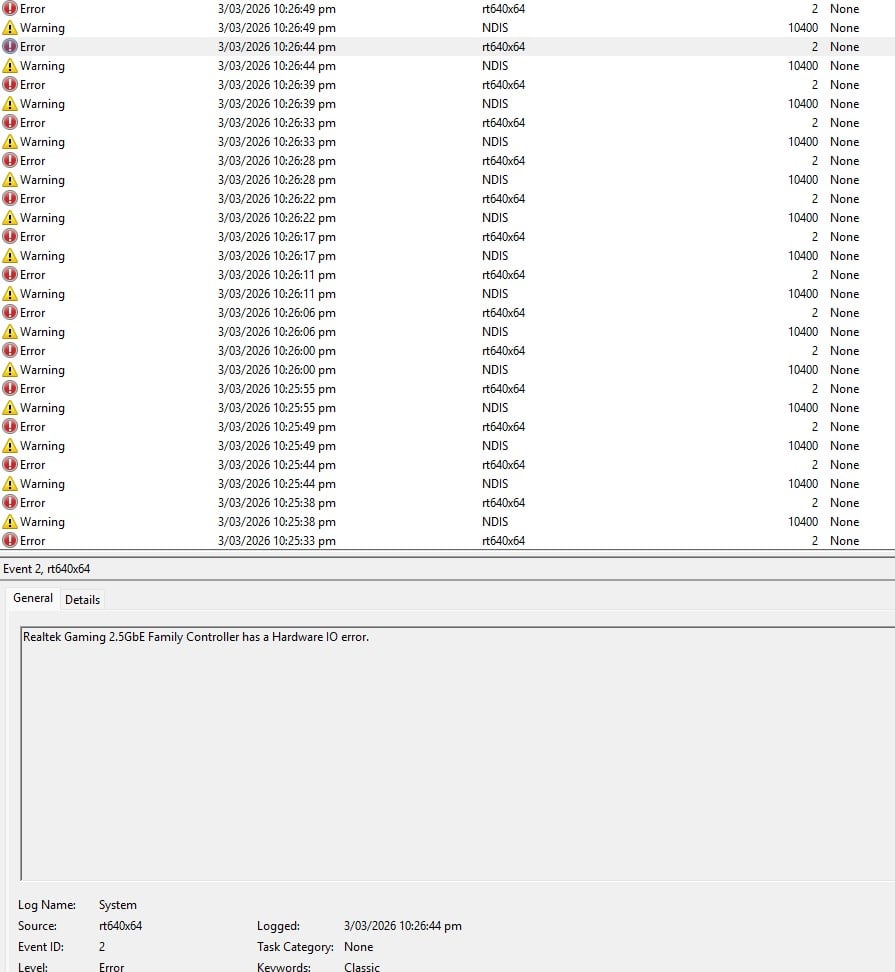
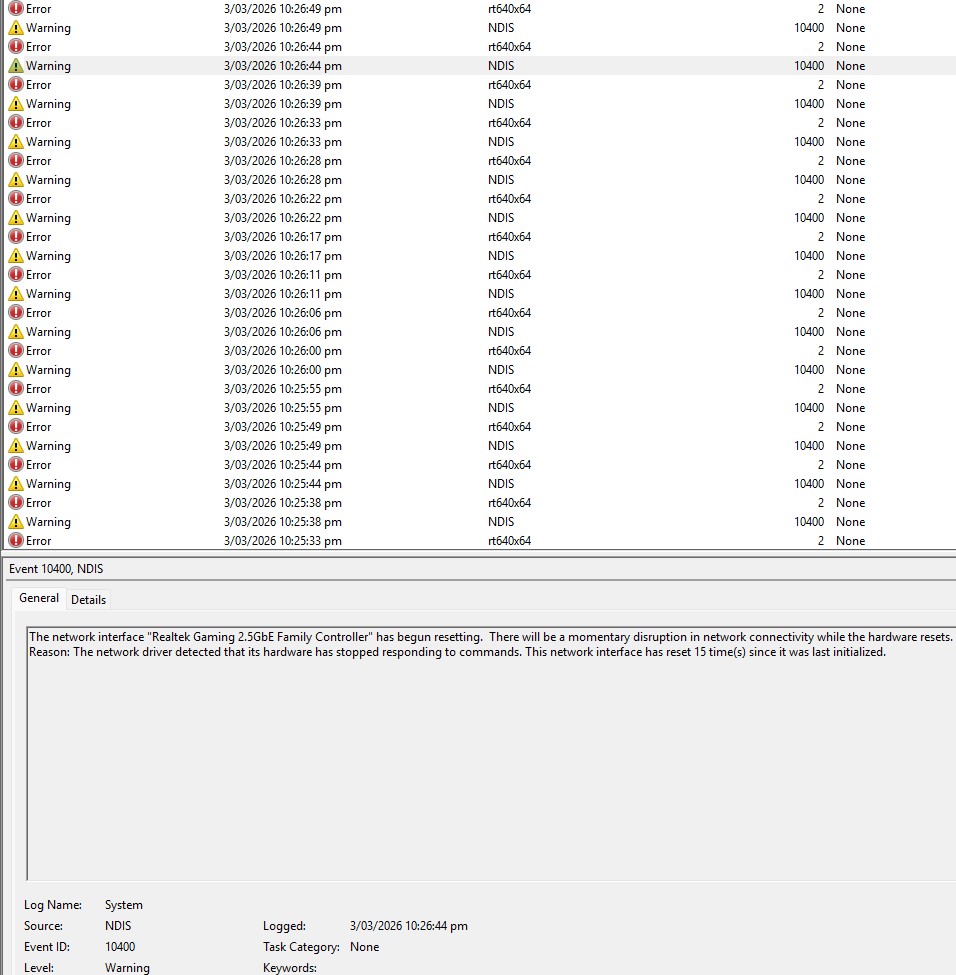
In the Windows logs under System I do see multiple errors and warnings with the 'Realtek Gaming 2.5GbE Family Controller'...Sounds like another issue in itself...i've disabled that controller for the time being, but any tips or suggestions to resolve this too would be appreciated!


xpd

xpd
Geek of Coastguard
14115 posts

Uber Geek
+1 received by user: 4574

Retired Mod
ID Verified
Trusted
Lifetime subscriber

  #3466603 4-Mar-2026 08:02
Send private message quote this post

Boot off a Linux USB, and see if that gives similar issues - if it does, Id suspect hardware fault. 


XPD / Gavin


LinkTree


gzt

gzt
18674 posts

Uber Geek
+1 received by user: 7809

Lifetime subscriber

  #3466620 4-Mar-2026 09:16
Send private message quote this post

However after 5-10 mins it made the same disconnect noise and the same ports stopped working/reading the drives & phone. However i did notice my phone still charged while plugged into USB-C and ipad charged plugged into USB-A even though it wasnt being read by windows...It appears there's power but no data being transferred...is that possible?

It's very likely. Unplug all your devices and restart the computer. See if the issue occurs with no devices.

Create new topic


Geekzone Live »

Try automatic live updates from Geekzone directly in your browser, without refreshing the page, with Geekzone Live now.


Are you subscribed to our RSS feed? You can download the latest headlines and summaries from our stories directly to your computer or smartphone by using a feed reader.