Geekzone: technology news, blogs, forums
Guest
Welcome Guest.
You haven't logged in yet. If you don't have an account you can register now.


Aaroona

3204 posts

Uber Geek
+1 received by user: 169


#89454 2-Sep-2011 15:43
Send private message

Okay, so I have a 1.5TB hard drive, its only got 38GB left on the drive, so is pretty much full.

When I try to open a folder, I can open the folder and list the contents, but when it starts grabbing details like the length of time and dates etc. it makes the media I am player (a tv program) stutter and it takes a while to grab the details of the ffiles..


I have heard that as a hard drive reaches capacity, it slows down more and more as it has less and less space.


Is this the case, or is my hard drive on its way out?

Create new topic
SaltyNZ
8862 posts

Uber Geek
+1 received by user: 9539

Trusted
2degrees
Lifetime subscriber

  #515795 2-Sep-2011 15:48
Send private message

Usually the sound it makes is more revealing. If it's loudly ticking or clicking then back it up. But if you're getting spurious unable-to-access file messages, back it up too, that's also a bad sign. Simply being slow doesn't necessarily mean it's dying. If you have 1.5TB of files all in a single directory you can expect glacial performance to be quite normal.

I find that some manufacturers (I'm looking at *you*, Seagate!) put the drives that would have otherwise failed QC into their external cases, at least based on their reliability.


iPad Pro 11" + iPhone 15 Pro Max + 2degrees 4tw!


These comments are my own and do not represent the opinions of 2degrees.


Aaroona

3204 posts

Uber Geek
+1 received by user: 169


  #515801 2-Sep-2011 15:52
Send private message

SaltyNZ: Usually the sound it makes is more revealing. If it's loudly ticking or clicking then back it up. But if you're getting spurious unable-to-access file messages, back it up too, that's also a bad sign. Simply being slow doesn't necessarily mean it's dying. If you have 1.5TB of files all in a single directory you can expect glacial performance to be quite normal.

I find that some manufacturers (I'm looking at *you*, Seagate!) put the drives that would have otherwise failed QC into their external cases, at least based on their reliability.


Ive just taken a look at my drive, and its a WD Green (so 5400RPM, could be a contributing factor to slowness)

Also, the files are located in a structure like this One folder > two folder > three folder > four folder, and in that fourth folder are the around 24 files.


Could this be why? (BTW, the hard drive was from an external originally).


SaltyNZ
8862 posts

Uber Geek
+1 received by user: 9539

Trusted
2degrees
Lifetime subscriber

  #515802 2-Sep-2011 15:55
Send private message

24 files wouldn't be a problem. I'm talking thousands of file in a single directory before you would notice any particular problem.


iPad Pro 11" + iPhone 15 Pro Max + 2degrees 4tw!


These comments are my own and do not represent the opinions of 2degrees.


Aaroona

3204 posts

Uber Geek
+1 received by user: 169


  #515804 2-Sep-2011 16:01
Send private message

Hmm.. I wonder what it is then.. The drive doesn't make any funny noises or anything, and I've only really noticed the problem now that my drive is fulling up. But I've never experienced this type of thing before, but;

1. I've never fulled a 5400RPM drive
2. I've never had a drive this full (% ratio wise)


Behodar
11089 posts

Uber Geek
+1 received by user: 6069

Trusted
Lifetime subscriber

  #515825 2-Sep-2011 16:26
Send private message

It could be a simple matter of the filesystem being a bit confused. Run chkdsk if you're on Windows, Disk Utility on a Mac.

Aaroona

3204 posts

Uber Geek
+1 received by user: 169


  #515837 2-Sep-2011 16:43
Send private message

Hmm good idea.. Running that now...


CHKDSK is verifying files (stage 1 of 5)...
12544 file records processed.
File verification completed.
100 large file records processed.
0 bad file records processed.
0 EA records processed.
0 reparse records processed.
CHKDSK is verifying indexes (stage 2 of 5)...
13464 index entries processed.
Index verification completed.
0 unindexed files scanned.
0 unindexed files recovered.
CHKDSK is verifying security descriptors (stage 3 of 5)...
12544 file SDs/SIDs processed.
Security descriptor verification completed.
461 data files processed.
CHKDSK is verifying Usn Journal...
37284832 USN bytes processed.
Usn Journal verification completed.
CHKDSK is verifying file data (stage 4 of 5)...
10 percent complete. (56 of 12528 files processed)


This is going to take some time!


Shop now for Lego sets and other gifts (affiliate link).
casewindow
310 posts

Ultimate Geek
+1 received by user: 4


  #515904 2-Sep-2011 19:37
Send private message

Use a SMART tool to check the attributes.

I use Everest (now AIDA 64) which has a trial period of 30 days.

There are free tools like Speedfan and others from memory.

THe key ones to consider are Reallocated Sector Count (should be zero or very low) and others I can't recall off the top of my head.

I regularly monitor the SMART attributes of all my drives and have been able to move drives that appear to have problems with these attributes away from critical to non-critical storage early. The two main culprits then later failed (both Seagate 7200.11's)


Q6600 @ 3.2Ghz (400x8) | GA-X38-DQ6 | 4Gb Corsair Dominator@800Mhz 4-4-4-12 | HIS HD5870 | Creative X-fi Fatality Pro | 2xWD SATAII Caviar Black 640Gb / 1xSeagate SATAII 7200.12 1000Gb | 2xASUS IDE DVDRW | Silverstone OP1000 PSU | Silverstone TJ09 Case

Aaroona

3204 posts

Uber Geek
+1 received by user: 169


  #515912 2-Sep-2011 19:57
Send private message

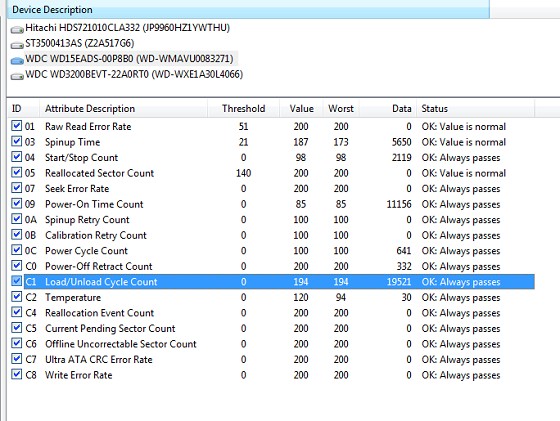
Can you make sense of this?


blakamin
4431 posts

Uber Geek
+1 received by user: 1306
Inactive user


  #515934 2-Sep-2011 20:37
Send private message

it's a slow drive... Might just be rpms/seek speed

Aaroona

3204 posts

Uber Geek
+1 received by user: 169


  #515935 2-Sep-2011 20:39
Send private message

blakamin: it's a slow drive... Might just be rpms/seek speed


It WAS external, I removed it from the casing, and mounted it inside my computer.

the only thing I can think is its a green drive.. HMm, will have to keep an eye on it.

casewindow
310 posts

Ultimate Geek
+1 received by user: 4


  #516024 3-Sep-2011 07:24
Send private message

THe drive looks fine to me from a SMART point of view. However the high load/unload cycle count could mean that the power saving features are not giving you good performance in the manner you want to use the drive (as a desktop drive)

Try checking these articles out:

http://community.wdc.com/t5/Desktop/Green-Caviar-High-Load-Cycle-Cout-after-short-operation-time/td-p/15731/page/4

http://wdc.custhelp.com/app/answers/detail/a_id/3263

http://wdc.custhelp.com/app/answers/detail/a_id/5357


Q6600 @ 3.2Ghz (400x8) | GA-X38-DQ6 | 4Gb Corsair Dominator@800Mhz 4-4-4-12 | HIS HD5870 | Creative X-fi Fatality Pro | 2xWD SATAII Caviar Black 640Gb / 1xSeagate SATAII 7200.12 1000Gb | 2xASUS IDE DVDRW | Silverstone OP1000 PSU | Silverstone TJ09 Case


Shop now on Samsung phones, tablets, TVs and more (affiliate link).
tdgeek
30048 posts

Uber Geek
+1 received by user: 9455

Trusted
Lifetime subscriber

  #516042 3-Sep-2011 09:12
Send private message

First, back it up.

That it is a green drive isn't an issue as that will just power save when not in use. That it is 5400rpm is slower, but its still fast, relatively.

Defragmentation needs to happen, if you use a third party one that has multi options, you can defrag it to make all files unfragmented, without having to move every file, although it willl still take a while as its full.

Windows Search Index, try turning that off. If it starts indexing, expect to wait, and wait. Google windows search index

Do you have all of Windows Explorer set to thumbnails? Try changing that to Details or List, thumbnails need to be drawn, and if one or any of the suggestions are the issue, this will add to the slowness. I suspect and hope that the drive speed is fine, other issues are the cause.

Cheers!


keewee01
1743 posts

Uber Geek
+1 received by user: 204

Trusted

  #516185 3-Sep-2011 16:41
Send private message

+1 to running a file defrag - file fragmentation will slow things down and can often have weird consequences.

timmmay
20857 posts

Uber Geek
+1 received by user: 5349

Trusted
Lifetime subscriber

  #516241 3-Sep-2011 21:13
Send private message

It doesn't sound like it's dying to me. It's just busy.

Any data you don't want to lose, no matter what it is, should be backed onto another hard drive and stored offsite. Small things like documents can easily and automatically be backed up twice a day by Mozy, free up to 2GB storage.

freitasm
BDFL - Memuneh
80646 posts

Uber Geek
+1 received by user: 41024

Administrator
ID Verified
Trusted
Geekzone
Lifetime subscriber

  #516246 3-Sep-2011 21:23
Send private message

First, moved to correct forum. This is not "Off Topic", but "Desktop Computing"... Please use correct forum folks.

Second... right click on the file, select Tools, Defrag... And defrag it. It will take time. Let it do its thing.

Have the CHKDSK finished? No errors?


Referral links: Quic Broadband (free setup code: R587125ERQ6VE) | Samsung | AliExpress | Wise | Sharesies 


Support Geekzone by subscribing (browse ads-free), or making a one-off or recurring donation through PressPatron.


Create new topic


Geekzone Live »

Try automatic live updates from Geekzone directly in your browser, without refreshing the page, with Geekzone Live now.


Are you subscribed to our RSS feed? You can download the latest headlines and summaries from our stories directly to your computer or smartphone by using a feed reader.