Geekzone: technology news, blogs, forums
Guest
Welcome Guest.
You haven't logged in yet. If you don't have an account you can register now.


patrickstarr

388 posts

Ultimate Geek
+1 received by user: 5


#138080 19-Dec-2013 12:07
Send private message

Hello everyone
Just have a problem, I have the Nokia Lumia 520 which I absolutely love considering downgrading from iPhone, however I have been trying for hours now trying to get my computer to detect my phone, I've downloaded Zune, and Windows Phone App, restarted my computer so many times as well.
I have a 2gb Toshiba A100 with 80gb HDD if that helps??




Create new topic
NZtechfreak
4649 posts

Uber Geek
+1 received by user: 461

Trusted

  #954756 19-Dec-2013 12:27
Send private message

Is there an error message? What happens when you plug the phone in? Does the phone recognise the connection? What cable are you using? USB 3.0 port or 2.0 port?


Twitter: @nztechfreak
Blogs: HeadphoNZ.org


semigeek
1606 posts

Uber Geek
+1 received by user: 124


  #954764 19-Dec-2013 12:30
Send private message

What OS are you using too?

wasabi2k
2102 posts

Uber Geek
+1 received by user: 860


  #954768 19-Dec-2013 12:32
Send private message

Zune isn't needed or supported with Windows Phone 8.

You can use the Windows Phone for Desktop app to put stuff on there, or just use My Computer.

You will need to unlock the phone to access it over USB.

Try swapping USB Cable.


semigeek
1606 posts

Uber Geek
+1 received by user: 124


  #954770 19-Dec-2013 12:34
Send private message

From the manual

 If your computer's operating system is Windows 7 or Windows 8, you can also use the
Windows Phone app. Windows 8 installs the app automatically. With Windows 7, you can
download it from www.windowsphone.com.


patrickstarr

388 posts

Ultimate Geek
+1 received by user: 5


  #954785 19-Dec-2013 12:53
Send private message

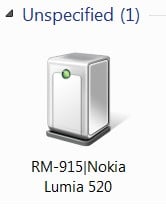
Thanks for your response, I use Windows 7, when I go to Device Management it shows up and there's no error messages, just says that it is under unspecified.

When I go into Windows Phone App its saying to plug my phone in.

this is what the logo looks like:

Wade
2225 posts

Uber Geek
+1 received by user: 373


  #954791 19-Dec-2013 13:03
Send private message

Is the phone unlocked as in the main lockscreen unlocked so normal homescreen visable?


Shop now on AliExpress (affiliate link).
patrickstarr

388 posts

Ultimate Geek
+1 received by user: 5


  #954807 19-Dec-2013 13:45
Send private message

Wade: Is the phone unlocked as in the main lockscreen unlocked so normal homescreen visable?


Yes it is

ubergeeknz
3344 posts

Uber Geek
+1 received by user: 1041

Trusted
Vocus

  #954816 19-Dec-2013 13:53
Send private message

Try uninstalling the device from Device Manager, then unplug and re-attach.

NZtechfreak
4649 posts

Uber Geek
+1 received by user: 461

Trusted

  #954831 19-Dec-2013 13:56
Send private message

If the post is USB 3.0 that could be the problem also. Using certain USB cables can be a problem too, from my experience longer USB cables seem to be hit and miss for whatever reason.


Twitter: @nztechfreak
Blogs: HeadphoNZ.org


Create new topic


Geekzone Live »

Try automatic live updates from Geekzone directly in your browser, without refreshing the page, with Geekzone Live now.


Are you subscribed to our RSS feed? You can download the latest headlines and summaries from our stories directly to your computer or smartphone by using a feed reader.