Geekzone: technology news, blogs, forums
Guest
Welcome Guest.
You haven't logged in yet. If you don't have an account you can register now.


xpd

xpd

Geek of Coastguard
14116 posts

Uber Geek
+1 received by user: 4579

Retired Mod
ID Verified
Trusted
Lifetime subscriber

#296260 2-Jun-2022 16:37
Send private message

I've run a dedicated Windows based Minecraft server before and had no issues, but now I'm having issues.....


Have tried on two different systems and same results. Tried multiple versions of Java and no change..... any ideas ?


Windows 10 Pro - 16GB RAM - plenty of storage


When running the default server command to start the server , I get this :
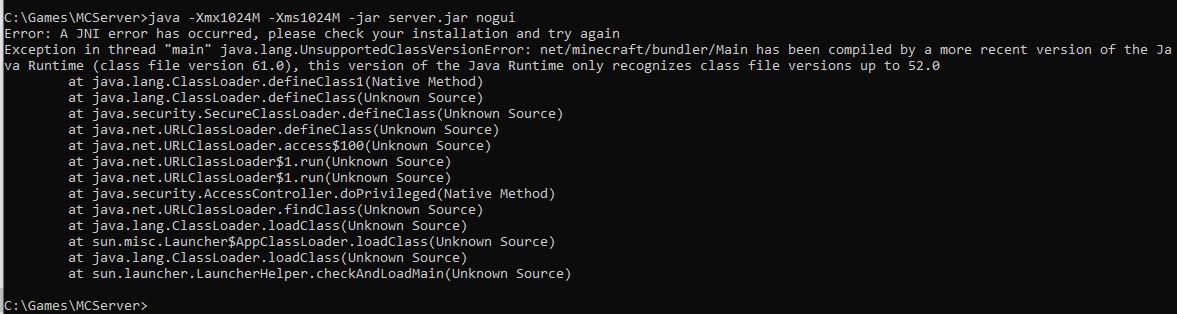


I've downloaded the latest Java so can't see how I'm out of date......   


XPD / Gavin


LinkTree


Filter this topic showing only the reply marked as answer Create new topic
MaxineN
Max
2049 posts

Uber Geek
+1 received by user: 1663

ID Verified
Trusted
Subscriber

  #2921990 2-Jun-2022 16:46
Send private message

Have you updated your vanilla install? 


Have you checked to see what JRE you're actually running?


Ramblings from a mysterious lady who's into tech. Warning I may often create zingers.


xpd

xpd

Geek of Coastguard
14116 posts

Uber Geek
+1 received by user: 4579

Retired Mod
ID Verified
Trusted
Lifetime subscriber

  #2922000 2-Jun-2022 17:13
Send private message

Yup, fresh install of the server direct from minecraft.net, fresh install of Java from Java.com.


C:\Users>java -version
java version "18.0.1.1" 2022-04-22
Java(TM) SE Runtime Environment (build 18.0.1.1+2-6)
Java HotSpot(TM) 64-Bit Server VM (build 18.0.1.1+2-6, mixed mode, sharing)


Apparently this issue appeared last year for a while, and fix was to use a Java SDK, but thats not working for me....... and I seem to be the only person (that I've found so far) having this issue this year :D


Its going to be something simple and stupid, I know it.......


XPD / Gavin


LinkTree


MaxineN
Max
2049 posts

Uber Geek
+1 received by user: 1663

ID Verified
Trusted
Subscriber

  #2922015 2-Jun-2022 17:44
Send private message

You could always do what I did and run PaperMC. It's still Vanilla at it's very core but it adds a ton more features and proper multi threading and it's a work around to your issue. I get the feeling that it's just specifically finding a version of JRE that's installed(I hope you don't have multiple currently installed right now) and still clinging onto that.


edit paper mc would get around that issue (for now)


Ramblings from a mysterious lady who's into tech. Warning I may often create zingers.


xpd

xpd

Geek of Coastguard
14116 posts

Uber Geek
+1 received by user: 4579

Retired Mod
ID Verified
Trusted
Lifetime subscriber

  #2922019 2-Jun-2022 18:01
Send private message

Sorted..... apparently the latest Java from java.com stops at v8. Which is just confusing as heck.


https://adoptium.net/temurin/releases?version=18 is the one you need (JRE)


Will look at PaperMC as well tho, thanks :)


XPD / Gavin


LinkTree


Filter this topic showing only the reply marked as answer Create new topic


Geekzone Live »

Try automatic live updates from Geekzone directly in your browser, without refreshing the page, with Geekzone Live now.


Are you subscribed to our RSS feed? You can download the latest headlines and summaries from our stories directly to your computer or smartphone by using a feed reader.
